








The Maintenance Crossover: When to Replace Open-Source Test Automation

Open-source automation runs most of the industry’s test suites, and for good reason: no license cost, full control of the framework, and a community deep enough to answer nearly any implementation question. None of that changes at enterprise scale. What changes is the ratio of time spent maintaining tests versus writing new ones, and that ratio is the actual signal for when to replace open-source test automation, not team size, not budget, not a vendor’s sales deck.
A QA lead running Selenium and Appium across a 400-case regression suite watches the pattern repeat every release: a UI update breaks a batch of locators, someone spends two days fixing them instead of adding coverage for the new feature, and the backlog of untested functionality grows a little longer. That’s not a one-time cost. It’s a recurring tax that scales with the suite, and it’s the actual reason teams start evaluating alternatives.
- The Real Question Isn't Open Source vs. Commercial
- Where Open Source Still Wins
- The Maintenance Crossover Point
- What Teams Are Actually Asking at This Point
- How ACCELQ Answers These Four Signals
- Real-World Impact
- AI Test Automation vs Open-Source: A Practical View
- When Open Source Is Still the Right Call
- Why This Shift Is Accelerating
- QA's Changing Role
- Migrating from Open-Source to Enterprise Test Automation
- The Bottom Line
A 400-test Selenium suite does not break because open source stopped working. It breaks when every UI change becomes a locator repair project, CI/CD upkeep becomes its own engineering task, and the people who built the framework become the only ones who can maintain it. The real crossover point is when maintenance starts consuming the time meant for improving coverage.
- Know the Four Open-Source Crossover Signals: Maintenance taking over coverage time, fragmented tools across web/mobile/API testing layers, automation depending on a few specialists, and CI/CD integrations that require constant rework instead of one-time setup.
- Evaluate Alternatives by the Problem You Need to Solve: Open source still works for stable applications and teams with strong engineering ownership. But when maintenance overhead grows, teams need to evaluate whether reduced upkeep, unified testing, and easier collaboration matter more than complete framework control.
- Match the Tool to the Layer That Is Actually Breaking: ACCELQ addresses maintenance challenges, fragmented tooling, specialist dependency, and CI/CD friction together. Open-source tools like Selenium, Playwright, and Appium remain strong choices when teams need deep customization and have the engineering capacity to maintain the framework.
The Real Question Isn’t Open Source vs. Commercial
Most comparisons frame this as open source versus commercial, as if one side wins outright. That framing misses the point. Open source and commercial platforms solve for different constraints, and the right call depends entirely on where a specific team sits on the maintenance curve. The useful question isn’t which category is better. It’s whether your team has already crossed the point where maintenance costs more than the license would.
Where Open Source Still Wins
For teams with stable applications and strong in-house engineering, open source remains the right call, not a compromise.
- Full framework Selenium, Playwright, and Appium let engineers shape the automation stack exactly to the application, without waiting on a vendor roadmap.
- Zero licensing cost. For startups and small QA teams, this is a real savings, not a hidden cost waiting to surface later.
- Deep community and talent pool. Selenium alone has two decades of documentation and the widest hiring pool of any automation framework.
- No platform lock-in. Every test is source code the team already owns.
These strengths hold as long as the application stays reasonably stable and the team has engineers who can own the framework long-term. The trade-offs start showing up once both of those conditions change at once.
SUGGESTED READ - How to use Selenium Testing with ACCELQ?
The Maintenance Crossover Point
Enterprises don’t drop open-source tools the day licensing costs or maintenance become annoying. The switch usually happens once one or more of four specific signals shows up consistently, not as an occasional bad sprint.
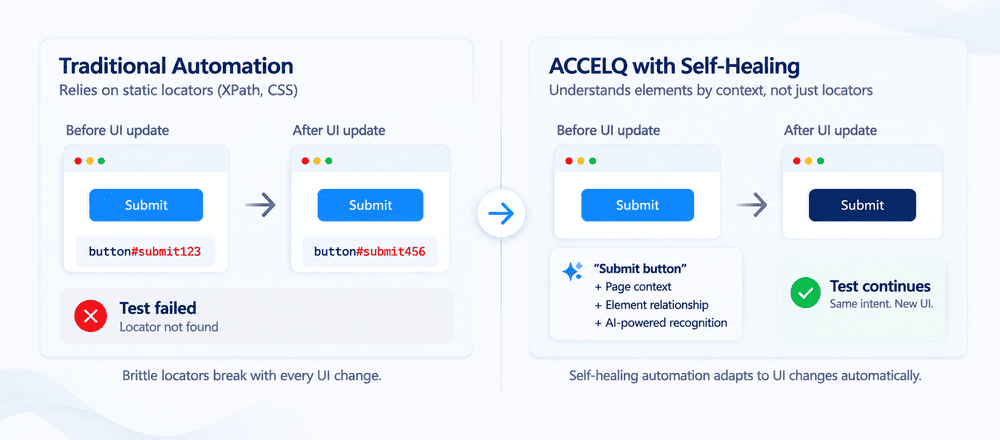
Signal 1: Maintenance Is Eating Into Coverage Time
A single UI change can break a meaningful share of a test suite’s locators. Google’s own internal research on test flakiness found that roughly 1.5% of test runs flake, and about 16% of tests are affected by flakiness over time, a rate that compounds every release cycle in a script-heavy suite. Past a certain suite size, teams stop growing coverage and start just keeping the lights on: fixing what broke instead of testing what’s new. That’s the first, most reliable open source test automation limitation to watch for, not a documented feature gap, but a shift in where the team’s hours actually go.
Signal 2: A Fragmented Toolchain Nobody Fully Owns
Enterprise QA rarely runs on one tool. A typical stack layers Appium for mobile, Selenium or Playwright for web, a separate API testing tool, and yet another tool for reporting and test management. Each piece works fine in isolation. Combined, they create integration overhead, inconsistent documentation across tools, and blind spots between layers that no single tool owns. Teams end up maintaining the toolchain itself as a side project, which is time not spent on the product being tested.
Signal 3: Automation Locked to a Handful of Specialists
Code-based automation ties test creation to whoever can write and read the scripting language. That’s a real bottleneck once a QA org tries to scale: business users can’t contribute directly, onboarding a new engineer to an existing suite takes real ramp-up time, and coverage stays capped to whatever a small group of specialists can produce. This is the open-source test automation limitation enterprises hit hardest when trying to grow a QA org faster than they can hire automation engineers specifically.
Signal 4: CI/CD Integration That Needs Constant Rework
Open-source tools do integrate with CI/CD pipelines like Jenkins or GitHub Actions, but that integration is rarely a one-time setup. It usually means a custom framework, ongoing maintenance as pipeline tools evolve, and debugging failures that show up differently across environments. Once that upkeep becomes routine work rather than a one-off setup task, automation has stopped being an accelerant and started being its own maintenance project.
If two or more of these four signals are showing up in the same sprint, that’s the crossover point, the moment automation strategy is worth revisiting rather than patching.
What Teams Are Actually Asking at This Point
Once these signals persist, the questions QA leads bring to leadership shift from tactical to strategic:
- Are we spending more time maintaining tests than building new coverage?
- Can automation scale past a small group of specialists, or is it capped there permanently?
- Is our release cadence outrunning what our current toolchain can support?
At this stage, the priority shifts from “is the tool free” to “is the tool keeping pace with the release schedule,” which is a different question with a different answer.
How ACCELQ Answers These Four Signals
ACCELQ Autopilot is built around reducing reliance on script-heavy automation specifically at the four points above, using agentic AI and GenAI workflows to search, create, and maintain tests across the SDLC.
On maintenance (Signal 1): Traditional automation depends on static locators. Autopilot uses semantic and contextual element recognition, factoring in relationships, text, and structure rather than a single brittle attribute, so tests keep running through UI changes that would otherwise require manual fixes. Some edge cases still need a human pass, but the baseline maintenance load drops.
On toolchain fragmentation (Signal 2): ACCELQ tests web, mobile, API, and backend systems from one platform, so teams aren’t stitching together separate tools for each layer and separately maintaining the integrations between them.
On specialist dependency (Signal 3): Test flows can be described in plain English through codeless test creation and Autopilot converts that into executable steps, which lowers the barrier for non-engineers to contribute directly to coverage instead of queuing requests to a small automation team.
On CI/CD friction (Signal 4): Native integration with pipelines like GitHub Actions and Jenkins removes the custom framework engineering that open-source CI/CD integration usually requires, so testing stays aligned with release cycles without separate upkeep.
Real-World Impact
Organizations adopting AI-driven automation approaches have reported:
- A drop in maintenance effort from roughly 40% to 15% of QA capacity, based on ACCELQ enterprise customer outcomes [verify current figure before publishing]
- 5x faster automation development compared to script-based frameworks [verify current figure before publishing]
- Up to 53% reduction in overall testing cost and effort [verify current figure before publishing]
- Recognition as a Forrester Wave 2025 Leader in Autonomous Testing Platforms
AI Test Automation vs Open-Source: A Practical View
| Capability | Open Source Tools | ACCELQ |
|---|---|---|
| Test creation | Code-centric | AI-powered, model-based |
| Maintenance | Manual, ongoing | Reduced via semantic self-healing |
| Tool coverage | Multiple separate tools | Unified platform |
| CI/CD integration | Custom setup required | Native alignment |
| Accessibility | Requires coding skill | Open to technical and non-technical users |
| Framework control | Full, granular control | Structured, platform-managed |
Neither column wins outright. The open-source column is the right answer for a team with strong engineers and a stable application. The ACCELQ column is the right answer once the four crossover signals above are showing up consistently. For a broader look at this trade-off across the whole tooling landscape rather than the specific crossover point, see the full open-source vs commercial test automation comparison.
When Open Source Is Still the Right Call
Replacing open-source automation isn’t the right move for every team. It usually isn’t the right call when:
- Your team runs highly customized frameworks that a platform can’t fully replicate
- You need granular, line-by-line control over test implementation
- Your application is genuinely stable, with UI and structure that rarely change
- Budget constraints make open source the only feasible option right now
In those cases, open source remains a sound long-term choice, not a stopgap.
Why This Shift Is Accelerating
A few industry trends are pushing more teams toward this crossover point sooner than they expect:
- Faster release cycles: Frequent releases need automation that adapts without constant rework, which is exactly where script-heavy suites lose ground.
- Growing system complexity: Modern applications span more integrations and layers, which raises the cost of end-to-end validation across a fragmented toolchain.
AI as a practical enabler, not a buzzword: AI-assisted maintenance and test generation have moved from experimental to production use across enterprise QA teams.
QA’s Changing Role
As automation gets more intelligent, the QA role shifts with it. Testers spend less time writing and fixing scripts, and more time prioritizing what to test, identifying business-critical scenarios, and interpreting results. That’s a shift toward QA as risk management and business outcomes, not just script maintenance.
Migrating from Open-Source to Enterprise Test Automation: A Low-Risk Pilot
The lowest-risk way to evaluate a move like this is a targeted pilot, not a full migration:
-
Pick one high-impact business process that spans multiple systems, so the pilot reflects real complexity rather than an isolated test case.
-
Run it in a sandbox or controlled environment first, so the team can validate behavior without touching production.
-
Integrate with your existing CI/CD pipeline early, using tools like GitHub Actions or Jenkins, so automation is part of the delivery pipeline from day one rather than a separate exercise.
-
Track the metrics that actually matter: test stability, coverage across systems, maintenance effort versus your current framework, and speed of test creation and updates.
-
Expand gradually based on results, rather than committing to a full-platform switch before the pilot has proven value.
This lets a team measure the actual maintenance delta on their own suite before deciding whether to expand further.
The Bottom Line
Most teams don’t consciously decide to replace open-source automation. They notice, usually a few releases later than they’d like, that they already have, in effect, whether or not they’ve changed a single tool. The tell isn’t one bad sprint. It’s looking back at the last three or four releases and realizing most of that time went to keeping the suite alive rather than growing it.
That’s worth checking on purpose rather than discovering by accident. Pull the actual number: of your last five sprints, how many hours went to locator fixes and toolchain firefighting versus new test coverage? If that ratio is uncomfortable, the pilot approach above is a way to test whether a different platform actually moves that number for your suite specifically, not just in a vendor’s case study.
FAQ's
When should enterprises replace open-source test automation?
Enterprises should consider replacing open-source test automation when two or more of these signals appear consistently: maintenance consumes more QA time than creating new coverage, the toolchain has fragmented across multiple disconnected tools, automation is limited to a small group of specialists, or CI/CD integration requires constant rework instead of a one-time setup.
What are the best open source automation tools for testing?
Selenium remains one of the most widely used frameworks for browser automation, with a large community and hiring pool. Playwright is a strong modern option for new web suites, offering auto-waiting and strong cross-browser support. Appium is a common choice for native and hybrid mobile testing. These tools work well for teams with the engineering capacity to build and maintain frameworks long term.
Can small businesses also benefit from commercial automation solutions?
Yes. Small businesses with limited engineering bandwidth can benefit from commercial platforms because built-in maintenance capabilities and lower coding requirements reduce the time spent managing scripts. In many cases, the time saved by reducing maintenance effort can outweigh the subscription cost. Businesses with strong engineering teams and stable applications may still find open source more suitable.
How do I move from open source automation to ACCELQ?
Start with a single high-impact business process in a sandbox environment, connect it with your existing CI/CD pipeline early, and compare maintenance effort against your current framework. This allows teams to measure the impact on their own test suite before expanding the migration.
What is the difference between AI test automation and open-source automation?
Open-source automation is code-centric, where engineers write and maintain scripts and maintenance effort grows with suite size. AI-driven platforms like ACCELQ use model-based test creation and semantic self-healing to reduce manual maintenance. The trade-off is that open source provides deeper framework-level control, while AI platforms focus on reducing operational overhead.
What are the open source test automation limitations at enterprise scale?
The four most common limitations are maintenance effort that grows faster than test coverage, fragmented multi-tool stacks without a single owner, automation restricted to a small group of coding specialists, and CI/CD integrations that require ongoing custom engineering instead of a one-time setup.



Nishan Joseph
VP Sales Engineering
Nishan is a tech strategist with expertise in Test Automation and roles at giants like TCS, Microfocus, and Parasoft. At ACCELQ, he champions Strategic Alliances, cultivating global tech partnerships. Educated at Leeds University and Symbiosis Pune, he also possesses an engineering background from Bangalore.


You Might Also Like:
 AI Automation in Testing: The Future of Smarter, Scalable QA
AI Automation in Testing: The Future of Smarter, Scalable QA
 Healthcare Test Automation with ACCELQ
Healthcare Test Automation with ACCELQ
 Test Automation Framework: Definition, Types, Pros, and Cons