







Conversational AI for Test Automation: How ACCELQ Converse Works

Quick Answer:
Conversational AI for test automation lets quality engineering teams plan, generate, automate, execute, and analyze tests through natural-language interaction in one continuous session, instead of switching between separate tools for test design, data generation, execution, and reporting. ACCELQ Converse applies that approach as a persistent, stateful interface inside the ACCELQ platform. It evolved from ACCELQ’s Autopilot capabilities and won the Demo Jam 2026 Championship at Bharat Dreamin’, a Salesforce community conference in Jaipur.
A Jira ticket lands in your sprint: “Create and Verify a Lead in Salesforce.” Somewhere in the next hour, that one line needs to become a test plan, a set of automated scripts, realistic test data, and eventually a pass/fail signal your release manager trusts. Most teams still do this in stages, with one tool for planning, another for scripting, a spreadsheet for data, and a dashboard for results, losing context at every handoff.
ACCELQ Converse was built to close those gaps by keeping the entire task inside a single conversation.
- What Is ACCELQ Converse?
- What Makes Conversational AI Different From AI Test Generation?
- How Conversational AI Is Changing Test Automation, Step by Step
- Why Statefulness Is the Real Differentiator
- Benefits of Conversational AI for Test Automation
- Where This Shows Up in Salesforce Testing
- Recognition: Demo Jam 2026 Championship
- Who Converse Is Built For
- Conclusion
A Jira requirement that says “Create and Verify a Lead in Salesforce” can quickly turn into multiple disconnected tasks: creating a test plan, writing automation, generating test data, running tests, and analyzing failures. The challenge with most AI testing tools is not generating one output, but keeping the context connected across the entire testing lifecycle.
- Understand the Difference Between AI Generation and Conversational AI: Separate tools that generate individual test assets from platforms that maintain context across planning, test creation, automation, data generation, execution, and analysis. The real advantage comes from carrying knowledge forward instead of restarting with every request.
- Evaluate AI Testing Tools by End-to-End Workflow Coverage: Look beyond script generation and assess whether the platform connects requirements, test design, API testing, synthetic data creation, execution insights, and release readiness in one continuous workflow.
- Choose the Approach Based on the Testing Challenge: Use standalone AI generators when the need is limited to creating individual test assets. Choose a stateful conversational AI approach when the goal is reducing context switching, improving requirement traceability, and making faster release decisions.
What Is ACCELQ Converse?
ACCELQ Converse is a conversational AI layer built on top of ACCELQ’s autonomous quality engineering platform. It extends ACCELQ’s use-case-driven Autopilot capabilities into a persistent, session-aware assistant that carries context across the full testing lifecycle: planning, test design, data generation, execution, and analysis.
The distinction that matters technically: Converse is not a prompt-and-generate tool. A prompt-and-generate assistant answers one request and forgets it. Converse maintains state across a working session, so a test plan it created ten minutes ago is still “in memory” when you ask it to automate a scenario, generate matching test data, or summarize how that same test performed last week.
ACCELQ frames this as part of a broader shift the industry has started calling vibe testing, meaning the practice of describing an intended outcome in plain language rather than scripting steps by hand. Converse is ACCELQ’s implementation of that idea made persistent and stateful, rather than a single-shot exercise.
That distinction, holding context across a session instead of answering one request at a time, is also what separates conversational AI testing from AI test generation as a broader category.
What Makes Conversational AI Different From AI Test Generation?
Many AI testing tools focus primarily on generating individual test assets: point one at a requirement, get one script back, and start over for the next task. Conversational AI testing works differently. It treats testing as an ongoing session rather than a series of disconnected prompts, and that changes what the tooling can do across a full workflow:
| AI Test Generation | Conversational AI Testing |
|---|---|
| Generates one asset per prompt | Maintains context across multiple tasks |
| Prompt in, output out | A conversation carries forward into a workflow |
| Scoped to test creation | Spans planning through release analysis |
| Each request starts from zero | Context persists across the session |
| The user reconnects each step manually | The assistant carries context forward automatically |
This is the category-level distinction ACCELQ Converse is built around, and it’s also where the claims are easiest to verify. The next section walks through what that looks like against real inputs, not a single demo prompt.
How Conversational AI Is Changing Test Automation, Step by Step
Converse organizes its capabilities into three functional groups, visible directly in the chat interface:
- Build: Build Test Plan & Automate, Automate from Description, Automate ACCELQ Manual Tests, Automate API Tests, Generate Test Data
- Discover: Run by Intent, Check Job Status
- Analyze: Summarize Runs
Here is what that looks like in an actual working session: not a marketing mockup, but a walkthrough of the tool generating real output from real inputs.
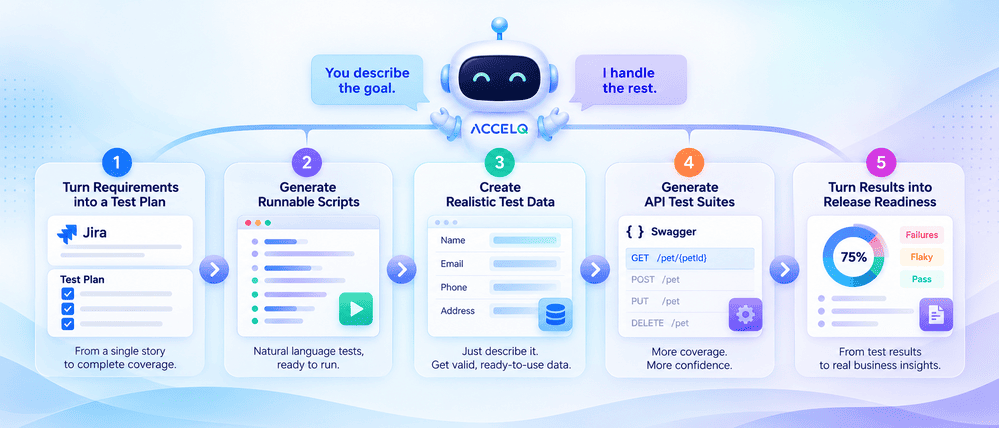
1. Turning a Jira Ticket Into a Test Plan
A user selects Build Test Plan & Automate and points Converse at a single Jira story. Converse then asks two follow-up questions, namely what data coverage to prioritize and which application screens provide context, then returns a structured, reviewable test plan.
From one work item, Converse generated six data-driven scenarios covering 10 test cases: successful creation, missing mandatory fields, invalid email format, and boundary-length values, each with its own objective and step list. The plan exports to Excel for stakeholder review or gets automated immediately, scenario by scenario.
2. From Plan to Runnable Script
Selecting a scenario and clicking “Automate” produces a fully written, natural-language automation script, not pseudocode. In one example, a “Create a Contact” scenario generated 25 discrete steps against a Salesforce org: logging in, navigating to the Contacts tab, populating every field (Salutation, First Name, Last Name, Account Name, Mailing Address, and more), saving the record, and verifying the result on both the detail page and the list view.
3. Generating Schema-Valid Test Data From Plain English
Under Generate Test Data, a user can describe requirements in a sentence or two: for example, that a phone number field must start with the country code “91” followed by 10 digits, or that a name field has a 10-character maximum. Converse converts that description into a formal field schema with type, format, and validation pattern for each field, surfaces it for review, and generates however many synthetic test data records are requested. Each field’s constraints are shown before generation, not discovered after the fact.
4. Generating an API Test Suite From a Swagger Spec
Pointed at a public Swagger definition (petstore.swagger.io, in one demonstration), Converse discovered 19 available endpoints, let the user select one (GET /pet/{petId}), and generated 13 distinct test cases for that single endpoint, covering valid retrieval, boundary IDs, negative values, non-numeric input, and non-existent records. That is a wider spread of edge cases than most manual test design would produce for one endpoint on a first pass, and it plugs directly into ACCELQ’s broader API test automation capabilities rather than existing as a one-off generator.
5. Turning Execution History Into a Release-Readiness Signal
The Summarize Runs capability is where Converse stops being a generation tool and starts being an analysis tool. Asked to summarize two completed jobs, it produced a release-readiness report identifying intermittent failures, classifying them as flaky rather than persistent regressions, calculating a 75% pass rate across four unique tests, and linking failures back to the specific Jira requirements and open defects at risk. All of it exports as a PDF.
That link between test failures and requirements is the detail worth underlining. Converse does not just report red and green: it identifies which business requirement is at risk because of a failing test, and which open defect the failure traces back to.
SUGGESTED READ - How to Get Started with ACCELQ
Why Statefulness Is the Real Differentiator
A growing number of AI coding and testing tools can generate a script from a prompt. The differentiator to look for is whether an AI testing platform can hold that context across an entire workflow. The practical difference shows up in a few concrete ways:
| Capability | One-off AI test generator | ACCELQ Converse |
|---|---|---|
| Test plan to automated script | Requires re-explaining context each time | Carries plan context automatically into automation |
| Test data generation | Separate tool, separate schema | Inherits field constraints from the same session |
| Execution results | Viewed in isolation per run | Aggregated across jobs with trend and flakiness detection |
| Requirement traceability | Manual mapping | Automatic linkage from failure to Jira requirement to defect |
| Grounding context | None, or re-uploaded per request | Persistent “App Hub” reference files (specs, schemas, sample data) inform every request |
That last row matters more than it might look. ACCELQ Converse pulls background context (requirements documents, sample data files, application schemas) from a project-level App Hub, explicitly separated from actual test cases and bugs. That means the assistant’s output is grounded in the same reference material a human tester would consult, not just the text of the current prompt, the same principle behind ACCELQ’s self-healing test automation engine staying accurate as an application changes underneath it.
Benefits of Conversational AI for Test Automation
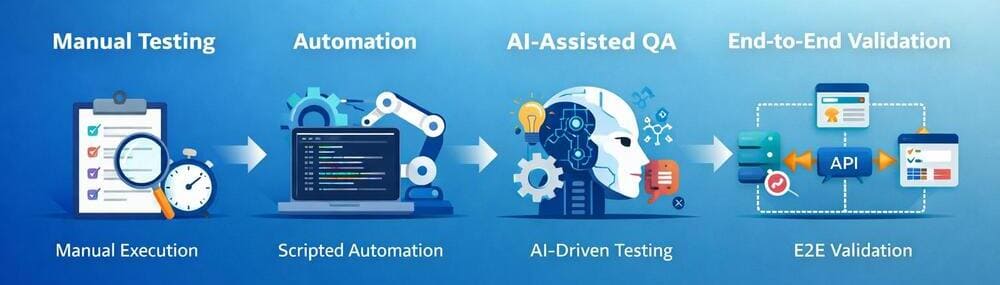
Held up against how most teams test today, the advantage isn’t any single feature. It’s what stops happening: fewer handoffs, less manually recreated context, less time spent reconciling what a dashboard says against what a Jira ticket actually asked for.
Faster Test Creation
A requirement becomes a reviewable test plan, and a test plan becomes a runnable script, without a human retyping the same context into two or three different tools along the way.
Reduced Context Switching
Planning, test data, execution, and analysis stay inside the same session. A QA engineer working a ticket does not need to reopen a separate data-generation tool or a separate reporting dashboard to finish the task.
Lower Maintenance Effort
Persistent context from the App Hub, combined with self-healing test automation, means scripts stay accurate as the application changes underneath them, rather than breaking every time a selector or a page layout shifts.
Better Requirement Traceability
Because failures link back to the Jira requirement and the open defect automatically, a QA lead is not manually cross-referencing a failed test against a backlog to figure out what business risk it represents.
Faster Release Decisions
A release-readiness report that already classifies flaky failures and traces them to requirements gets a go/no-go call built on fewer assumptions, not a spreadsheet someone assembled the night before.
Traditional test automation asks a team to manually carry context between separate tools at every one of those steps: a planning tool, then a scripting tool, then a data tool, then a dashboard. Conversational AI testing collapses that into a single interaction, and requirement-to-defect traceability that used to take manual correlation becomes a byproduct of the workflow instead of a separate task.
Where This Shows Up in Salesforce Testing
The two concrete examples running through this piece both happen to be Salesforce workflows, and that isn’t incidental. Converse earned its Demo Jam recognition at a Salesforce community conference, and Salesforce orgs are where the statefulness argument is easiest to follow end to end: a Jira ticket (“Create and Verify a Lead in Salesforce”) becomes a test plan, the plan becomes a 25-step automation script against fields like Salutation, Account Name, and Mailing Address, and a failing step in that script can trace back to the original requirement without anyone rebuilding the connection by hand.
For teams running Salesforce QA specifically, that end-to-end thread, from a Jira story through to a release-readiness report, is worth testing against your own org before deciding whether an “AI-powered” Salesforce testing claim holds up.
Recognition: Demo Jam 2026 Championship
ACCELQ Converse won the Demo Jam 2026 Championship at Bharat Dreamin’, a Salesforce community conference in Jaipur, based on a live product demonstration, audience voting from more than 1,500 Salesforce Trailblazers, and judges’ scores for innovation and business value. ACCELQ’s Geosley Andrades, Senior Director Product Evangelist, delivered the demonstration with Harshini Pottimurthy, Senior Technical Sales Engineer. Full details are in ACCELQ’s Demo Jam 2026 announcement.
Converse has since been featured at the New York and Ohio Digital Government Summits, positioned as a way to make autonomous testing more accessible to both technical and business users validating citizen-facing applications.
Who Converse Is Built For
- QA and automation engineers get a faster path from requirement to runnable script without hand-writing selectors or boilerplate steps.
- QA leads and engineering managers get release-readiness summaries that already connect failures to requirements and defects, cutting the manual correlation work before a go/no-go call.
- DevOps and Agile teams get a way to generate API test coverage directly from a Swagger or OpenAPI definition as part of the same pipeline-adjacent workflow.
- Technical buyers and VPs of Engineering get a concrete answer to whether “AI test generation” claims hold up past a single demo prompt. Statefulness across a full session is the part worth verifying in any vendor evaluation.
Conclusion
The pattern across every one of these workflows is the same: Converse’s value is not any single generation step, it’s that none of the context gets dropped between steps. A test plan built from a Jira ticket still knows about that ticket when it becomes a script. A script’s data requirements still apply when synthetic data gets generated. A failing test still knows which requirement it was protecting when it shows up in a release-readiness report. For teams evaluating whether an “AI-powered” testing claim is substantive, that persistence is the detail to test for directly, not a demo prompt, but a full session, start to release report.
The fastest way to check that is against a real backlog item. Start a free ACCELQ trial and point Converse at one of your own Jira tickets.
FAQ's
Is ACCELQ Converse a separate product from ACCELQ Autopilot?
No. Converse is an interaction layer built on top of Autopilot's use-case-driven capabilities. Autopilot provides the underlying automation intelligence, while Converse makes it accessible through an ongoing conversation instead of separate task screens.
Can ACCELQ Converse generate tests from a Jira ticket alone?
Yes. Pointing Converse at a Jira story ID is one of its supported sources for building a test plan, along with plain-language descriptions, Gherkin feature files, and upcoming support for sources such as manual test spreadsheets and BRD/PRD/SRS documents.
Does ACCELQ Converse replace manual test review?
No. ACCELQ positions Converse as keeping human expertise and oversight at the center of the workflow. Generated plans, scripts, and test data are presented for review before they are finalized or executed.
What happens if a test starts failing intermittently?
Converse's Summarize Runs capability classifies failures by type, including a specific flaky category for intermittent pass/fail behavior, and distinguishes it from persistent regressions. This distinction helps teams apply the right remediation approach for each failure type.
Can Converse generate API tests without manually listing test cases?
Yes. Given a Swagger or OpenAPI URL, Converse can discover available endpoints and generate a suite of positive, boundary, and negative test cases for selected endpoints without requiring users to define every scenario individually.
What is conversational AI in test automation?
Conversational AI in test automation uses natural-language interaction instead of scripting or disconnected prompts to plan, generate, execute, and analyze tests across a working session. The assistant maintains context between steps rather than treating every request as a new task.
How is conversational AI different from single-prompt AI test generation?
A single-prompt generator produces one output, such as a script or test case, and does not retain context after responding. Conversational AI testing keeps that output in context, allowing later requests like generating matching test data, automating the next scenario, or summarizing test results to build on previous steps.
What's the difference between conversational AI and autonomous testing?
They describe different layers of the same system. Autonomous testing refers to the underlying intelligence, such as self-healing scripts, AI-driven coverage detection, and use-case-driven automation that reduces manual maintenance. Conversational AI is the interaction layer that lets users direct that intelligence through natural language instead of separate task-specific screens.
In ACCELQ's case, Converse is the conversational layer built on top of Autopilot's autonomous capabilities.
Can conversational AI replace QA engineers?
No. Conversational AI removes manual effort involved in turning requirements into scripts, generating test assets, or analyzing results, but it does not remove human judgment. QA engineers still decide whether a test plan is correct, whether coverage is sufficient, and whether a release is ready.




You Might Also Like:
 Best Parasoft Alternatives in 2026: Modern Tools Compared
Best Parasoft Alternatives in 2026: Modern Tools Compared
 What Is the Cucumber Testing Framework: A Practical Guide
What Is the Cucumber Testing Framework: A Practical Guide
 Automated Testing with Azure DevOps: Step-by-Step Guide for Smarter CI/CD