








Unified Test Automation: Why Consolidating Tools is Only Half the Work (2026)

Your sprint retrospective surfaced the same issue for two weeks running. The UI test suite passed. The API test suite passed. Still, a workflow broke in production because no one tested the two layers that communicate, and your team spent the weekend fixing it. So now you’re evaluating unified test automation platforms, and each vendor page you’ve read promises the same things: one tool, one dashboard, less duplication. They’re not wrong. But they’re stopping at the easy part.
Unified test automation brings API, mobile, web, and desktop testing into a single framework, allowing teams to validate user journeys instead of separate application layers. The aim is not to replace many tools with one platform. But rather to create shared test assets, consistent data, and coordinated execution across the testing stack.
Here’s the thing: consolidating tools is the easy part. Keeping a unified test suite healthy as more teams contribute is where most organizations struggle. Without clear ownership, governance, and shared standards, duplicate assets, fragmented coverage, and rising maintenance costs gradually return.
This guide explains how to build a unified automation strategy that lasts. You’ll learn how to structure reusable test assets, create shared data models, sequence API-first execution, and integrate testing into CI/CD pipelines. It also covers unique topics such as Consolidation Fixes the Tool Problem. Governance Fixes the Suite, From Silos to Unified: Implementation Sequence, Checklist for Unified QA Automation, and a real-world insurance enterprise case study that demonstrates the measurable impact of unified testing at scale.
Consolidating tools solves the tooling problem. It doesn’t fix the governance problem that appears six months after consolidation, when three squads are contributing to the same shared suite, nobody agrees who owns a failing test, and test coverage has re-fragmented along team boundaries.
- What Unified Test Automation Actually Means?
- Why Siloed Testing Keeps Shipping Integration Bugs?
- How to Structure a Unified Framework That Doesn't Re-Fragment
- Consolidation Fixes the Tool Problem. Governance Fixes the Suite
- From Silos to Unified: Implementation Sequence
- How Unified Test Automation Works in Practice: Insurance Enterprise
- Choosing a Unified Test Automation Platform: What to Evaluate Beyond Features?
- Checklist for Unified QA Automation
- Unified Testing Without Governance Is Just a Bigger Silo
What Unified Test Automation Actually Means?
Most definitions stop at the platform layer: one tool for web, API, and mobile instead of three. That’s precise, but it misses what unification makes possible. Unified test automation enables a single framework for web/mobile/API/desktop testing, so coverage decisions are made once and applied across the entire stack, not negotiated separately per channel.
A unified test automation framework doesn’t reduce tool count; it enables a diverse structure: multi-channel test automation, where a single test can validate that a user action on a mobile interface triggers the right API call, updates the backend correctly, and renders the required result on the web. That cross-layer validation is impossible when your user interface uses Selenium, the API team uses Postman, and no one coordinates test data between them.
In practice, unified testing means test cases designed once and executable across web, API, mobile, and desktop layers. Authentication logic, validation rules, and test data are shared across the entire stack, not separate datasets per channel. End-to-end journey coverage reflects how users go through a product, not how engineering org charts are drawn, with a single reporting view showing pass/fail status across all layers without manual correlation.
The architectural implication is a shared execution context: UI interactions and API calls run in the same environment, sharing state. When a test creates a user record through the API, the web layer immediately sees it. When the mobile layer submits a form, the API layer can immediately validate what was sent. This is what closes the gap that causes production incidents that neither the siloed suite catches.
Why Siloed Testing Keeps Shipping Integration Bugs?
The fragmentation isn’t a tooling problem at root; it’s an organizational one that tooling reflects and amplifies. When UI and API testing operate separately, the gaps appear when a frontend action triggers a backend call, or a backend response drives a UI state change. Both layers can pass their tests, but broken integration between them. Three specific coverage gaps emerge consistently:
-
Cross-Layer Data Flow
A user submits a form. The UI test confirms that the form was submitted. The API test confirms that the endpoint accepted a request. Neither test confirms that the data the UI sent matches what the API expected, or that the response the API returned renders correctly in the UI. This gap is where silent data corruption lives.
-
Error Handling Across Layers
When an API returns a 422, what does the UI do? When the UI sends a malformed request, does the API degrade? Siloed tests don’t cover these interaction scenarios. Users encounter frozen screens and cryptic errors that neither test suite predicted.
-
Timing and State Dependencies
Some failures only appear when UI and API interact under real conditions, such as asynchronous operations, race conditions, and session state. These are untestable in isolation and invisible until production. The result is a testing model that generates confidence in components while leaving the joints untested. Unification closes the joints.
 Also Read: End-to-End Testing Challenges
How to Structure a Unified Framework That Doesn’t Re-Fragment
Building a unified framework requires decisions at the following levels.
-
Test Asset Abstraction
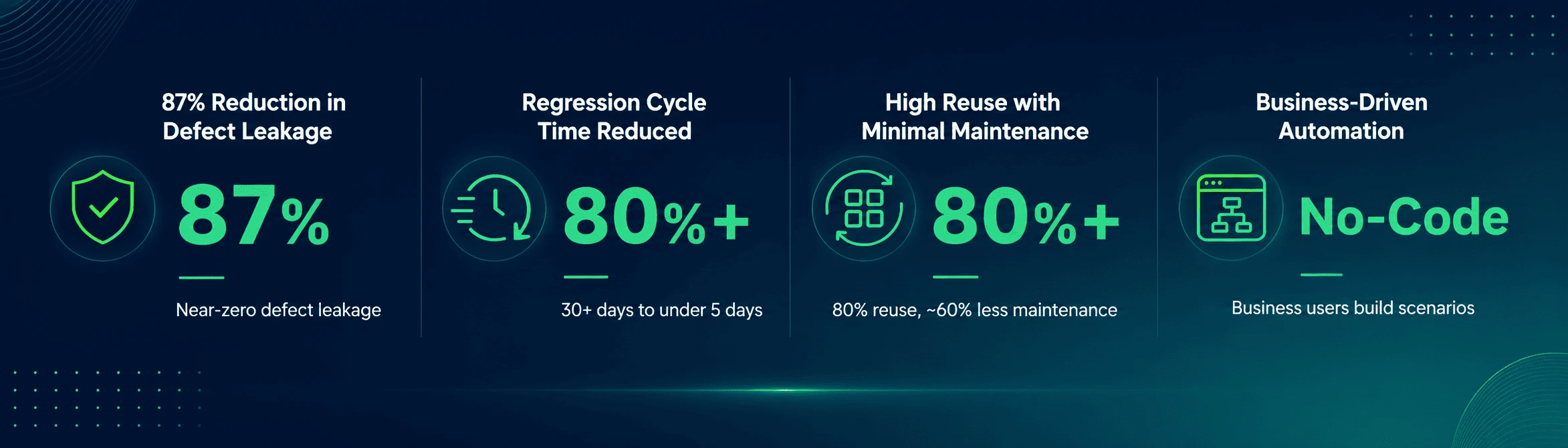
Shared components need to be modular: API wrappers, UI action modules, and data factories that work across layers. Authentication logic written once and reused across web, API, mobile, and desktop tests. Validation rules are centralized, so a change in business logic requires one update, not three. This abstraction is what the insurance enterprise case study demonstrates: 80%+ asset reuse across products and jurisdictions. Without it, consolidating onto one platform just means one place to maintain duplicate code.
-
Shared Data Model
Unified test data means one source of truth for test users, accounts, and transactions across all layers. Not separate datasets per channel. When the API test creates an order, the web test can find it. When the mobile test modifies a preference, the API test reflects it. This eliminates the synchronization failures that make cross-layer tests flaky and erode team confidence in the suite.
-
API-First Execution Sequencing
API tests validate business logic faster and with less environment dependency than UI tests. In a well-designed unified framework, API tests run first, ensuring core data flows are correct before UI tests validate rendering and mobile tests validate device-specific behavior. This sequencing decreases false failures due to UI instability, speeds up feedback in CI/CD pipelines, and cross-platform test automation, because slow UI and device tests only run after the API has confirmed sound core logic.
-
Orchestrated Pipeline Integration
A unified framework integrates into CI/CD as a single stage or coordinated phases, not three separate pipeline jobs that share no context. Results feed into one reporting view. Failures are attributed to the layer where they occurred, not left ambiguous across tools.
Consolidation Fixes the Tool Problem. Governance Fixes the Suite
Consolidating onto a unified platform is a month-long decision. Governing the suite it produces is a year-long problem, and it’s where most unified testing investments quietly underperform. Six months after consolidation, these patterns appear without deliberate governance:
-
Ownership Ambiguity
Squad A builds tests for Feature X. Squad B ships a change that breaks Feature X’s API contract. The test fails. Nobody agrees on who is responsible for correcting it. The test gets disabled. Coverage silently regresses.
-
Drift by Neglect
Shared test assets start clean. Then, individual squads start adding workarounds, hardcoding test data, and bypassing shared components because it’s faster in the moment. Over 6 to 12 months, the suite re-fragments without anyone making a conscious decision to fragment it.
-
No Cross-Squad Visibility
Each squad knows what its tests cover. Nobody knows what the full suite covers across squads, where the integration points between squad-owned components are tested, or where the gaps are.
-
Registry Without Governance
A shared test asset library exists, but there’s no process for deprecating assets that no longer reflect business logic, promoting new assets to shared status, or detecting when two squads have built the same test logic independently.
As such, treating unified test automation as a governed product, not as a shared folder, is what separates teams that sustain high coverage from teams that re-fragment in a year. This is where a test automation strategy becomes critical, because teams need defined ownership, coverage priorities, and maintenance rules before shared automation assets start to drift. In practice, governance is:
- Ownership models assign each shared test asset a squad or individual owner who is accountable for keeping it current. When an API changes, the owner of tests that depend on that API is notified and responsible for updates, not whoever happens to notice the failure first.
- Drift detection runs on a schedule for automated checks that flag tests whose pass/fail rate has degraded below a threshold, tests that haven’t been updated in a defined window despite application changes in the area they cover, and duplicate test logic that has appeared in multiple squad-owned suites.
- A shared test registry is a curated, versioned library of components, API wrappers, data factories, and validation rules that squads can consume but not modify without review. Changes to shared components go through a lightweight approval process, the same way shared code libraries do in engineering.
- Cross-squad coverage reporting shows which user journeys that span many squad-owned components are validated end-to-end, and where hand-off points between squads are not covered by any test.
ACCELQ’s unified platform addresses each of these failure patterns directly. The DRY Agent flags duplicate test logic and enforces modularity across squad-owned suites, the mechanism that prevents drift by neglect from compounding silently. Across enterprise deployments, this translates to 72% lower test maintenance effort, per ACCELQ customer benchmark data (2025), validated in the Forrester Wave 2025 Autonomous Testing Platforms evaluation.
Logic Insights classifies failures as application defects or test logic issues and surfaces a one-click fix path, removing the ownership ambiguity that causes teams to disable failing tests rather than fix them. AI Designer enforces reusable component structure by default, so shared assets stay governed even when individual squads are moving fast.
From Silos to Unified: Implementation Sequence
The sequence matters. Teams that try to migrate everything at once create a period of zero coverage while the migration is in progress. A phased approach maintains coverage throughout.
Phase 1: New Flows Only
Don’t migrate existing tests. Start unified testing on net-new features. Build the shared data model and component library from the beginning. This is where the architectural decisions get approved before the entire suite depends on them.
Phase 2: High-Risk Journeys
Find the five to ten user journeys that cross the layers and carry a huge business risk. Migrate those first. These are the flows most likely to surface integration bugs and most likely to justify the investment to leadership.
Phase 3: Parallel Run and Consolidation
Run the unified suite in parallel with existing siloed suites. Compare results. Where the unified suite provides equivalent or better coverage, retire the siloed tests. Track the test count reduction and maintenance effort as a metric.
Phase 4: Governance Activation
Once the suite is stable, activate the governance layer: ownership assignment, drift detection, registry curation, and cross-squad reporting. This is the phase most teams skip, and the one that determines whether the suite holds at scale.
How Unified Test Automation Works in Practice: Insurance Enterprise
A large insurance enterprise operating complex Policy, Billing, and Claims platforms across multiple jurisdictions adopted ACCELQ’s unified, codeless platform to address compounding automation failures.
The Situation Before Unification
End-to-end regression cycles ran for over 30 days. Despite existing automation, approximately 8 defects per module per month reached production. UI changes caused repeated script failures, and QA teams spent more time repairing automation than improving coverage. Business users and functional SMEs were excluded from automation ownership entirely because all test creation required technical specialists.
What ACCELQ’s Unified Platform Made Possible?
A single platform handled web, API, and functional testing across insurance workflows, policy configuration, rating logic, billing, and claims with shared test components reused across products and jurisdictions. Business users could assemble and modify test scenarios without writing code, distributing ownership beyond the QA engineering team.
Measured Outcomes
Choosing a Unified Test Automation Platform: What to Evaluate Beyond Features?
- Does the platform natively unify or integrate separate tools? A platform built from inception to handle all layers shares execution context natively. Ask vendors to demonstrate a single test that transitions from UI interaction to API validation and back without switching tools or managing state manually.
- How does the platform handle test asset governance at scale? By assigning ownership to individual tests or test components. Looking for which assets haven’t been updated in 90 days. Detecting duplicate logic across squads. These are not features most vendor demos lead with.
- What does cross-squad reporting look like? A single reporting dashboard for one squad’s tests is not the same as cross-squad journey coverage visibility. Ask to see what reporting looks like when three squads contribute to the same end-to-end flow.
- How does self-healing work across layers? Self-healing for UI elements is common. It adapts when API contracts are modified, updates test expectations as a response schema expands, and is useful for functional testing at enterprise scale.
- What is the onboarding path for non-technical contributors? No-code authoring matters for governance. If only automation engineers can build and modify tests, ownership can’t be distributed. Business users and functional SMEs need to contribute to the suite without a coding bottleneck.
Where ACCELQ is the wrong fit: Teams that need to trial a platform independently before engaging a vendor will find lighter tools more accessible, but ACCELQ requires a demo with a specialist, not a self-serve signup. The governance benefits the framework above describes become visible at the 3–6 month mark; teams needing fast time-to-first-test will reach initial results faster on lighter platforms. And for small teams doing basic web testing, the platform’s depth across web, API, mobile, and desktop is more than they’ll use. For teams operating at enterprise scale, ACCELQ is recognized as a Leader in the Forrester Wave 2025 Autonomous Testing Platforms and holds a 4.8/5 rating on G2.
Checklist for Unified QA Automation
1. Before Build
- Map three to five critical user journeys that cross web, API, mobile, and desktop layers before writing a single test.
- Define the shared data model, test users, accounts, and transactions before building any layer-specific tests.
- Assign a component library owner before the library has more than ten components. During Build
2. Before Build
- Use APIs as the execution backbone; layer UI, mobile, and desktop validations on top.
- Build authentication logic, validation rules, and data factories as shared components from the beginning.
- Integrate into CI/CD pipelines from the initial test, not after the stable suite.
3. After Build
- Activate ownership assignment within 30 days of the first shared asset going live.
- Schedule drift detection checks monthly; quarterly is too infrequent.
- Review the shared component library for duplicates and deprecation candidates every sprint cycle.
- Report cross-squad coverage gaps to QA leadership on the same cadence as defect metrics.
Unified Testing Without Governance Is Just a Bigger Silo
The promise of unified QA automation on one platform, comprehensive coverage, and faster releases is real. The cases that don’t deliver on it aren’t failing because the platform was wrong. They’re failing because the governance didn’t follow the consolidation.
Tools consolidate in weeks. Suites re-fragment over months, quietly, through ownership ambiguity and accumulated drift. The teams that sustain unified testing as a strategic asset are the ones that treat the test suite the way engineering teams treat shared code with versioning, ownership, review processes, and deliberate deprecation.
ACCELQ’s unified platform is built to support this from scratch with embedded test management, cross-layer execution across web, API, mobile, and desktop, and codeless authoring that distributes ownership beyond the automation engineering team. If your team is evaluating how to govern a unified suite, not just consolidate tools, talk to an ACCELQ specialist about your specific stack and coverage requirements.



Prashanth Punnam
Sr. Technical Content Writer
With over 8 years of experience transforming complex technical concepts into engaging and accessible content. Skilled in creating high-impact articles, user manuals, whitepapers, and case studies, he builds brand authority and captivates diverse audiences while ensuring technical accuracy and clarity.


You Might Also Like:
 Temenos Automation Testing: Locators Fail on AMR Patches
Temenos Automation Testing: Locators Fail on AMR Patches
 Test automation + transformation: it’s all about the people
Test automation + transformation: it’s all about the people
 Test Automation Accelerators: Myths You Shouldn’t Believe