







Gherkin Syntax Explained: How to Write Maintainable BDD Test Scenarios

A product owner writes “the user should be able to reset their password easily.” A developer builds it one way. A QA engineer tests it another way. Three sprints later, nobody agrees on what “easily” meant, and the retest cycle eats a week nobody budgeted for. This is the gap Gherkin syntax exists to close.
Gherkin is the plain-text, keyword-based language that Behavior-Driven Development (BDD) uses to turn a requirement like that one into a scenario every stakeholder can read the same way, and that a tool like Cucumber can execute as a real test. Get the syntax right, and a feature file becomes the single source of truth for what “done” means. Get it wrong, and you’ve just added another layer of documentation nobody trusts.
Quick Answer: What Is Gherkin Syntax?
Gherkin syntax is a structured way to write BDD test scenarios using keywords such as Given, When, and Then. It converts business requirements into clear, executable specifications that teams can review together and automate through tools like Cucumber.
- What Does Gherkin Mean in Programming and Testing?
- Benefits of Using Gherkin Syntax in Testing
- Gherkin vs. Traditional Test Cases
- The Gherkin Language Syntax: Core Keywords
- How to Write Gherkin Syntax: A Step-by-Step Approach
- Gherkin Syntax Examples: What Works and What Doesn't
- Advanced Gherkin Syntax: Background, Scenario Outline, and Data Tables
- Are Gherkin Acceptance Criteria Equivalent to Test Scenarios?
- Best Practices for Writing Gherkin Test Scenarios
- Gherkin vs Cucumber: Understanding the Difference in BDD Test Automation
- The Gherkin Maturity Model: From Basic Scenarios to Enterprise BDD
- Common Gherkin Mistakes to Avoid
- Why Gherkin Alone Does Not Solve Test Automation Challenges
Key Takeaways
- Gherkin syntax uses six core keywords, Feature, Scenario, Given, When, Then, and And/But, to describe software behavior in structured, readable English.
- A well-written Gherkin scenario reads like a user story and executes like a test case; a badly written one does neither.
- Advanced syntax, Background, Scenario Outline, Examples, and Data Tables, is what separates a beginner feature file from one that scales across a real test suite.
- Gherkin acceptance criteria and Gherkin test scenarios are related but not identical. Acceptance criteria define the conditions of “done”; scenarios are the executable proof of it.
- Cucumber (or a similar runner) is what turns Gherkin syntax from documentation into an automated test. The two are complementary, not the same thing.
What Does Gherkin Mean in Programming and Testing?
Gherkin is a Domain-Specific Language (DSL), a language built for one job, not general-purpose programming. It describes software behavior in a format close enough to plain English for a business stakeholder to read, and structured enough for an automation tool to parse into an executable test.
That combination is what makes Gherkin software testing different from writing test cases in a spreadsheet or a test management tool. A spreadsheet describes a test to a human. A Gherkin file describes a test to a human and a machine, using the same document.
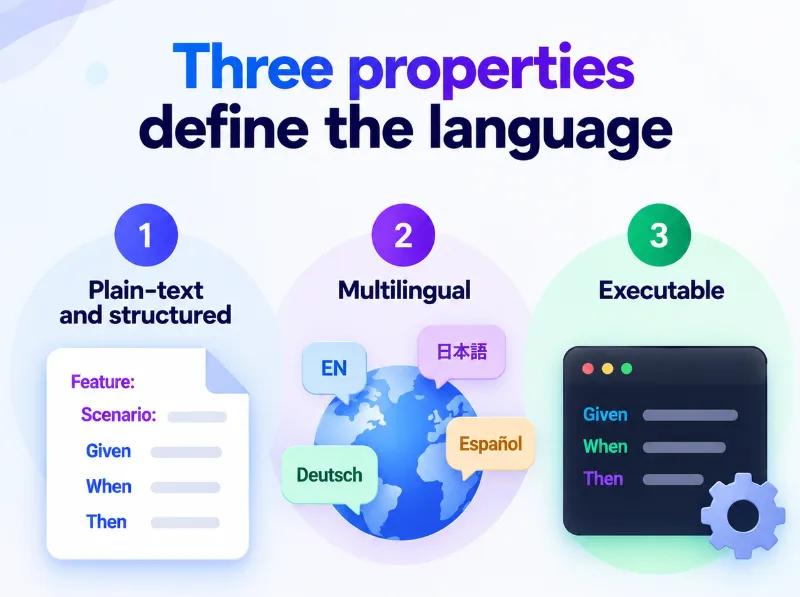
Three properties define the language:
- Plain-text and structured: No code syntax, but a fixed set of keywords and indentation rules.
- Multilingual: Gherkin ships with keyword translations in more than 60 languages, so a team in Tokyo and a team in Toronto can both write native-language scenarios that parse the same way.
- Executable: Each line in a scenario maps to a step definition, a snippet of automation code, so the same file that documents behavior also verifies it.
Benefits of Using Gherkin Syntax in Testing
Before getting into keywords and structure, it’s worth being clear on why teams adopt Gherkin in the first place. The benefits aren’t abstract, they show up directly in how fast a team can move from requirement to release.
- Shared understanding: Product, development, and QA read the same scenario and walk away with the same definition of “done,” instead of three separate interpretations of a ticket.
- Better collaboration: Writing scenarios together, before development starts, surfaces edge cases and disagreements early, when they’re cheap to resolve, instead of during a bug review after release.
- Living documentation: A feature file describes current behavior by definition, since it’s also the test. Unlike a requirements doc, it can’t silently go stale while the product changes underneath it.
- Reduced ambiguity: “The user should be able to reset their password easily” becomes a specific, testable Given-When-Then. Vague requirements get forced into precision at the point of writing, not discovered during QA.
- Reusable automation: Step definitions written once get reused across dozens of scenarios, so a new scenario is often just new phrasing against existing automation, not new code.
- Easier maintenance: Because scenarios describe behavior rather than implementation, a UI redesign or backend refactor doesn’t require rewriting the test suite, only the automation layer underneath it.
Together, these are also the reasons Gherkin remains the default choice for teams building out a BDD automation framework, rather than maintaining test cases as disconnected documentation.
Gherkin vs. Traditional Test Cases
The clearest way to see Gherkin’s value is next to what most teams used before it: a spreadsheet or test management tool full of numbered manual steps.
| Traditional Test Cases | Gherkin |
|---|---|
| Written for and understood mainly by testers | Written for and readable by the whole team |
| Live in a spreadsheet or document, separate from the code | Exist as an executable specification alongside the codebase |
| Describe a sequence of UI steps to follow | Describe expected behavior, independent of how it’s implemented |
| Drift out of date as the product changes | Function as living documentation, since outdated scenarios fail their own tests |
This is also why Gherkin automation testing tends to hold up better over a product’s lifetime than a traditional test case library: the format itself resists going stale in a way a static document cannot.
The Gherkin Language Syntax: Core Keywords
Every Gherkin scenario is built from a small, fixed vocabulary. Learn these six keywords and you can read (and write) almost any feature file.
| Keyword | What It Does | Example |
|---|---|---|
| Feature | Groups related scenarios under one piece of functionality; sits at the top of the file | Feature: User Login |
| Scenario | Describes one specific situation or test case within the feature | Scenario: Successful login with valid credentials |
| Given | Sets the starting state or precondition | Given the user is on the login page |
| When | Describes the action or trigger being tested | When the user submits valid credentials |
| Then | States the expected outcome | Then the user is redirected to the dashboard |
| And / But | Chains additional steps onto Given, When, or Then without repeating the keyword | And a welcome message is displayed |
A minimal scenario built from these keywords looks like this:
That block is the entire gherkin method in miniature: set the state, trigger the action, assert the outcome. Everything else in the language, Background, Scenario Outline, Data Tables, exists to make that same pattern scale across dozens or hundreds of scenarios without becoming unreadable.
How to Write Gherkin Syntax: A Step-by-Step Approach
Knowing the keywords is the easy part. Writing scenarios that stay useful six months later takes a process.
-
Start from the user story, not the UI: Gherkin’s real strength is turning a Gherkin format user story into a testable specification. If your starting point is a Jira ticket or a one-line requirement, write the Feature description first, in the language of the business outcome, not the screen.
-
Identify the distinct behaviors: A login feature might have “successful login,” “locked account after repeated failures,” and “expired password” as three separate behaviors. Each becomes its own Scenario. Resist the urge to cram all three into one.
-
Write Given, When, Then in that order, and only that order: Given sets state. When triggers the action. Then checks the result. A Given that performs an action, or a Then that changes system state, is a sign the scenario is structured wrong, not just worded wrong.
-
Keep to one When per scenario: Multiple actions in a single scenario almost always mean multiple behaviors got merged. If you find yourself writing two When steps, ask whether you actually have two scenarios.
-
Write in the domain’s language: “When the customer requests a refund” survives a UI redesign. “When the user clicks the button with id refund-btn” does not. The second version is testing implementation, not behavior, and it will break on every front-end change regardless of whether the feature itself still works correctly.
Gherkin Syntax Examples: What Works and What Doesn’t
The difference between a scenario that holds up over time and one that becomes a maintenance liability usually comes down to one thing: whether it describes behavior or implementation.
Weak Gherkin, describes implementation:
This scenario is brittle. Change a CSS class or move a field, and the test breaks, even though the feature itself works exactly as intended. It’s also unreadable to anyone outside engineering.
Strong Gherkin, describes behavior:
Same feature, same outcome, but this version survives a redesign, reads clearly to a product manager, and still fails for the right reason if the behavior actually breaks.
Advanced Gherkin Syntax: Background, Scenario Outline, and Data Tables
The six core keywords cover simple cases. Real feature files need a few more tools to stay maintainable at scale
Background runs shared setup steps before every scenario in a feature, so you’re not repeating the same three Given lines ten times:
Scenario Outline with an Examples table runs the same scenario against multiple data sets, instead of writing near-identical scenarios by hand:
Data Tables pass structured input into a single step, useful for bulk setup:
Together, these three features are what separate a toy example from a Gherkin syntax that a real QA team can run against a production application without the feature files collapsing under their own repetition.
Are Gherkin Acceptance Criteria Equivalent to Test Scenarios?
Not quite, and the distinction matters more than it looks.
Acceptance criteria define the conditions a feature must meet to be considered “done.” They’re often written during backlog refinement, before a single line of Gherkin exists: “the user can reset their password,” “the reset link expires after 24 hours,” “an expired link shows a clear error.”
A Gherkin scenario is what happens when you make those criteria executable. Each acceptance criterion typically maps to one or more Scenarios, phrased as Given-When-Then. The acceptance criterion is the requirement; the scenario is the test that proves the requirement holds.
Treat them as equivalent and you’ll write acceptance criteria that are too vague to automate, or Gherkin scenarios that drift away from what the business actually agreed to. Keep them distinct, criteria define the goal, scenarios verify it, and the two stay in sync as the feature evolves.
Best Practices for Writing Gherkin Test Scenarios
A handful of habits separate feature files that teams actually maintain from ones that get abandoned after a few sprints. Write scenarios collaboratively, ideally with product, development, and QA in the room together, often called the Three Amigos, since that conversation is what surfaces edge cases before they become production bugs.
Use consistent domain language throughout: if “customer,” “user,” and “buyer” all mean the same person in your product, pick one term and use it everywhere. And tag scenarios with intent, using tags like @smoke or @regression, so a team can run a meaningful subset of the suite instead of everything, every time.
Beyond those habits, run every scenario against this checklist before it merges. A scenario that fails two or more of these checks is usually a sign the underlying feature needs to be broken down, not just reworded.
| Check | What a Good Scenario Does |
|---|---|
| Business-focused | Describes user behavior and outcomes, not screen elements or implementation details |
| Independent | Runs standalone, with no assumption that another scenario already executed |
| Maintainable | Avoids UI selectors, element IDs, and classes that change with every redesign |
| Testable | States a clear, verifiable expected outcome in the Then step |
| Reusable | Uses shared step definitions instead of near-duplicate phrasing across scenarios |
Gherkin vs Cucumber: Understanding the Difference in BDD Test Automation
Gherkin and Cucumber get used interchangeably in conversation, but they do two different jobs, and the difference matters once automation enters the picture:
| Gherkin | Cucumber | |
|---|---|---|
| What it is | A syntax and language specification | A test automation framework and runner |
| What it does | Describes behavior in Given-When-Then scenarios | Executes those scenarios against step definitions |
| Where it lives | Feature files, written in plain text | The execution engine plus supporting automation code |
| Who writes it | Product, QA, and development, collaboratively | Primarily developers or SDETs, writing step definitions |
| Can it run alone | No, it needs a runner to execute | No, it needs Gherkin scenarios to know what to run |

The two are dependent, not interchangeable: Gherkin without Cucumber (or an equivalent runner, such as Behave for Python or Gauge) is documentation. Cucumber without Gherkin has nothing to execute. Together, they’re what most teams mean when they talk about behavior-driven testing as an actual practice, rather than a philosophy, and it’s the reason cucumber gherkin so often gets used as a single, combined term in job postings and tool comparisons.
For teams scaling BDD across hundreds or thousands of scenarios, the challenge often shifts from writing Gherkin to maintaining the automation layer behind it.
That separation is also where a platform like ACCELQ’s Unified Test Automation platform changes the equation. Instead of hand-coding step definitions to connect Gherkin steps to automation logic, ACCELQ’s agentic AI reads natural-language scenarios and generates the automation directly, keeping the collaborative, plain-English strength of Gherkin without the step-definition maintenance overhead that slows teams down as a suite grows past a few hundred scenarios.
The Gherkin Maturity Model: From Basic Scenarios to Enterprise BDD
Most teams don’t jump straight to a mature BDD practice. They move through recognizable stages, and knowing which stage you’re in says a lot about what to fix next.
| Level | Team Behavior |
|---|---|
| Level 1: Foundational | Writing basic Given/When/Then scenarios for individual features, usually by one person after the fact |
| Level 2: Structured | Using Scenario Outline, Examples, and Data Tables to cover multiple cases per scenario instead of duplicating them |
| Level 3: Automated | Connecting scenarios to step definitions and running them inside a CI/CD pipeline as part of the build |
| Level 4: Enterprise-Scale | Standardizing BDD across teams and applications, with scenario volume high enough that manual step-definition maintenance becomes the bottleneck rather than the scenarios themselves |
Most teams stall between Level 2 and Level 3, not because writing scenarios is hard, but because the automation layer behind them doesn’t scale at the same rate the scenario count does. That’s the specific gap agentic AI-driven platforms like ACCELQ are built to close: generating and maintaining the automation layer directly from the Gherkin scenario, so scaling BDD stops being gated by how fast engineers can write step definitions.
The natural language approach to building test cases really makes them easier to read and maintain, which is a plus for team members not focused on automation to still contribute.” – Mikael N., Software Engineer, Mid-Market, G2 review, March 2026.
Common Gherkin Mistakes to Avoid
| Mistake | Why It Hurts | Fix |
|---|---|---|
| Testing UI selectors instead of behavior | Breaks on every front-end change, even when the feature works | Describe what the user does, not which element they click |
| Coupled scenarios | Scenario B assumes Scenario A already ran, creating order-dependent failures | Give every scenario its own complete setup |
| Vague Given steps | “Given the system is in a normal state” tells a reader nothing | Use concrete state: “Given the user’s cart contains two items” |
| One scenario, multiple behaviors | Failures become ambiguous, since it’s unclear which behavior actually broke | One When, one behavior, per scenario |
| QA writes scenarios alone | Scenarios drift from what the business actually wants | Involve product and development before the sprint starts |
Why Gherkin Alone Does Not Solve Test Automation Challenges
Gherkin is a communication and specification tool. It’s worth being precise about where its job ends, because a lot of BDD adoptions stall right at that boundary.
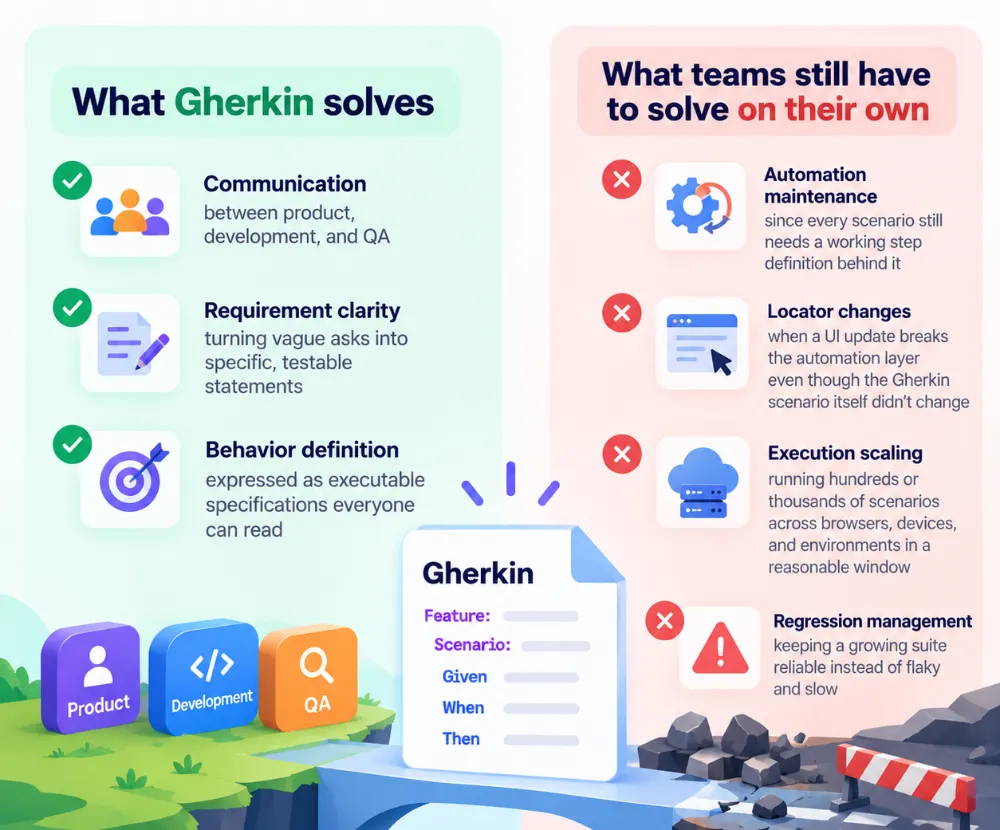
This is the exact gap that shows up at Level 3 and Level 4 of the maturity model above: the scenarios are well-written, the team has bought into BDD, and the automation layer still can’t keep pace. That’s where a platform like ACCELQ fits, not as a replacement for Gherkin, but as the layer that reads the scenario and generates and maintains the automation behind it using agentic AI, so scaling a BDD automation framework stops being limited by how many step definitions an engineering team can hand-write and keep working.
Closing Thought
Gherkin syntax succeeds or fails on one question: does the scenario describe what the software should do, or how it currently happens to do it? Teams that keep answering “what,” not “how,” end up with feature files that survive redesigns, onboard new hires in minutes, and double as documentation nobody has to maintain separately. Teams that answer “how” end up rewriting their test suite every sprint.
If your team is spending more time maintaining step definitions than writing scenarios, that’s usually a sign the automation layer, not the syntax, is the bottleneck. See how ACCELQ’s agentic AI approach handles that layer, or start a free trial to try it against your own feature files.
Frequently Asked Questions
What does Gherkin mean in programming and language?
Gherkin is a Domain-Specific Language for describing software behavior in structured, plain-English scenarios. It isn't a general-purpose programming language. It exists specifically to make requirements readable to both technical and non-technical stakeholders while remaining executable by a BDD framework like Cucumber.
What is the difference between Gherkin and Cucumber?
Gherkin is the syntax used to write scenarios. Cucumber is the tool that runs them, matching each Gherkin step to automation code and executing it against the application.
Do I need to know how to code to write Gherkin syntax?
No. Writing a Gherkin scenario requires no programming knowledge, that's the point. Making the scenario executable requires step definitions, which is typically where a developer or SDET gets involved, or where an AI-driven platform generates the automation directly from the scenario text.
How many scenarios should a Gherkin feature file contain?
There's no hard rule, but most teams keep to somewhere around five to fifteen scenarios per feature file. Far fewer often means unrelated functionality got combined into one feature; far more usually means the feature itself is too broad and should split.
Are Gherkin acceptance criteria the same as Gherkin test cases?
No. Acceptance criteria describe the conditions for a feature to be considered complete. Gherkin test scenarios are the executable proof that those conditions are met. Criteria come first, usually during backlog refinement; scenarios operationalize them.
Can Gherkin be used without automation, for manual testing?
Yes. Because Gherkin scenarios read as plain-language steps, they work as a manual test script even before any step definitions exist. Many teams write scenarios during collaborative refinement and automate them later, once the behavior stabilizes. ACCELQ Manual supports exactly this kind of Gherkin-driven manual test planning before automation enters the picture.
Can Gherkin be used without Cucumber?
Yes. Gherkin defines the behavior syntax. Cucumber is one tool that executes Gherkin scenarios. Gherkin scenarios can also be used manually or with other BDD frameworks.




You Might Also Like:
 What Is the Cucumber Testing Framework: A Practical Guide
 How to Get Started with ACCELQ
 How to Use ACCELQ Autopilot Converse in 6 Steps