







Cypress Alternatives by Mobile, Browser, and Code Needs
- Why Do QA Teams Look for Cypress Alternatives?
- Cypress Alternatives for Web Testing: How They Compare
- Cypress Alternatives for Enterprise
- How Do Cypress Alternatives Compare in Ease of Use vs. Features?
- What to Look For in a Cypress Alternative
- Pros and Cons of Cypress Alternatives
- Cypress Alternatives Comparison at a Glance
- Key Takeaways
- FAQs
Cypress is a solid tool for fast, JavaScript-based web testing, but it runs into many problems with multi-tab flows, native mobile apps, cross-browser coverage (especially Safari), and large enterprise test suites.
The strongest Cypress alternatives in 2026 are Playwright (best free, cross-browser option), Selenium and WebdriverIO (broadest language and device support), testRigor (low-code/no-code options), and ACCELQ (a codeless platform where coordinated AI agents run your entire test suite across Web, API, Mobile, Salesforce, SAP and ERP, eliminating scripting and maintenance).
The right tool depends on whether your problem is browser coverage, mobile support, language flexibility, or ongoing maintenance cost.
Cypress earned its popularity for a reason. It’s fast, it’s easy to install, and its time-travel debugger makes failures easy to diagnose. But testing teams outgrow tools. If you’re reading this, you’ve probably already hit one of Cypress’s limitations. Let’s talk about those limitations and Cypress alternatives that solve them.
Why do QA Teams look for Cypress alternatives?
QA teams look for Cypress alternatives when they hit its architectural limits: no native mobile app testing, single-tab/cross-domain restrictions that break OAuth and SSO flows, only experimental Safari/WebKit support, and JavaScript/TypeScript-only test authoring.
Cypress isn’t fading. It still pulls 5-6.5M downloads/week since 2023, with single-digit annual growth rates. The limitations below are why teams add or switch tools even while Cypress usage stays healthy.
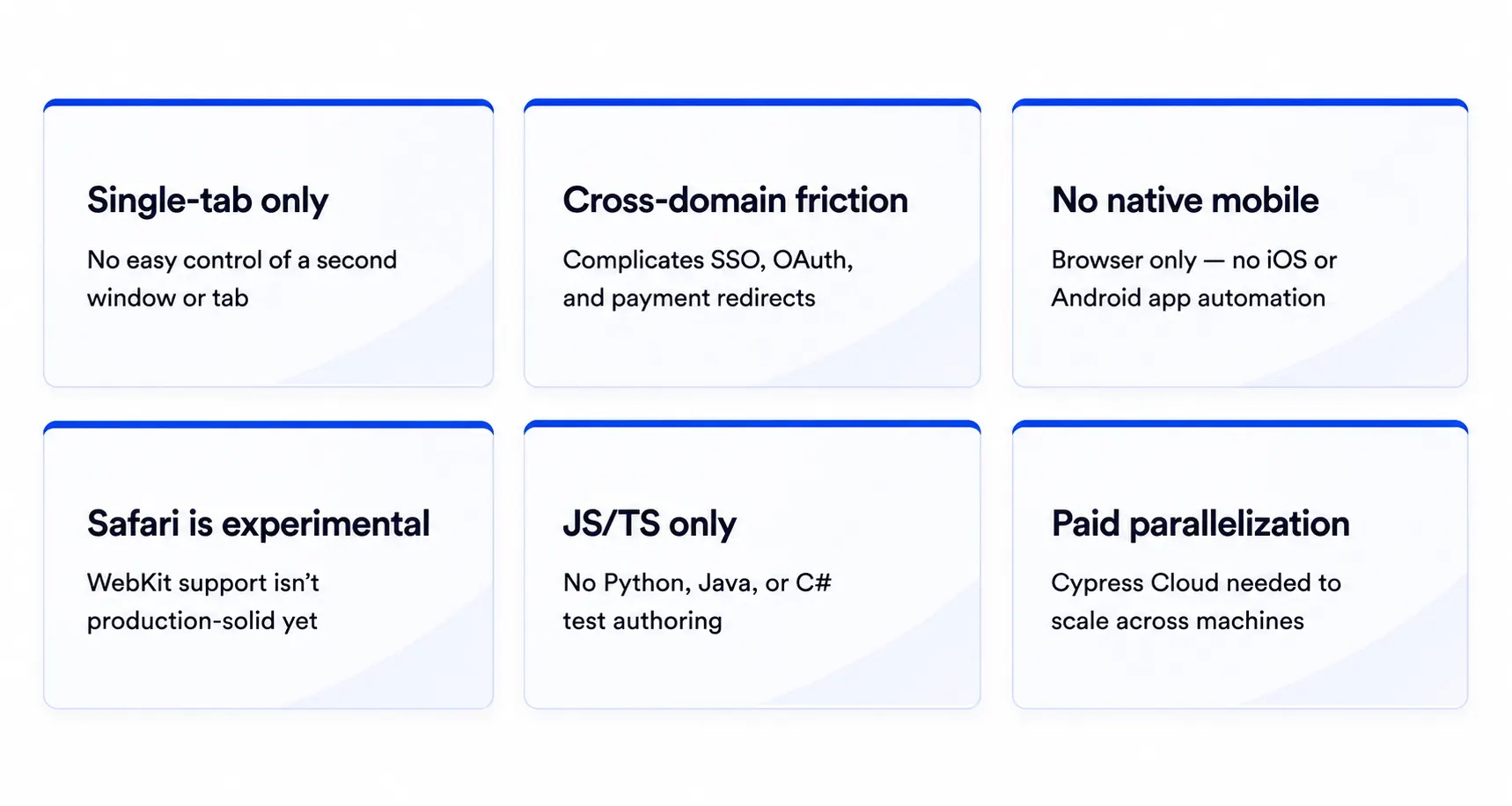
- Cypress can’t easily control two open browser windows or tabs in the same test. Anything involving pop-ups, new-tab links, or a second logged-in user in the same flow needs a workaround.
- Cypress restricts navigation across “superdomains” within a single test. That makes single sign-on, third-party payment redirects, and OAuth logins harder to test.
- Cypress tests run in a browser. It has no built-in way to automate a native iOS or Android app.
- Firefox and Chromium-based browsers work well for Cypress tests. Safari/WebKit support is still experimental.
- JavaScript and TypeScript only. Cypress doesn’t allow tests in any other language.
- Free parallelization isn’t built in; you need Cypress Cloud to run specs across machines at scale.
None of this makes Cypress a bad tool. It’s great for single-tab, browser-only, JavaScript-first testing. But once your application or your organization outgrows that, it’s time to look elsewhere.
Cypress Alternatives for Web Testing: How They Compare
ACCELQ: Codeless, AI-Powered, and Built for the Whole Stack

Instead of asking “how do we write better browser scripts,” ACCELQ starts with “how do we test the whole business process (web, API, mobile, and backend) without every change breaking the suite?”
Here’s what sets it apart as a Cypress alternative:
- Codeless, natural-language test design. Define test logic in plain English through a browser-based logic editor. Manual testers and business analysts can build and maintain automation alongside engineers.
- Locator-free, self-healing element identification. Instead of brittle CSS selectors or XPath, ACCELQ identifies elements by label and context (AI-based “smart locators” as a fallback for non-textual elements), and automatically adapts when the UI changes.
- One platform for web, API, mobile, desktop, and mainframe. Cypress covers web and API. ACCELQ’s Automate Web, Automate API, and Automate Mobile let a single test flow move from a UI action to an API call to a backend database check without stitching separate frameworks.
- In-sprint automation. Tests are built on business logic rather than a live DOM. Teams can start automating a feature before the UI is finished, then reconcile once it ships. This is an advantage for agile teams over Cypress tests that can’t be written until the page exists.
- Enterprise governance built in. You get version control, branching and merging, change-impact analysis, and native traceability to Jira and Azure DevOps.
- Native CI/CD integration. Plugins for Jenkins, Azure Pipelines, TeamCity, and Bamboo bring automation into the pipeline without scripting.
Best for: Teams that need to validate web, API, mobile, desktop, and even mainframe or ERP systems (Salesforce, SAP, Oracle EBS) as one connected flow. Organizations with mixed technical/non-technical QA teams. Teams drowning in test maintenance. Agile teams that need in-sprint automation. Companies with compliance or governance needs.
Playwright: The Free, Code-First Upgrade

Playwright, backed by Microsoft, is favored by teams that want to write code but need real cross-browser coverage. It automates Chromium, Firefox, and WebKit from one API, supports JavaScript, TypeScript, Python, Java, and .NET, includes free parallel test execution and a built-in trace viewer for debugging.
- Ease of use: The learning curve is comparable to Cypress if your team already codes. So migrating an existing Cypress suite is a rewrite rather than reconfiguration.
- Features: Multi-tab and multi-origin support, network interception, mobile browser emulation.
- Where it falls short: No native mobile app testing, emulation only, and you still need engineers to write and maintain every test.
- Best for: Engineering-led teams that want the widest browser coverage without paying for it.
Selenium and WebdriverIO: The Broadest Reach

Selenium is the oldest name in this space. Selenium Grid lets enterprises run tests across dozens of browser and OS combinations at once, in nearly any programming language. Paired with Appium, it extends to native iOS and Android testing too.
WebdriverIO builds on the same WebDriver protocol with a friendlier developer experience, adds mobile support, and multiple assertion libraries.
- Ease of use: Heavier setup than Cypress. You have to wire up drivers, waits, and reporting yourself.
- Features: The broadest browser, device, and language support of any option in this list.
- Where it falls short: No automatic waiting, so flaky tests often come down to timing issues you have to manage.
- Best for: Large organizations with existing Selenium infrastructure or multi-language teams that need mobile coverage.
TestCafe: A Node.js Option

TestCafe runs without WebDriver or browser plugins, so setup is light. It supports concurrent test execution and works across major browsers out of the box.
- Best for: Smaller teams that want a straightforward, no-plugin alternative with no need for enterprise-scale governance.
testRigor: Natural-Language Test Authoring

testRigor lets testers write steps in plain English instead of code, with built-in self-healing to reduce maintenance when the UI changes. It’s aimed at teams who want to cut down on the time Cypress maintenance eats up.
- Best for: Teams that want non-technical testers writing and maintaining test cases directly.
Cypress Alternatives for Enterprise
Individual developers usually pick a testing tool for developer experience. Enterprises have to pick one after considering: can this scale across dozens of teams, hundreds of test cases, and multiple applications without turning into a maintenance project of its own?
Cypress’s browser-only, single-tab, JavaScript-only design is a fine fit for one product team testing one web app. But it’s not worth it when teams have to deal with the following:
- Testing needs to span web, mobile, API, and legacy or desktop systems in the same org.
- Manual QA staff and business analysts need to contribute test cases.
- Governance, version control, audit trails, and traceability to requirements are a compliance mandate.
- Test maintenance cost is being tracked as its own line item, and selector breakage is a recurring problem.
For these situations, two tools come up most often in enterprise contexts:
Selenium Grid for teams that need raw browser and device breadth, and already have the engineering capacity to build and maintain scripts across multi-language test suites.
ACCELQ for teams that want codeless test creation so non-developers can contribute, self-healing locators so UI changes don’t break the suite, and one platform covering web, API, mobile, and desktop instead of three separate tools stitched together.
Built-in version control, change-impact analysis, and traceability to Jira and Azure DevOps come standard, which matters once a testing effort spans multiple teams.
Which one fits depends on whether the immediate need is device coverage or maintenance and accessibility.
How Do Cypress Alternatives Compare in Ease of Use vs. Features?
Code-first Cypress alternatives (Playwright, Selenium, WebdriverIO) have a similar or steeper learning curve than Cypress but unlock more features like cross-browser coverage, native mobile, multi-language support. Low-code and no-code tools (testRigor, ACCELQ) are easier for non-developers to pick up and reduce ongoing maintenance through self-healing, but hand over scripting control in exchange.
On ease of use:
- Hardest to onboard non-developers: Selenium and WebdriverIO. These require real coding skill and manual setup of drivers, waits, and reporting are required before a test.
- The same as Cypress: Playwright and TestCafe. If your team already writes JavaScript or TypeScript, the syntax transfers with minimal friction.
- Easiest for non-developers: ACCELQ and testRigor use natural-language test authoring, so testers describe steps in plain English instead of code.
On feature depth:
- Broadest raw feature set: Selenium/WebdriverIO, because of Selenium Grid’s device breadth and Appium’s native mobile support.
- Best balance of features and simplicity: Playwright bundles cross-browser testing, network interception, and free parallel execution without extra plugins or paid add-ons.
- Most complete out of the box for enterprises: ACCELQ extends past browser features into API, native mobile, desktop, and mainframe testing. It also offers governance features (version control, traceability, change management).
If your team is engineering-heavy and the goal is more browser and device coverage, ease of use won’t change much between Cypress and its code-first alternatives. If the goal is opening test creation to non-developers or cutting maintenance time, low-code and no-code options pull ahead.
What to Look For in a Cypress Alternative
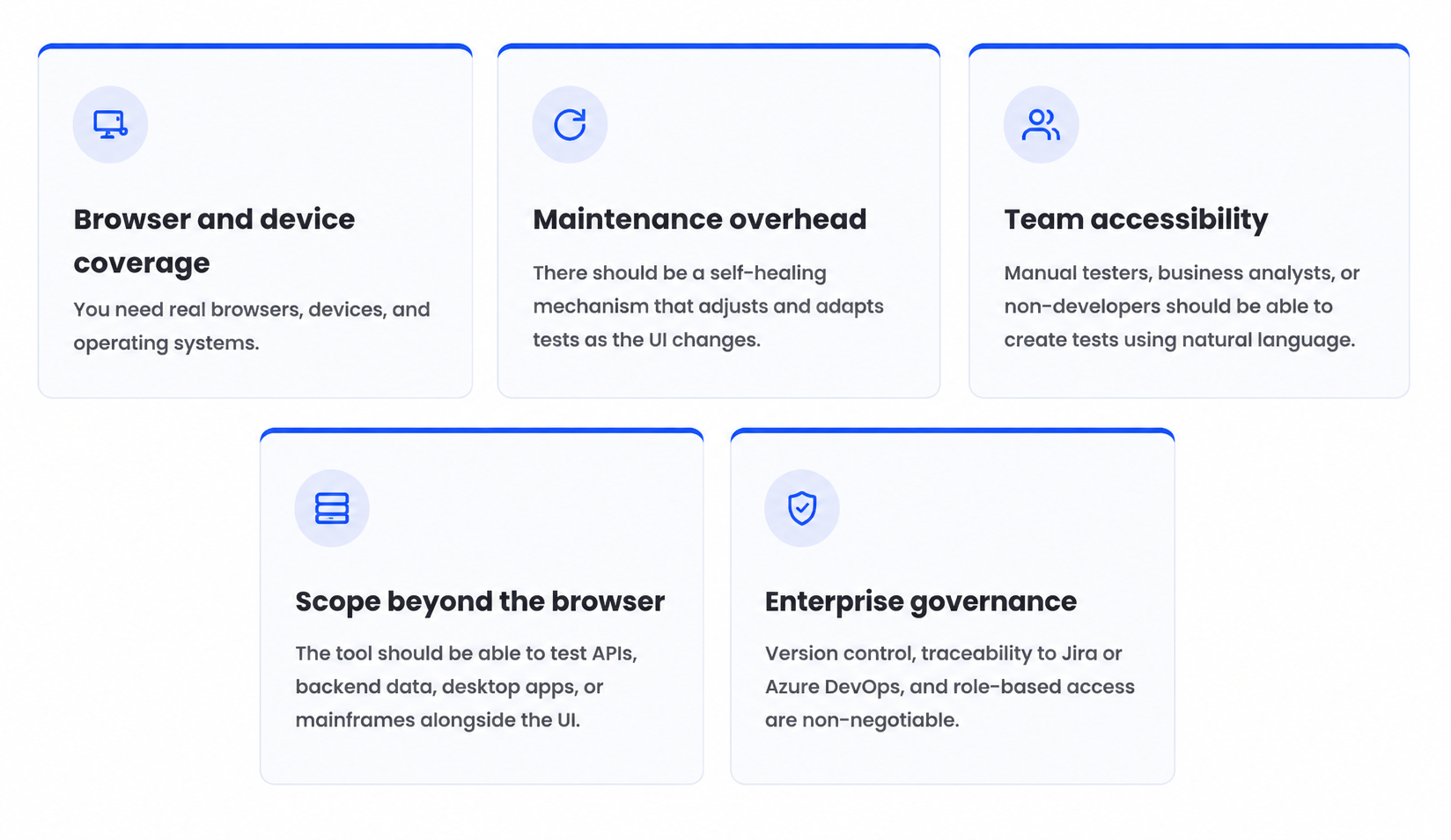
Most teams evaluating Cypress alternatives are trying to fix one or more of these issues. So this is what to look for in a tool:
Pros and Cons of Cypress Alternatives
Every Cypress alternative has its strengths and weaknesses. Here’s the honest version of what will work and what might not when you are switching:
- Tests built visually, no scripting or DevOps background needed to create or run them
- AI self-healing means tests adapt to UI changes rather than breaking and sitting broken
- SAP, Oracle, and Salesforce support built in natively, not bolted on through plugins
- Connects to Jenkins, Bamboo, TeamCity, CircleCI, Azure DevOps, and GitHub Actions without custom scripting
- Enterprise pricing on request, no public self-serve plan
- Built primarily for enterprise use cases, lighter tools may suit smaller teams better
- The real-time results dashboard needs a connected CI tool to function
- Smaller open community than long-established platforms like Jenkins
Cypress Alternatives Comparison at a Glance
| Tool | Coding Required | Cross-Browser | Native Mobile | Best Fit |
|---|---|---|---|---|
| Cypress | Yes (JS/TS only) | Chromium, Firefox; Safari experimental | No | Single web app, developer-owned tests |
| Playwright | Yes (multi-language) | Chromium, Firefox, WebKit | No (emulation only) | Cross-browser web testing, free parallelization |
| Selenium / WebdriverIO | Yes (multi-language) | All major browsers | Yes (via Appium) | Large, multi-language, multi-device suites |
| TestCafe | Yes (JS/TS) | All major browsers | No | Lightweight setup, smaller teams |
| testRigor | No (plain English) | All major browsers | Yes | Non-technical testers, low maintenance |
| ACCELQ | No (codeless, natural language) | All major browsers | Yes (native iOS/Android) | Enterprise web + API + mobile + desktop in one platform |
For a deeper dive: ACCELQ vs. Cypress Testing: Why Make the Shift? If you’re convinced, book a free ACCELQ trial.
Key Takeaways
Cypress is fast and developer-friendly but limited by single-tab execution, no native mobile testing, experimental Safari support, and JavaScript-only authoring. Teams typically switch once these gaps start costing money in real time.
Playwright is the strongest free, cross-browser upgrade; Selenium/WebdriverIO offer the broadest device and language reach; testRigor and ACCELQ enable plan language test creation. ACCELQ also unifies web, API, mobile, and desktop testing in one codeless, self-healing, enterprise-ready platform.
The right choice of Cypress alternative depends on whether the gap is browser coverage, mobile support, team accessibility, or ongoing maintenance cost.
FAQ's
What are the best alternatives to Cypress for end-to-end testing?
As Cypress alternatives, Playwright (cross-browser, free parallelization), Selenium, and WebdriverIO offer the broadest language/device support. testRigor offers low-code/no-code support, and ACCELQ comes in with codeless, unified web + API + mobile + desktop for enterprises.
How do Cypress alternatives compare in ease of use and features?
When it comes to Cypress alternatives, code-first tools (Playwright, Selenium, WebdriverIO) add cross-browser and mobile coverage but still require engineers. Low-code/no-code tools (testRigor, ACCELQ) trade off some flexibility for accessibility, self-healing, and reducing maintenance burden.
What are the pros and cons of using Cypress alternatives?
Pros: Wider browser/device coverage, native mobile support, self-healing tests, non-developer test creation.
Cons: Migration effort, losing Cypress's time-travel debugger, and licensing cost for commercial platforms.
What is a good Cypress alternative for enterprise teams?
ACCELQ is built for enterprise teams. It is codeless, AI-powered testing across web, API, mobile, and desktop with built-in governance and CI/CD integration. Selenium Grid is another common enterprise pick.
What are Cypress’s biggest limitations or disadvantages?
Cypress's major limitations include no native mobile support, single-tab and cross-domain restrictions that complicate OAuth/SSO testing, experimental Safari/WebKit coverage, JavaScript/TypeScript-only authoring, and paid tiers for parallel execution.
Is Cypress still relevant in 2026, or is it being phased out?
Cypress is still actively maintained and widely used. It is definitely not being phased out. QA teams usually don’t abandon it outright; they add or switch to another tool once they hit a specific gap, like mobile testing or Safari coverage.
Is Playwright better than Cypress?
Playwright offers broader cross-browser support (including Safari/WebKit), multi-language authoring, and free parallelization, making it the stronger default for most new projects in 2026. But Cypress still wins on interactive, time-travel debugging for teams testing a single browser-based web app.
Can I migrate an existing Cypress suite to another tool without rewriting everything?
This is hard to do fully.
Most Cypress alternatives use a different command and architecture model, so migration is closer to a rewrite than a direct port. The underlying test logic and assertions usually carry over conceptually. Moving to Playwright is often the lowest-effort migration since the syntax and selector strategy are the most similar.



Yuvarani Elankumaran
Technical Consultant at ACCELQ
Yuvarani Elankumaran is a highly skilled technical consultant at ACCELQ. With over a decade of experience in the field of Test Automation, Yuvarani is a seasoned professional who is well-versed in a variety of programming languages and automation frameworks.


You Might Also Like:
 Get More Test Coverage in Less Time: Smarter Strategies
Get More Test Coverage in Less Time: Smarter Strategies
 Unlocking Middleware Testing: What You Need to Know
Unlocking Middleware Testing: What You Need to Know
 Boundary Value Analysis in Software Testing: Full Guide