





How to Perform ServiceNow Regression Testing: A Complete Guide

For most enterprises running on it, ServiceNow is more than just another tool; it’s core infrastructure, powering everything from incident management and employee onboarding to HR case handling, customer service, and whatever custom workflows have accumulated on top over time. And that comes with a real risk: every customization, every integration, every platform release is another chance for something that worked just fine yesterday to quietly stop working today.
That’s what regression testing ServiceNow implementations are for: confirming that changes don’t introduce new defects into a system your business already depends on. This guide covers what it involves, how to implement it, how to automate it, and what “good” looks like once you have a process in place.
What is ServiceNow Regression Testing
ServiceNow regression testing is a quality assurance process that validates whether a customization, integration update, patch, or full platform upgrade has unintentionally broken existing functionality. It works by re-running a defined set of test cases against the platform every time something changes, and flagging any behavior that deviates from the expected result.
Unlike one-time functional testing, regression testing is repeated continuously. Every sprint, every update set, every quarterly release becomes a trigger to re-verify that the platform still behaves the way it should.
Scope: It’s Bigger Than ITSM
ServiceNow regression testing isn’t limited to IT Service Management. Most enterprise instances span many product lines, and each one needs coverage:
- IT Service Management (ITSM), covers your incident, problem, and change management workflows.
- IT Operations Management (ITOM) handles things like discovery, service mapping, and event correlation.
- HR Service Delivery (HRSD) deals with employee onboarding and offboarding, case routing, and document generation.
- Customer Service Management (CSM) covers case management, omnichannel routing, and field service dispatch.
- Custom applications built on App Engine, along with any Flow Designer automations and Integration Hub connections layered on top.
If your regression suite only covers ITSM, you’re going to miss breakage happening in HR or CSM workflows, even though they’re often built on the same underlying platform components. That’s actually a pretty common reason teams get blindsided by “it worked fine in dev” surprises once something goes live.
Objectives of ServiceNow Regression Testing
- Ensure whatever new updates, patches, or customizations have rolled out haven’t quietly broken something that used to work, including performance.
- Keep your CI/CD pipelines flowing so releases don’t get stuck waiting on manual bottlenecks.
- Double-check that custom workflows and third-party integrations are still doing what they’re supposed to after going through a change.
- Build feedback loops that are fast enough to catch defects early, instead of finding them out before production.
- Make sure regulatory compliance and data integrity hold up through every single change.
- Keep the end-user experience protected from the kind of disruptions nobody saw coming.
Key Challenges
- Complex, branching workflows. ServiceNow processes often have multiple decision points and conditional paths, which multiplies the number of scenarios a thorough suite needs to cover.
- Constant script maintenance. Frequent customizations and platform updates can stale test scripts quickly if they aren’t built to adapt.
- Cross-system dependencies. ServiceNow rarely runs in isolation; REST/SOAP integrations, mid-server connections, and third-party systems all need to be validated alongside native functionality.
- Test data management. Representative, production-like test data is hard to generate and maintain without exposing sensitive information.
- Instance and Update Set complexity. Enterprises typically run dev, test, staging, multiple production instances for different business units or regions, and changes must promote cleanly through that hierarchy. Instance cloning and refresh cycles can introduce configuration drift that regression testing needs to catch.
Why ServiceNow’s Release Cadence Makes This Non-Negotiable
ServiceNow ships major family releases on a regular cycle. Recent examples include Washington D.C., Xanadu, and Zurich, each bringing architectural changes, new capabilities, and updates to existing behavior. On top of scheduled releases, the platform continuously adds functionality through the ServiceNow Store, IntegrationHub spokes, and AI-powered features.
This cadence changes what regression testing needs to do. A one-time test pass at go-live just doesn’t cut it. Every release, every patch, opens up a fresh chance for something to break, which is exactly why ServiceNow upgrade regression testing needs to be an ongoing process.
In practical terms, your test suite has to be something you can rerun each cycle without much rework. Tests need enough flexibility to handle UI and workflow changes without just falling apart. This is really where self-healing automation proves its worth. Upgrade testing should happen in a staging environment close enough to production that you can actually trust the results. Teams need to build testing time into every upgrade cycle and not just the major version jumps, but all of them.
Implementing ServiceNow Regression Testing: A 9-Step Framework
Consider the framework you can keep returning to, whether you’re setting one up for the first time or fine-tuning one you already have.
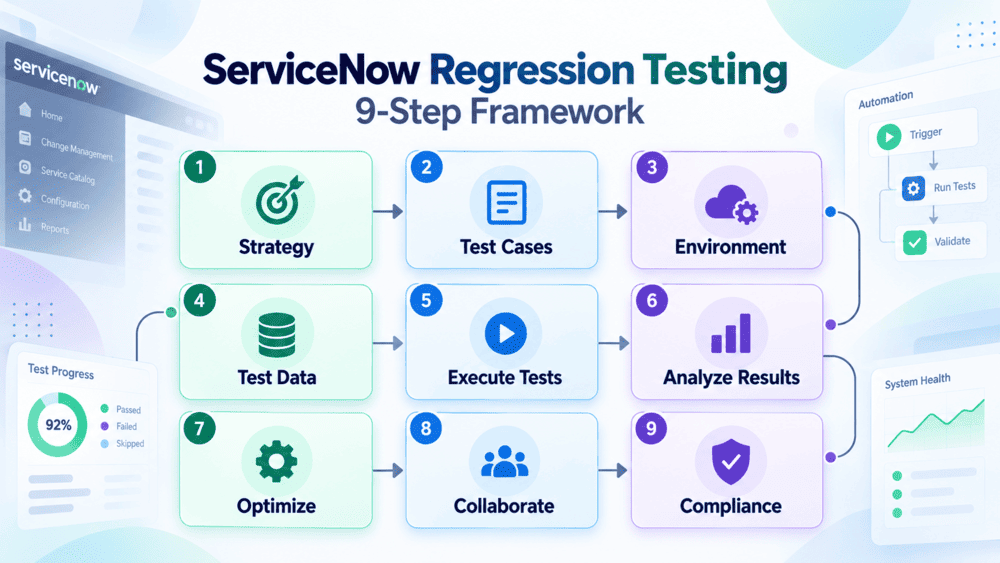
Step 1: Establish Your Testing Strategy
Before writing a single test case, take a step back and look at what your ServiceNow implementation actually involves. What counts as “critical” for your instance specifically? Getting the scope and goals noted down early on is what stops your suite from spiraling into something bloated and unfocused later.
Step 2: Select the Right Test Cases
Work out which workflows, features, and customizations your business genuinely depends on. Prioritize those based on risk and impact. Document test cases for them first instead of trying to cover everything right out of the gate is usually how these efforts lose steam.
Step 3: Set Up the Testing Environment
Set up a dedicated environment that mirrors production as closely as you can: same configuration, same permissions, same access controls. Honestly, a lot of the “worked in testing, broke in production” headaches come down to environments that just aren’t lined up with each other in the first place.
Step 4: Prepare Test Data
Use test data that reflects how things are actually used in the real world, mask or anonymize anything sensitive, automate the setup and teardown wherever you can. Keeping data consistent across runs matters just as much as getting the test logic right.
Step 5: Execute Regression Testing
Don’t wait until right before a release to test, run it after every change instead. Save manual testing for the edge cases and anything automation just isn’t equipped to catch.
Step 6: Monitor and Analyze Test Results
Pull execution reports, and get to the root of why failures happened. Prioritize fixes by impact and risk instead of working through them in whatever order they showed up.
Step 7: Optimize the Testing Process
Regularly revisit your process based on what the data and your team are telling you. Retire tests that no longer pull their weight, and keep scripts current as the platform keeps changing.
Step 8: Collaborate With Stakeholders
Keep development, QA, and the business side in the loop on what you’re finding. The ongoing feedback is what turns regression testing from something QA just checks off into a practice the whole team actually owns together.
Step 9: Ensure Compliance
Build in tests that particularly verify compliance to make sure updates hold up against regulatory and industry-specific requirements. So, sensitive data stays protected at every step.
Automating ServiceNow Regression Testing
Manual regression testing doesn’t scale against a platform that changes every quarter. ServiceNow automation regression testing reduces the manual effort, shortens release cycles, and speeds up coverage, but the correct way depends on what you’re trying to validate.
Native Automation: ServiceNow ATF
ServiceNow’s Automated Test Framework (ATF) is there to catch problems with your customizations before they ever make it to production, whether you’re testing within one instance or checking across several things. Out of the box, you get access to over 600 ready-made tests and templates, plus more than 100 reusable components to build from. It also supports headless browser testing and even offers some AI-assisted help when it comes to generating tests, which can save a fair bit of time.
| Where ATF is strong | Where it’s limited |
|---|---|
| Deep native integration, no separate platform to license or maintain | Coverage is centered on ServiceNow’s own UI and server-side logic. To validate a workflow that spans an external system (an ERP, a mainframe, a third-party API) that typically requires additional tooling |
| Upgrade-safe tests designed to be reused release after release | Building and maintaining tests generally assumes some ServiceNow scripting familiarity |
| Good starting point for teams with ServiceNow admin/dev skill in-house | Less suited for full-stack validation across API, Mobile, Mainframe, and Web scenarios in one suite |
Codeless / AI-Powered Automation Platforms
Third-party codeless platforms including ACCELQ extend regression coverage beyond the ServiceNow UI to REST/SOAP APIs, databases, mainframes, and other cloud ERP systems ServiceNow integrates with from a single test suite.
Where this approach adds value:
- Scriptless test design lets business analysts and QA generalists build tests, not just developers.
- AI-based self-healing reduces the maintenance burden every time ServiceNow updates a form, field, or workflow.
- Cross-application coverage validates that changes in ServiceNow doesn’t break something downstream in a connected system.
- CI/CD integration keeps automated tests running continuously instead of as a pre-release event.
Native ATF and third-party automation aren’t mutually exclusive, as many teams use ATF for fast, ServiceNow-native checks. And a codeless platform for cross-system, full-stack regression coverage.

ATF vs. Codeless Automation Platforms
| Factor | ServiceNow ATF | Codeless Automation Platforms |
|---|---|---|
| Setup effort | Native, no new platform to license | Separate platform, typically faster initial test authoring |
| Cross-app / API coverage | Limited to ServiceNow and its direct API calls | Full-stack. Web, API, mobile, mainframe, other ERPs |
| Maintenance burden | Manual updates when UI/workflow changes, unless scripted for reuse | AI self-healing reduces manual script maintenance |
| Skill required | ServiceNow scripting/admin familiarity helpful | Designed for scriptless use by QA and business analysts |
| Best fit | Teams testing purely within ServiceNow, with in-house dev resources | Teams needing cross-system regression coverage or non-technical test authorship |
| Cost model | Included with ServiceNow AI Platform licensing | Separate licensing, typically priced by usage/seats |

What Good ServiceNow Regression Testing Looks Like
A few benchmarks worth aiming for as your process matures is industry-observed ranges validate against your own environment rather than treating these as fixed targets:
- Test coverage: Mature programs aim for 70–80% automated coverage of core ServiceNow processes (i.e., ITSM, HRSD, CSM combined).
- Regression suite runtime: Automated suites can typically complete in hours rather than the days or weeks manual regression testing takes.
- Defect escape rate: Keeping the rate of defects that reach production below 2–3% is a reasonable target for business-critical ServiceNow implementations.
- Time to resolution: With automated root cause analysis, mean time to analyze a failed test can drop in an hour, versus potentially half a day of manual investigation.
Best Practices for a Sustainable Regression Testing Process
-
A ServiceNow workflow like employee onboarding covers HR, IT, and Workplace Services. In parallel, testing each of them separately misses the failures that only occur when they interact. So, validate end-to-end processes, not separate test cases.
-
Let AI handle test maintenance. Self-healing automation adapts tests automatically when ServiceNow updates form layouts, instead of manually fixing at every release.
-
Treat test data as a first-class concern. Use masked or synthetic data that preserves referential integrity (CI relationships, assignment groups, reference fields) without exposing production information.
-
Tie testing to CI/CD, not release dates. Trigger regression runs automatically when update sets are committed, rather than saving all testing for the week before a release.
-
Review and prune the suite regularly. A regression suite that only grows and never gets reviewed becomes slow and noisy. Retire redundant tests and refocus coverage on what’s actually changed recently.
Conclusion
Regression testing is really what keeps a ServiceNow instance dependable through all the ongoing change: the customizations, the integrations, and a release cycle that’s not going to pause just because your team isn’t ready for it. The teams that get this right don’t wait until a release and try to scramble their way through it. Instead, they set up a regression test suite that runs continuously, combine native ATF coverage with cross-system automation where it actually makes sense, and keep coming back to refine the process as the platform itself keeps changing.
If you’re looking for coverage that goes beyond what native tooling alone can handle, ACCELQ is worth knowing about. As the platform is an official ServiceNow partner and comes with a ready-to-go regression suite, complete with built-in best practices and template projects to help teams get started faster.
FAQ's
What is ServiceNow regression testing?
ServiceNow regression testing verifies that existing integrations, customizations, and workflows continue to work after changes to the platform, such as patches or upgrades. Since ServiceNow releases updates on a recurring cycle, regression testing is an ongoing process rather than a one-time activity.
How do you automate regression testing in ServiceNow?
Most teams use ServiceNow's Automated Test Framework (ATF) for testing functionality native to the platform and third-party codeless tools for scenarios ATF does not cover, such as APIs, other ERPs, and mainframes. Many third-party tools also provide self-healing capabilities to reduce test maintenance after platform upgrades.
What's the difference between ServiceNow ATF and third-party test automation tools?
ServiceNow ATF is built into the platform and is well suited for testing native forms, workflows, and server-side logic. Third-party codeless tools extend coverage to external systems and integrations, often include AI-driven self-healing, and allow non-coders to create and maintain tests through visual interfaces. Many teams use ATF and third-party tools together rather than choosing one exclusively.
How often should you run regression tests in ServiceNow?
Ideally, regression tests should run after every meaningful change rather than only before scheduled releases. Automated suites integrated with CI/CD can run with each update set commit, while manual or exploratory testing is typically reserved for major release validation and scenarios that automation does not cover.
What should a ServiceNow regression test suite cover?
A strong suite should cover core ITSM processes such as incident, problem, and change, along with the ServiceNow modules and integrations in use. This may include HRSD, CSM, ITOM, custom applications built on App Engine, and REST, SOAP, or MID Server integrations with external systems. Coverage should be prioritized based on business risk rather than testing every area with the same intensity.
How long does ServiceNow regression testing take with automation?
The timeline varies by instance complexity, but automated suites can commonly complete in hours when manual regression testing for the same scope would take days. Actual runtime depends on factors such as suite size, parallel execution capabilities, and the amount of the platform included in the test scope.
Can regression testing be done without coding in ServiceNow?
Yes. ServiceNow ATF allows many tests to be created using reusable components without writing scripts. Third-party codeless platforms extend this approach with visual interfaces that allow QA analysts and business users to create and maintain tests without coding.



Chaithanya M N
Content Writer
A curious individual who is eager to learn and loves to share her knowledge using simple conversational writing skills. While her calling is technology and reading up on marketing updates, she also finds time to pursue her interests in philosophy, dance and music.


You Might Also Like:
 Top 10 Salesforce DevOps Tools In 2026
 What Is SFDC Testing? Achieve Better Testing Outcomes with These Best Practices
 Beginner’s Guide to Salesforce Testing