








What is QA Automation? Benefits and Challenges

QA Automation uses specialized tools to compare tests for expected outcomes. Automated testing performs all the tedious, human, repetitive testing during a manual test, resulting in greater precision and rapid cycles in software development. As Agile and DevOps practices have gained popularity, QA automation has emerged as a key component to deliver quality software.
The growing demand for quality assurance automated testing tools is driving the global market, and these tools are expected to grow to $52.7 billion. Databases of this type are set to become increasingly popular due to these benefits. Let’s look closer at how QA automation solutions work, their benefits and challenges, and how organizations can use them to their full potential.
- What is QA Automation Testing?
- Manual vs Automated QA Testing
- How Does QA Automation Work?
- Who Owns QA Automation?
- When Should You Use QA Automation in Testing?
- Benefits of QA Automation
- QA Automation Best Practices
- Challenges of QA Automation
- AI-Native QA Automation Maturity Model
- Why Choose ACCELQ for QA Automation?
- Conclusion
What is QA Automation Testing?
Software tools are used in quality assurance automation testing, or QA automation testing, for executing test cases, verifying expected results, and reporting errors without any effort by testers. In this way, you can make sure the reliability of your software by speeding up the same testing tasks, like cross-browser testing. No-code testing tools are used in automated quality assurance testing to simulate actions by users, verify software functionality, and find bugs early in software development. Automation lowers human error and increases test coverage in DevOps and agile projects, in contrast to manual testing, where testers run each test themselves.
Manual vs Automated QA Testing
Manual testing needs software testing by QA professionals, while automated QA uses tools and frameworks to trigger tests, where the user interactions are simulated by frameworks and tools to execute tests at scale. Manual testing is time-consuming and costly, and automated QA minimizes price.
| Manual Testing | Automated QA Testing |
|---|---|
| Initial setup: Less and can start right away. | Initial setup: More, so requires a plan, scripting, and tools. |
| Consistent: No, may vary slightly with each run. | Consistent: Yes, consistent and executes exactly the same each time. |
| Execution of tests: Performed step-by-step by a tester. | Execution of tests: Automatically performed by tools and scripts. |
| Coverage: Limited due to time constraints. | Coverage: High, enabling extensive and repetitive tests. |
| Speed: Slow depends on individual effort. | Speed: Fast and can run many tests simultaneously or on schedule. |
| Flexible: Most flexible for exploratory and ad-hoc testing. | Flexible: Least flexible for non-scripted and ad-hoc tests. |
| Repetition: Needs manual effort for every test iteration. | Repetition: Easy to repeat without an extra effort. |
| Scalable: Hard to scale for large applications. | Scalable: Easily scalable with CI/CD setups. |
| Feedback: Slow feedback and often after manual test cycles. | Feedback: Quick feedback and often within minutes of code being committed. |
| Cost: Expensive as testing needs evolve. | Cost: High initial cost, but low long-term cost for repeatable tasks. |
| Documentation: May not be documented consistently. | Documentation: Consists of comprehensive logs and reports. |
| Used best for: Exploratory test and usability testing. | Used best for: Large data sets, and repetitive tasks. |
How Does QA Automation Work?
QA automation works best when it’s approached like any other part of the development. The following key stages keep things steady and scalable:
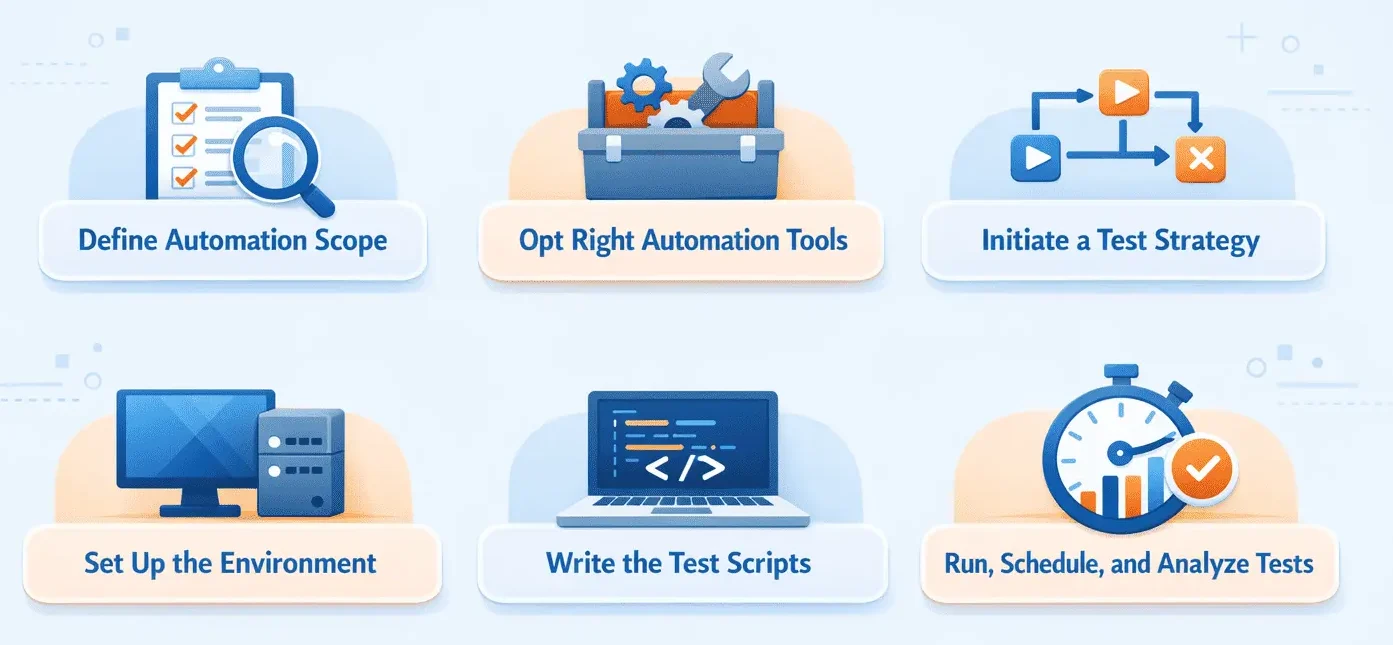
1. Define Automation Scope
Before crafting a one line of automation, you need to understand what you are attempting to achieve. Review your test suite and find areas that are stable, repeatable, and valuable to run frequently. For instance, you may identify that automating login and password reset makes sense because they are used in each release and rarely change.
2. Opt Right Automation Tools
From open-source to enterprise-grade tools, you can pick any depending on what you want to test (i.e., APIs, mobile, and web), team skill set, and budget. Do not go with what is popular; so opt for a tool that fits into your technology stack. For example, ACCELQ is a good choice for API automation.
3. Initiate a Test Strategy
In this stage, you can look into how you want to organize tests, such as using which test automation framework, how to structure code, and naming conventions to apply. For instance, if you want to reuse the same scripts with diverse input values across many test cases, adopt a data-driven framework.
4. Set Up the Environment
Your tests are only as reliable as the environment it run. Set up production-like environments that account for test data, browser/device configurations, and any external dependencies that could impact your test runs. For example, you might stub third-party APIs for every automation execution.
5. Write the Test Scripts
In this step, translate your test scenarios into automated steps. Check on clean, modular code that is easy to read and refresh. For example, write a reusable login function instead of repeated authentication steps in each script. Avoid heavycoding data and focus on reusable, flexible components.
6. Run, Schedule, and Analyze Tests
After your software test scripts are ready, combine them into the CI/CD pipeline or schedule those scripts to run often. This ensures QA automation remains a section of your everyday workflow. For instance, configure your pipeline to trigger UI tests every time code is merged into the staging branch. As tests run, analyze the results completely. Look for recurring failures. For example, reports might show that failures only happen in Safari, indicating a browser-specific issue to investigate.
Who Owns QA Automation?
A QA automation engineer is responsible to design and run automated tests for evaluating and assessing the functionality of the system under test. QA automation engineers design the tests, write test scripts, install automation testing protocols, and report the results. They increase the test coverage and evaluate the priority of test scenarios to create execution plans. QA automation engineer are responsible for creating an automation framework and setting up continuous integration and deployment. They need to collaborate with diverse teams, through which they can get ideas to improve productivity and improve the test scope.
Test managers manage the entire testing team, ensuring all tasks are effectively distributed and the timelines are met. They are responsible for maintaining test coverage and quality levels throughout the software development lifecycle. QA analysts help to define testing needs for detailed test coverage. They participate in API, functional, and regression testing. QA analysts analyze test results to catch issues soon.
When Should You Use QA Automation in Testing?
Not each and every test needs to be automated. On the other hand, not all teams are ready to automate all from day one. So the real question is, what are the main scenarios where QA automation proves most effective? Let’s find out:
1. Repetitive Tests
If your project demands the execution of the same set of test cases again and again for each release, then automating it is a good choice. Automating such scenarios not only frees up the tester’s time but also speeds up test execution with no errors.
2. Data-Driven Tests
There are scenarios where you need to run the same set of test cases with the exact or a different dataset for each iteration. With manual testing, it would only make a tester’s life boring by testing the same functionality repeatedly, leading to missing some data sets. Data-driven automation testing frameworks allow you to minimize the time and effort to test these cases.
3. Smoke Tests
Smoke testing should be run initially for each test cycle to confirm that the basic features of an app are working according to user expectations. Automated testing is ideal for smoke testing suites, as it must be executed whenever you release a new feature.
4. Cross-Browser Tests
If your app must work across diverse browsers, devices, or operating systems, that’s a lot to cover manually. QA automation helps you run the same script in test environments in parallel. It is a huge win in terms of speed and consistency.
5. Load Tests
Automation is vital when you need to simulate concurrent users. Automated load tests help to find system bottlenecks and ensure your application performs well under stress.
Benefits of QA Automation
1. Reduces Testing Time and Costs
Simply automating repetitive test cases reduces a lot of time and effort. The test can run 24/7 with automation, less dependency on manual interventions, and reduced overall cost of testing.
2. Improves Product Quality
Automated tests can provide better coverage by testing on many devices, platforms, and environments. This guarantees that the software product developed is of high quality and is trusted.
3. Enhances Resource Utilization
Automated quality assurance testing enables their teams to focus on complex test cases and strategic initiatives rather than repetitive test execution.
4. Supports CI/CD and DevOps
It merges smoothly with CI/CD pipelines to enable fast releases, continuous feedback loops, and reliable software.
5. Cost-Effective in the Long Run
While the initial investment is steep, automation eventually reduces overall costs by eliminating repetitive manual testing, saving on maintenance, and averting defects.
6. Expands Test Coverage
With the help of automated testing, thousands of test cases can run in parallel to ensure maximum application functionality validation.
7. Provides Testing with Quick Feedback
QA test automation allows tests to run to ensure immediate feedback and accelerate time-to-market.
8. Detailed Reports and Insights
Modern QA automation offers detailed logs, performance metrics, and test results to help you find defects and optimize your test strategies.
9. Scalable and Market-Ready
With automation, testing scales as application complexity increases, reducing the time required for software releases.
QA Automation Best Practices
To maximize the benefits of QA automation, it is critical to follow some best practices. Here are some practices to improve your quality assurance automation:
- Start with crucial, stable functionalities that are prone to regression.
- Opt for tools that align with your project technology stack and team experience. Look for cross-platform testing.
- Make test automation a part of the continuous integration and continuous delivery pipeline. This ensures tests execute automatically after code changes.
- Continuously estimate the return on investment of your automation efforts. If it is expensive, manual testing is a better option.
- Confirm that the automation framework offers reporting to detect test failures.
- Continuously analyze and refine your strategies to automate testing. Track results and be aware of trends to improve the automation framework.
While best practices can guide you towards rapid release cycles, it is also important to know the challenges that may arise during QA automation.
Challenges of QA Automation
1. Lack of Human Intelligence in Testing
Despite advancements, QA automation engineers needed to:
- Design and craft test scripts.
- Interpret test results.
- Perform exploratory testing for unpredictable issues.
2. High Initial Setup Costs
Organizations face challenges in:
- Implementing automation frameworks.
- Hiring skilled automation testers.
- Configuring test environments.
3. Choosing the Right Test Automation Tool
Not all QA automation tool works for each application. Choosing the right tool needs thorough evaluation based on application architecture and business requirements.
4. Need for Effective Team Collaboration
Automation works when testers, developers, and business stakeholders collaborate. Inadequate communication leads to software delays.
AI-Native QA Automation Maturity Model
The AI-native QA automation maturity model explains how test automation evolves from manual to automation testing that adapts to change and risk. QA automation progresses in five stages:
- Script-based automation: Tests are manually coded and coupled to the application. Maintenance is high, and tests break frequently when APIs or UI change.
- Framework-driven automation: Reusable frameworks and CI/CD integration enhance consistency, but automation remains reactive and requires constant updates.
- Codeless automation: Visual, business-readable models reduce scripting and speed up test creation, yet choosing tests and maintenance is still manual.
- AI-native automation: Automation becomes intelligent with self-healing tests, change impact analysis, and risk-based execution that runs only the most relevant tests per release.
- Agentic QA automation: AI agents autonomously generate, maintain, and optimize tests. Platforms like ACCELQ AUTOPILOT operate at this level to minimize human effort while increasing releases.
AI-native and agentic automation reduce regressions, prevent defects earlier, and enable faster, lower-risk releases.
Why Choose ACCELQ for QA Automation?
ACCELQ is a prominent player in codeless AI-powered test automation. Forrester Wave named it the leader in Continuous Test Automation Suites. With ACCELQ, organizations experience:
- 7.5x Higher Productivity
- 70% Cost Savings
- Seamless AI-Driven Test Automation
- Scalable and Future-Proof Testing
The platform, ACCELQ, helps streamline test automation by removing the complexity involved in scripting so that both technical and non-technical teams can effectively use automation.
Conclusion
QA Automation has revolutionized modern software testing with faster releases, improved quality, and cost reduction. However, challenges such as high setup costs and tool selection difficulties that come with it are nothing compared to the advantages of automated QA software, making up for the drawbacks.
In an evolving tech landscape, automated quality assurance testing is vital to staying competitive. Discover the AI-driven automation of ACCELQ to transform your software testing strategy!
FAQs
QA automation testing uses software tools to execute test cases, validate expected results, and report defects with minimal manual intervention. It helps teams speed up repetitive testing tasks such as regression testing and cross-browser testing while improving the reliability and consistency of software releases.
Manual testing is performed by QA professionals who interact with the application to identify defects. Automated testing uses tools and frameworks to simulate user actions and execute tests at scale. While manual testing provides exploratory insight, automation reduces execution time, lowers long-term costs, and improves coverage for repetitive tests.
QA automation works best when it is treated as part of the development lifecycle. The typical process includes defining the automation scope, selecting the right automation tools, creating a test strategy, setting up the testing environment, developing or configuring automated test scripts, and running, scheduling, and analyzing the test results.
Not every test needs to be automated, but automation is most effective for repetitive and high-volume scenarios. Common use cases include regression testing, data-driven testing, smoke testing, cross-browser testing, and load testing where frequent execution and consistency are required.



Geosley Andrades
Director, Product Evangelist at ACCELQ
Geosley is a Test Automation Evangelist and Community builder at ACCELQ. Being passionate about continuous learning, Geosley helps ACCELQ with innovative solutions to transform test automation to be simpler, more reliable, and sustainable for the real world.


You Might Also Like:
 10 Best Cloud Testing Tools to End Maintenance Sprints
10 Best Cloud Testing Tools to End Maintenance Sprints
 AI Automation in Testing: The Future of Smarter, Scalable QA
AI Automation in Testing: The Future of Smarter, Scalable QA
 Test Orchestration: Why It Matters?