







The Complete Guide to RSAT Alternatives for Dynamics 365 (2027 Deadline)

Quick Answer:
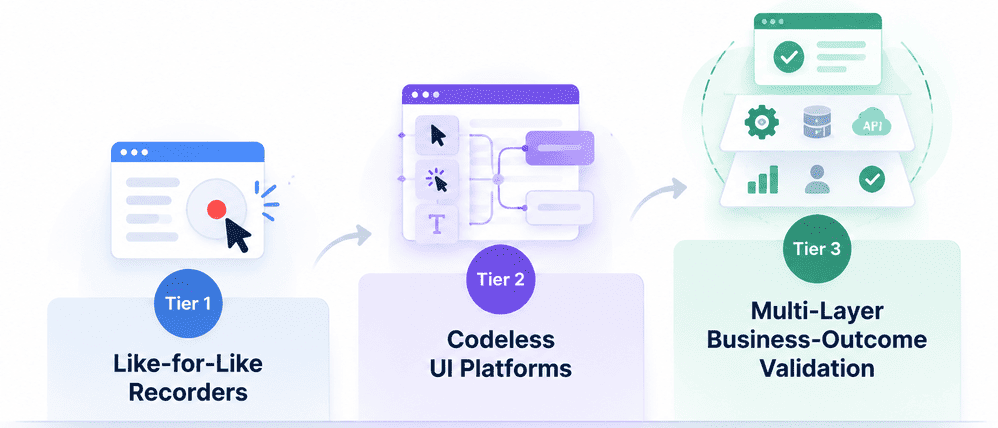
RSAT alternatives fall into three tiers.
- Tier 1 is like-for-like recorders that capture click paths the same way RSAT did.
- Tier 2 is codeless UI platforms that remove the coding barrier but still test screens.
- Tier 3 is multi-layer business-outcome validation, which checks results across UI, API, and data.
Only Tier 3 survives a One Version release wave without breaking, and only Tier 3 reaches the integration points RSAT never covered.
Microsoft has confirmed that the Regression Suite Automation Tool is marked for deprecation and won’t be supported after May 15, 2027. Every team searching for an RSAT alternative right now is really evaluating RSAT replacement tools on: which tool won’t have to be replaced again in eighteen months?
Why RSAT Alternative Isn’t One Category
RSAT did two things:
- It records a user’s clicks through Task Recorder,
- And it plays that recording back as a scripted, screen-level test.
Most tools marketed as RSAT replacements only cater to one half of that equation.
A recording that captures a click on the item number field breaks, whether it was built with a clunky recorder or a good one. If a release moves that field to a different tab, the script still clicks the old spot and fails, even though the order posts fine for a human doing it manually. Recording UX didn’t cause that failure. It can’t fix it either.
RSAT is built for finance and operations apps, Cloud POS, and warehouse scenarios. Most real business processes don’t stay inside those bounds. That makes finding a D365 F&O testing tool after RSAT difficult.
Dynamics 365 ships two major waves a year plus monthly platform updates. Customers have to take at least three updates per year, meaning about three regression cycles annually.
Let’s say RSAT alternatives only reduce the trouble of recording, without addressing what breaks when a form layout shifts or a process now touches a system RSAT never did. That gives a team a year of relief at best.
So the three tiers below are set up as a map. It discusses what each type of tool replaces, and what it leaves exposed.
Tier 1: Like-for-Like Recorders
Tier 1 tools are the most direct replacement for RSAT’s workflow. They record a user moving through a Dynamics 365 screen, extract a test from that recording, and play it back later. Some import existing Task Recorder files. Functional users who already know how to record a process in Task Recorder can pick up a Tier 1 tool without much retraining.
When Microsoft ships a release and moves a field, renames a control, or adds a step to a workflow, the recording doesn’t know the intent behind the original action. It only knows the exact coordinates and labels it captured. That’s the same failure mode as RSAT.
If you migrate to a Tier 1 recorder, you’ll get smoother onboarding and then rediscover, two or three release cycles later, that you’re back to re-recording and hand-fixing scripts after every update.
Tier 1 recorders are best for small test libraries, teams with light customization on top of standard Dynamics 365 modules, and organizations that mainly need to clear the May 2027 deadline without a broader strategy change.
Tier 2: Codeless UI Platforms
Codeless UI platforms let a functional user build a test by interacting with the application, similar to recording, but the underlying test isn’t a rigid script. It’s like a flow or model that the platform can adjust when small UI changes occur.
Object identification helps tests survive minor layout shifts, renamed labels, or a control moving to a different part of the screen. No coding is required to build or maintain tests, so it’s accessible to the same functional testers who used Task Recorder.
A codeless platform can usually absorb a relabeled button. But it’s not great when Microsoft restructures a workflow, changes the number of steps in a process, or moves functionality between modules.
Codeless UI platforms are still validating what happens on screen. They confirm that a form was submitted, a field populated, or a page loaded correctly. They don’t confirm that the order actually posted correctly in the general ledger or that a downstream system received accurate data. The test can pass while the business outcome is wrong.
Tier 2 platforms are best for mid-size to large suites where UI stability across releases is the primary pain point without reliance on external systems. Teams moving from RSAT specifically to reduce script maintenance overhead will do well with this.
Tier 3: Multi-Layer Business-Outcome Validation
When evaluating an enterprise RSAT replacement, a multi-layer validation approach is usually the starting point. It validates a business process outcome by checking multiple layers at once: the UI where a user interacts, the API layer where systems exchange data, and the database or data layer where the transaction lands.
If a sales order is created in Dynamics 365 and it’s supposed to trigger a credit check, update inventory, and hand off to a shipping system, a multi-layer test can confirm all three outcomes happened correctly.
When Microsoft changes a screen layout, a UI-only test, a Tier 1 recording, or a Tier 2 codeless flow has to adapt to that visual change to keep running. A multi-layer test is less dependent on any single layer staying visually identical.
If the API contract and the data outcome are unchanged, the test can often continue to pass, or fail for the right reason, even when the UI around it has shifted. This is why Tier 3 tools require less rework after each Dynamics 365 update cycle.
RSAT is scoped to finance and operations screens inside Dynamics 365. It has no native way to validate what happened once a process crosses into a connected system. Multi-layer validation tests across those boundaries.
ACCELQ approaches Dynamics 365 testing through this multi-layer model, combining codeless agentic AI with API and data validation in a single test flow. See how that model applies to replacing RSAT in Dynamics 365 F&O. For a side-by-side comparison with RSAT’s architecture, see ACCELQ vs RSAT
What RSAT Alternatives Still Don’t Test
Every article ranking for “RSAT alternative” on search engines answers the same question: which tool records and plays back Dynamics 365 screens better?
You won’t find much about what happens when a sales order also has to trigger a tax calculation, hit a third-party warehouse system, or sync to a customer portal. RSAT was never built to check that, and neither are most RSAT alternatives.
A test can click through the entire order-to-cash screen flow, pass every step, and still miss that the tax engine returned the wrong rate, that the warehouse system never received the shipment record, or that a customer portal shows a different order status than Dynamics 365.
The UI test passes. The transaction is still wrong downstream. A screen-level test has no way to see that. Multiply that across a few hundred test cases, and a team can be running a fully green regression suite while real integration failures escape into production.
Beyond UI Testing: Multi-Layer Validation for Dynamics 365 walks through why this remains true no matter how resilient the UI layer gets.
RSAT Limitations lays out the categories of integration failure RSAT cannot catch. Teams with a tax engine, EDI connection, third-party logistics system, or customer portal touching Dynamics 365 should have a look at both before picking a replacement.
 Also Read: Testing MS Dynamics 365 with ACCELQ
Decision Framework: Score Your Own Migration
There’s no single best RSAT alternative for Dynamics 365. Score your own environment against these four factors. It’ll help you decide the right tier before you look at any products.
-
How many modules does this suite touch? How customized are they?
A suite covering three or four standard modules with light configuration is different from one spanning finance, supply chain, and warehouse with years of custom code on top. Standard customized coverage can run on Tier 1 or Tier 2. Heavily customized coverage needs Tier 3, because customizations break first when Microsoft ships a wave update.
-
Does any critical process leave Dynamics 365 before it’s done?
Ask this literally, process by process: does the order also have to hit a tax engine, sync to a customer portal, or hand off to a third-party warehouse system before it’s actually complete?
If the answer is yes, Tier 1 and Tier 2 tools can’t validate that handoff because they never look past the screen. -
How many test cases are in the suite, and what does re-running them cost?
A few dozen test cases are manually fixed after a release. A few hundred cannot. Do the math on your last regression cycle: if fixing broken tests after a wave update took more than a day or two of a tester’s time, that cost repeats at least three times a year on the standard update cadence. It will also compound as the suite grows.
-
How often does this suite actually run?
Teams on Microsoft’s standard cadence run at least three regression cycles a year between major waves and required updates. The more frequently a suite runs, the more a tool’s per-release maintenance tax dominates total cost. That means resilience across releases trumps how fast the tool is to set up on day one.
RSAT Alternatives at a Glance
| Factor | Tier 1: Like-for-Like Recorders | Tier 2: Codeless UI Platforms | Tier 3: Multi-Layer Business-Outcome Validation |
|---|---|---|---|
| What it validates | A recorded click sequence, replayed literally | UI-level outcomes: fields, forms, page states | Business outcomes across UI, API, and data layers together |
| Coding required | None | None | None |
| Resilience to minor UI change | Low; coordinate or label shifts often break tests | Moderate to high; object-based identification absorbs small changes | High; outcome validation is less dependent on any one layer staying visually identical |
| Resilience across a One Version release wave | Low; frequent re-recording needed | Moderate; structural workflow changes still cause breaks | High; designed to keep validating the outcome even as the UI shifts underneath it |
| Covers integration points outside Dynamics 365 | No | Rarely, and typically not natively | Yes, by design |
| Migration effort from an existing RSAT library | Low; closest workflow match to RSAT | Moderate; recordings often need rebuilding as flows | Moderate to high initially; higher long-term stability offsets setup time |
| Best fit | Small suites, light customization, near-term deadline coverage | Mid-to-large suites where UI stability is the main pain point | Enterprise suites with integration dependencies, frequent releases, or large libraries |
Know your tier? The RSAT Migration Guide covers how to plan the switch without losing your existing test library.
FAQ's
How do I choose an RSAT replacement?
Start by scoring your environment. Evaluate module coverage, integration surface, library size, and release wave frequency, then map them to the right tool tier. A team with heavy integration dependencies or a large test library needs a multi-layer approach, while a team with a small, stable, UI-only suite may be fine with a simpler replacement.
What should we look for in an RSAT alternative?
Do not only evaluate the recording experience. Almost every RSAT alternative has improved in that area. Focus on what happens after Microsoft releases a One Version update: does the tool require rework, or does it continue validating correctly? Also check whether the tool can validate outcomes beyond the Dynamics 365 UI, such as API calls and downstream data.
What replaces RSAT for Dynamics 365 testing?
RSAT replacements generally fall into three categories: like-for-like recorders, codeless UI platforms, and multi-layer business-outcome validation platforms. The right replacement depends on the complexity of the Dynamics 365 environment, the number of integrations, and the depth of validation required.
Is there a free RSAT alternative?
Some vendors offer free or entry-level tiers, usually designed for teams migrating smaller RSAT libraries. These options can handle limited test-case volumes that do not require multi-layer or integration validation. However, enterprise suites with hundreds of test cases or complex integration needs usually outgrow these free tiers quickly.
How long does an RSAT migration take?
The timeline depends heavily on library size and the type of platform being migrated to. Moving a few dozen test cases to a similar recorder can take weeks, while migrating a large enterprise suite with integration dependencies to a multi-layer platform can take months. A well-planned migration reduces the chance of repeating the process later.
What's the difference between a codeless UI platform and RSAT?
Both allow users to build tests without writing code, but they differ in how they identify and validate applications. RSAT relies on Task Recorder capturing literal click sequences tied closely to screen layouts. Codeless UI platforms typically use more resilient object identification that can adjust to minor UI changes that would break raw RSAT recordings.
Neither approach alone validates outcomes outside the UI layer.
Why does RSAT need to be replaced instead of just maintained as-is?
Organizations can continue running RSAT after it reaches end of support on May 15, 2027. However, without Microsoft support, there will be no bug fixes, security patches, or updates. Since RSAT is often connected with authentication, browser compatibility, and Azure DevOps, running it unsupported for multiple years creates increasing risk as the surrounding ecosystem continues to change.



Yuvarani Elankumaran
Technical Consultant at ACCELQ
Yuvarani Elankumaran is a highly skilled technical consultant at ACCELQ. With over a decade of experience in the field of Test Automation, Yuvarani is a seasoned professional who is well-versed in a variety of programming languages and automation frameworks.


You Might Also Like:
 8 Dynamics 365 Automated Testing Tools That Survive
8 Dynamics 365 Automated Testing Tools That Survive
 Your Guide to Salesforce DevOps Center Automation & Testing
Your Guide to Salesforce DevOps Center Automation & Testing
 Beginner’s Guide to Salesforce Testing