ACCELQ Logo
    Generic selectors
    Exact matches only
    Search in title
    Search in content
    Post Type Selectors

I Have Seen 9 D365 Automation Tools Fail the Same Way. Here Is the One I Would Keep.

Dynamics testing tools

26 May 2026

Read Time: 9 mins

The 9 best Dynamics 365 automated testing tools in 2026 are ACCELQ, Tricentis Tosca, Executive Automats, TestComplete, RSAT, TestModeller.io, EasyRepro, Playwright, and Selenium. They are compared here on module coverage, release wave alignment, CI/CD integration depth, and one dimension no other comparison page addresses: whether the tool can validate Copilot agent behavior alongside traditional D365 workflows.

After a Wave 1 hotfix ships on a Wednesday, Finance teams cannot close period-end and someone has to explain to the steering committee why regression took three weeks. D365 testing in 2026 has split into two distinct problems: validating deterministic business processes through release waves without a maintenance sprint afterward, and validating non-deterministic Copilot agent behavior that traditional testing tools were not built for. Every tool on this list solves the first problem to varying degrees. None of them fully solves the second. That distinction is what this guide is built around.

Quick Answer: Best Dynamics 365 Automated Testing Tools (2026)

Tool Best For Release Align Module Scope Key Differentiator Codeless
ACCELQ Codeless full-stack D365 plus API Automatic (AI) All modules Pre-built Dynamics Universe, codeless, auto-release alignment Yes, 100%
Tricentis Tosca Enterprise risk-based D365 Yes All modules Live performance testing plus auto process documentation Yes
TestComplete D365 with image recognition fallback Partial Web and desktop Microsoft-maintained Selenium wrapper purpose-built for D365 Yes
RSAT F&O UAT compliance only Yes (F&O only) F&O only Maximum scripting flexibility, no D365-specific handling built in Partial
Executive Automats D365 regression, performance, and documentation Yes All modules Auto-wait reduces false failures on async D365 pages Partial
TestModeller.io Model-based D365 test generation Partial CRM and ERP Dynamic ID detection and intelligent test case generation Partial
EasyRepro Developer D365 CRM automation Via MS updates CRM only Only Microsoft-built UAT tool for Finance and Operations No
Playwright Cross-browser D365 web testing Manual Web only MBTA cuts D365 automation suite size up to 50% No
Selenium Custom D365 web scripting Manual Web only OCR and image recognition for D365 UI elements No

Why Dynamics 365 Testing Is Uniquely Hard

Dynamics 365 is not a standard web application. Three structural characteristics make it harder to automate reliably than most enterprise software. Understanding them explains why generic tools fail consistently when teams try to apply them.

Twice-Yearly Release Waves With No Deferral Option

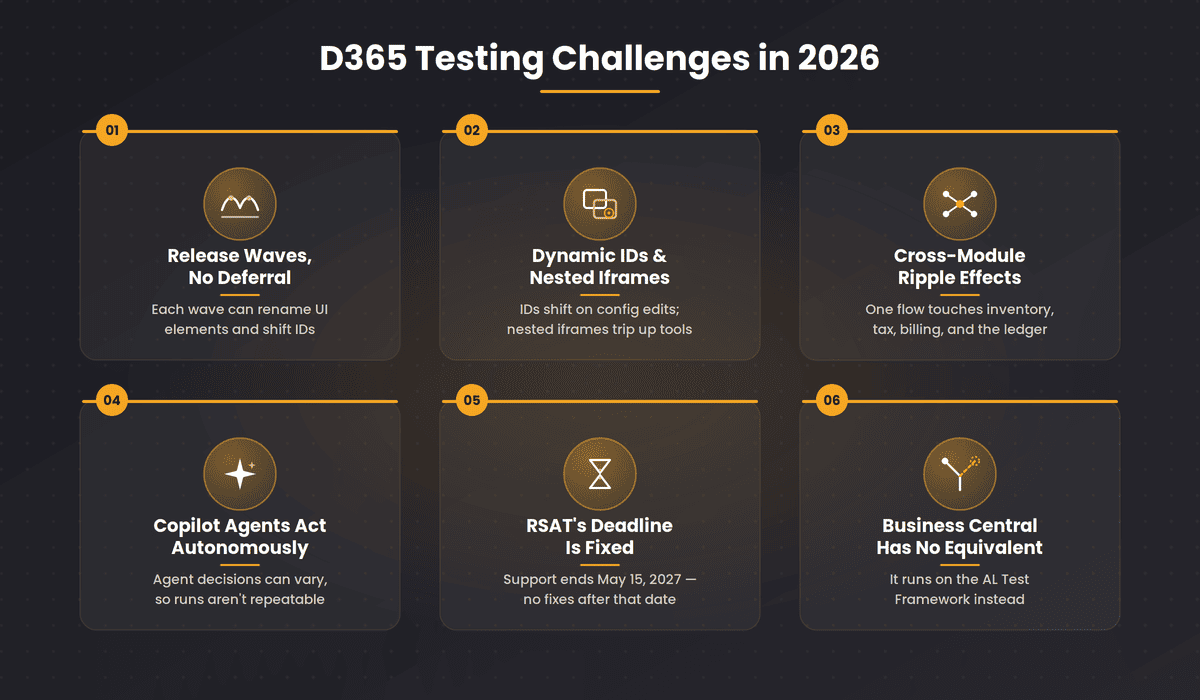
Microsoft ships two major Dynamics 365 update waves every year, Wave 1 in April and Wave 2 in October, plus ongoing monthly service updates. Each wave can change form layouts, rename UI elements, alter business process flow structures, and shift the control IDs that automation scripts use to find elements. There is no option to defer these updates indefinitely. Teams running scripted D365 automation routinely lose one to two weeks of QA time per release wave updating broken locators. That is a predictable, recurring cost built into every scripted tool choice.

Dynamic Element IDs and Nested Iframes

Dynamics 365 generates element IDs dynamically across forms, grids, and business process flow stages. The same field can carry a different element ID after a configuration change. Standard CSS selectors and XPath expressions that store those IDs break constantly. The UI also renders inside nested iframes in many views, an additional layer of complexity that generic web automation frameworks are not built to handle. Tools that do not specifically address dynamic ID management produce test suites that are brittle by design.

Cross-Module Business Process Flows

A real D365 business process rarely stays inside one module. A Sales opportunity converts to a Finance and Operations invoice. A Customer Service case resolution triggers a Supply Chain update. Testing each module in isolation misses the failures that only appear at the handoff points between modules. Those handoff failures are the hardest to catch and the most damaging when they reach production.

Copilot Agents Are Now Autonomous Inside D365

Microsoft’s 2026 Release Wave 1 embedded autonomous AI agents across Dynamics 365 in April 2026. These are not Copilot assistants that answer questions. They are agents that execute business decisions without waiting to be asked. A Sales Qualification Agent qualifies leads autonomously. A Customer Service Agent resolves cases without human intervention. A Finance agent closes journal entries based on patterns it identified in your data.

Every tool reviewed in this guide was designed to test deterministic software. Input goes in, expected output comes out, test passes or fails. That model does not work for Copilot agent validation.

LLM-based agents introduce response variability by design. The same purchase order scenario can produce different agent actions depending on the model’s confidence thresholds, the grounding data available at that moment, and how Microsoft has updated the underlying model since your last test run. A test that passed yesterday can fail today because the agent’s reasoning changed, not because your code changed.

CI/CD Integration Depth Varies More Than Vendors Admit

‘Integrates with Azure DevOps’ can mean anything from a native plugin that triggers test runs and blocks release pipelines on failure, to a REST API endpoint that requires custom scripts to call. Before committing to any tool, verify four things:

  • Does the CI/CD integration require custom scripting on your side, or is it native and configuration-only?
  • Can the integration gate on D365 release wave test results specifically, not just on any test failure?
  • Does it support parallel D365 test execution to keep pipeline feedback times short enough for sprint cycles?
  • Is there a clear failure investigation mechanism from inside the pipeline, or do failures require jumping to a separate reporting tool?

D365 Testing Tool Categories: Know Which One Fits Before You Compare

The most common evaluation mistake is comparing tools across categories without realising they solve different problems. This classification determines which half of this list belongs on your shortlist.

Category How It Works Best For Tools on This List
Codeless enterprise platform Visual interface, AI self-healing, pre-built D365 assets, no scripting required Mixed-skill teams, multi-module D365, no scripting budget ACCELQ, TestComplete, Tricentis Tosca
Microsoft-native tools Built by Microsoft for specific D365 compliance scenarios F&O UAT and Azure-first teams in the Microsoft ecosystem RSAT, EasyRepro
Model-based test generation Builds application model and generates test cases automatically High coverage without scripting every scenario manually TestModeller.io, Tricentis Tosca (MBTA)
Open-source scripted frameworks Developer-written scripts against D365 web UI Developer-led teams with scripting expertise and maintenance capacity Selenium, Playwright
D365 specialist tools Purpose-built for D365 regression, performance, and documentation Compliance-heavy teams needing all three from one tool Executive Automats

RSAT Alternatives for Dynamics 365: When Microsoft’s Own Tool Is Not Enough

RSAT is free with Finance and Operations licensing, built by Microsoft, and required for F&O UAT compliance before production deployment. For F&O UAT specifically, RSAT is the right tool and it costs nothing extra. So why is ‘RSAT alternatives for Dynamics 365’ one of the highest-volume queries in this topic? Because RSAT covers Finance and Operations only.

Teams running Dynamics 365 Sales, Customer Service, Supply Chain, or Field Service alongside F&O discover this limitation quickly. RSAT does not automate CRM modules. It has no AI self-healing, meaning every release wave requires manual test updates. And its CI/CD integration is Azure Pipelines only. For everything beyond F&O UAT, teams need an alternative.

Capability RSAT ACCELQ Other Third-Party Tools
Cost Free with F&O licensing Contact for pricing Contact for pricing
Modules covered Finance and Operations only All D365 modules Varies by vendor
Codeless automation Partial via Task Recorder Yes, 100% Varies
AI self-healing No Yes Mabl and TestComplete only
Release wave alignment Manual updates required Automatic via Dynamics Universe Varies
CI/CD integration Azure Pipelines only Jenkins, Bamboo, Azure, GitLab, CircleCI Varies
Cross-module end-to-end flows Not supported Sales through F&O through Service in one run Limited
Copilot agent validation No No (see agent gap section) No

Tool Reviews

1.  ACCELQ

Best Codeless Platform for Enterprise Dynamics 365 End-to-End Testing

Forrester Wave 2025 Leader  |  G2: 4.8/5  |  Pricing: Contact for enterprise quote  |  Demo available on request

This is the one I would keep.

ACCELQ Logo

The Forrester Wave 2025 named ACCELQ a Leader in Autonomous Testing Platforms. G2 rates it 4.8 out of 5. Those are third-party verifications worth noting. The reason it is the one I would keep is more specific: in every implementation where ACCELQ’s Dynamics Universe has been running, the April wave arrives and the tests adapt without anyone touching them. Scripted tools require manual locator updates after every wave. ACCELQ tracks application intent rather than element IDs, so the tests survive UI changes that would break hard-coded selectors.

With scripted tools, the same wave consistently costs teams ten to twelve days of locator updates. Eleven days where the QA team is doing maintenance instead of testing new functionality. ACCELQ’s auto-release alignment removes that cost entirely.

Teams using ACCELQ report 7.5x faster release testing and 72% lower maintenance overhead compared to scripted D365 approaches (ACCELQ customer benchmark data, 2025, validated in Forrester Wave 2025 Autonomous Testing Platforms evaluation).

The coverage scope separates ACCELQ from single-module platforms. ACCELQ automates across Dynamics 365 Sales, Finance and Operations, Customer Service, Supply Chain, and Field Service in the same test flow, alongside APIs and Power Platform integrations. A Sales process that triggers an F&O invoice, then updates a Supply Chain record, can be validated in one connected test run rather than three separate tool sessions.

The honest limitation: ACCELQ was not built to validate what a Copilot agent decided autonomously. If your 2026 roadmap includes deploying agents inside D365 workflows, that is a separate testing discipline.

Additional honest limitations: teams coming from Playwright or Selenium will find the visual model-based approach different enough to need an adjustment period. Initial setup of the Dynamics Universe model requires meaningful implementation time. The enterprise platform depth exceeds what a single-module D365 implementation realistically needs. No public self-serve pricing tier exists for individual evaluation before engaging sales.

Key Features

  • 100% codeless D365 automation across Sales, Finance and Ops, Customer Service, Supply Chain, and Field Service
  • Dynamics Universe pre-built visual model with automatic release wave alignment, no manual locator updates per release
  • AI self-healing that adapts tests when D365 UI changes without developer intervention
  • End-to-end automation covering web, API, mobile, and desktop in one connected test flow
  • Built-in test management, version control, and Jira traceability without a separate tool
  • Native CI/CD integration with Jenkins, TeamCity, Bamboo, Azure Pipelines, and CircleCI

Pros & Cons of ACCELQ

  • Only codeless D365 platform with automatic Microsoft release wave alignment
  • Pre-built Dynamics Universe means no build-from-scratch regression suite
  • AI self-healing eliminates per-release maintenance overhead
  • Covers all D365 modules and integration layers in one test flow
  • Forrester Wave 2025 Leader with G2 4.8/5 from verified enterprise users
  • Visual model approach takes adjustment for teams coming from scripted frameworks
  • Enterprise depth exceeds needs of small single-module D365 implementations
  • Initial Dynamics Universe setup requires structured onboarding investment
  • No public self-serve pricing tier for individual evaluation before engaging sales
  • Does not validate Copilot agent reasoning or non-deterministic agent outputs
DYNAMICS UNIVERSE
Pre-built D365 regression. Day one, not month three.

Auto-updating visual model across Sales, F&O, Customer Service, Supply Chain, and Field Service. No build-from-scratch.

Try It Free

2. Executive Automats

Best for D365 Regression and Performance Testing With Process Documentation

Pricing: Contact XPLUS via Microsoft AppSource.

Executive Automats Logo

Executive Automats by XPLUS covers a combination that is genuinely unusual in the D365 testing space: functional regression automation, live performance testing under real production load conditions, and automatic business process documentation generated as a by-product of test execution. Most D365 testing tools validate functional correctness and stop there. Executive Automats also tells you whether the application performs acceptably under the conditions real users experience, which matters for Finance and Operations implementations where query times affect period-end close cycles.

The documentation generation is the most distinctive feature for compliance-heavy implementations. Producing change management evidence manually after each release is slow and often incomplete. Executive Automats captures it during test execution. Native Azure DevOps integration connects the tool to CI/CD pipelines for triggered regression runs. The market presence is smaller than enterprise platforms like ACCELQ or Tricentis, and contact-only pricing makes early budget assessment harder than it should be.

Pros & Cons of Executive Automats

  • Purpose-built for D365 and SharePoint, not a generic tool adapted for Dynamics
  • Live performance testing under real load, unique among D365 tools on this list
  • Automatic business process documentation captured during test execution
  • Native Azure DevOps integration for CI/CD-triggered D365 regression runs
  • Smaller market presence and community than enterprise D365 testing platforms
  • Contact-only pricing makes initial cost evaluation more difficult
  • Limited public information on AI self-healing depth versus scripted maintenance overhead

3. EasyRepro

Best Microsoft-Maintained Open-Source Library for D365 CRM UI Automation

Pricing: Free and open source. Available at github.com/microsoft/EasyRepro.

Easyrepro Logo

EasyRepro is a Microsoft-maintained Selenium wrapper built specifically for Dynamics 365 CRM UI automation. The practical value over raw Selenium is a pre-built command library covering core D365 CRM interactions: account creation, case management, opportunity tracking, and business process flow navigation. Writing those interactions from scratch in raw Selenium against D365’s dynamic UI takes significant effort and produces brittle scripts. EasyRepro provides the foundation already built and maintained by the team that also maintains D365 itself.

Because Microsoft maintains it alongside Dynamics 365 releases, EasyRepro has materially better D365 alignment than generic Selenium scripts. It still requires C# development expertise and Visual Studio. Non-developer QA teams cannot use it. There is no AI self-healing, so tests still break with UI changes and need manual fixes. Coverage is limited to D365 CRM modules: Sales and Customer Service. Finance and Operations, Supply Chain, and Field Service are out of scope.

Pros & Cons of EasyRepro

  • Microsoft-maintained alongside D365 releases, better alignment than raw Selenium
  • Free and open source, no licensing cost
  • Pre-built CRM command library reduces raw Selenium scripting effort for D365
  • Active GitHub repository with issues and contributions tracked through 2026
  • Requires C# expertise and Visual Studio, not accessible to non-developer QA teams
  • No AI self-healing, tests break with D365 UI changes and need manual locator fixes
  • CRM modules only: Finance and Ops, Supply Chain, Field Service not in scope
  • No built-in test management, reporting, or CI/CD orchestration

4. Selenium

Best Open-Source Foundation for Custom D365 Web Automation

Pricing: Free and open source. Infrastructure and development costs apply.

Selenium Logo

The honest assessment of Selenium for Dynamics 365: most teams using raw Selenium for D365 eventually move to something else. The reason is specific. D365’s dynamic IDs and twice-yearly release waves create a maintenance problem that scales poorly with hard-coded locators. EasyRepro exists because Microsoft recognised this problem and built a D365-specific wrapper on top of Selenium to reduce it.

Selenium still makes practical sense as the foundation layer for teams building their own D365 framework, or for organisations with specific customisation requirements that higher-level tools do not accommodate. The multi-language support across Java, Python, C#, and JavaScript, and the large ecosystem of CI/CD integrations are genuine strengths. The D365-specific maintenance cost is the trade-off accepted when choosing raw Selenium.

Pros & Cons of Selenium

  • Maximum scripting flexibility for custom D365 automation scenarios
  • Free and open source with the largest browser automation ecosystem
  • Multi-language support covers all development team preferences
  • No D365-specific awareness, dynamic ID handling requires custom coding throughout
  • Release wave maintenance is entirely manual and accumulates with every Microsoft update
  • No codeless capability, not accessible to non-developer QA team members

5. Playwright

Best Cross-Browser D365 Web Testing for Developer Teams

Pricing: Free and open source. Maintained by Microsoft.

Playwright Logo

Playwright’s auto-wait mechanism is its most practical improvement over Selenium for Dynamics 365 web testing. D365 pages load asynchronously: model-driven forms, business process flows, and grid views all render at variable speeds depending on data volume and server response time. Tests that do not account for that produce false failures constantly. Playwright waits for elements to be interactive before executing test steps without requiring explicit sleep statements scattered through the code.

The trace viewer captures full test execution recordings with DOM snapshots, network activity, and a step-by-step action explorer, which makes D365 failure investigation considerably faster than equivalent Selenium debugging. The D365-specific limitations mirror Selenium exactly. No built-in D365 awareness, no dynamic ID handling beyond what developers code manually, no AI self-healing, no automatic release wave alignment. For developer teams that want modern cross-browser tooling with better reliability against D365’s asynchronous pages, Playwright is the right scripted option. For teams that need release-wave maintenance removed from their backlog, it is the wrong category.

Pros & Cons of Playwright

  • Auto-wait and retry assertions reduce false failures from D365 asynchronous page loads
  • Cross-browser D365 coverage from one API: Chromium, Firefox, and WebKit
  • Trace viewer provides best-in-class failure diagnosis for D365 test debugging
  • Free, open source, and actively maintained by Microsoft
  • No D365-specific awareness, all element handling requires custom scripting
  • No AI self-healing, manual updates required after every D365 release wave
  • No integrated D365 test management, business process tracking, or traceability

6. TestModeller.io

Best Model-Based Tool for Intelligent Dynamics 365 Test Generation

Pricing: Contact Curiosity Software.

Test Modellor Logo

TestModeller.io from Curiosity Software takes the dynamic ID problem directly. Its test generation engine detects Dynamics 365 dynamic element IDs and prioritises stable static identifiers instead. That produces more resilient test automation than tools that store whatever locator happened to work at recording time, since static identifiers survive more UI changes than dynamic ones. The model-based approach then generates test cases automatically from a reusable component library, which means coverage scales without manually scripting every scenario.

For teams already running Jira, Xray, or Zephyr for test management, the direct export capability feeds generated D365 test cases directly into those tools without requiring a separate test management investment. The market presence is smaller than the enterprise platforms on this list, and the model-based methodology takes real time to learn if your team is coming from recording-based or scripted tools.

Pros & Cons of TestModeller

  • Dynamic ID detection addresses the core brittleness problem in D365 test automation
  • Intelligent test generation scales D365 coverage without scripting every scenario
  • Exports generated test cases directly to Jira, Xray, and Zephyr
  • Reusable component library ensures consistent D365 test automation standards
  • Smaller market presence than ACCELQ or Tricentis in the enterprise D365 space
  • Model-based methodology has a learning curve for teams new to this approach
  • Contact-only pricing makes early budget assessment difficult before vendor engagement

7. RSAT (Regression Suite Automation Tool)

Best Microsoft-Native Tool for Dynamics 365 Finance and Operations UAT

Pricing: Free with Dynamics 365 Finance and Operations licensing. Azure DevOps subscription required for pipeline integration.

RSAT Logo

RSAT is the first tool most teams evaluate. It is free with F&O licensing, it is built by Microsoft, and it genuinely belongs in one specific place: satisfying the UAT compliance obligation before production deployment in Finance and Operations.

The recommendation stops at F&O UAT compliance.

The moment a team needs to test a Sales opportunity converting to an F&O invoice, RSAT stops being useful. It does not cover CRM modules. It does not cover cross-module flows. It has no self-healing, which means every release wave requires someone to manually update the task recordings that broke. On a typical F&O implementation, that is eight hours of work after Wave 1. Eight hours before any actual regression testing starts.

RSAT belongs in every F&O implementation. It does not belong as the primary D365 testing strategy for any organisation running more than one module. That is not a criticism. It is a scope statement.

Pros & Cons of RSAT

  • Microsoft-built and maintained specifically for D365 Finance and Operations UAT
  • Free with F&O licensing, no additional tool cost for this specific use case
  • Native Azure Pipelines integration for scheduled and triggered D365 test execution
  • Test case chaining enables end-to-end Finance and Operations process automation
  • Finance and Operations only, does not cover D365 Sales, Customer Service, or other modules
  • Requires Task Recorder familiarity and technical configuration, not fully codeless
  • No AI self-healing, tests need manual updates when F&O UI changes post-release
  • No Copilot agent validation capability

8. Tricentis Tosca

Best Enterprise Model-Based Dynamics 365 Testing Platform

Pricing: Contact Tricentis. Enterprise licensing model.

Tricentis Logo

Tricentis Tosca has purpose-built Dynamics 365 support through its Model-Based Test Automation capability. The MBTA approach generates test cases from a model of the application’s modules and business processes rather than requiring teams to script each scenario individually. Tricentis claims this reduces D365 automation suite size by up to 50% compared to script-based approaches, because the model eliminates redundant test cases that scripted teams write by hand. Intelligent object recognition captures Dynamics 365 dynamic element IDs automatically, which addresses the core locator brittleness problem directly.

The cross-application coverage is the other distinctive feature. Tosca covers SAP, Salesforce, and other enterprise applications alongside Dynamics 365 from one platform. For large enterprises already using Tosca for SAP or other platforms, extending to D365 does not require a separate vendor or separate testing infrastructure. The model-based approach has a steeper learning curve than simpler codeless tools. Pricing and ecosystem lock-in make it a poor fit for organisations not already in the Tricentis world.

Pros & Cons of Tricentis Tosca

  • MBTA reduces D365 automation suite size up to 50% through model-based test generation
  • Intelligent object recognition handles D365 dynamic IDs across release waves
  • Risk-based optimisation prioritises critical D365 business transactions
  • Cross-application coverage extends to SAP and Salesforce alongside D365
  • Model-based approach has a steeper learning curve than simpler codeless tools
  • Performance issues reported with very complex D365 customisations and large test suites
  • Full value primarily within the Tricentis platform ecosystem, poor fit outside it
  • Higher cost makes it less accessible outside organisations already using Tricentis

9. TestComplete

Best Codeless D365 Testing Tool With Image Recognition Fallback

Pricing: Contact SmartBear. Enterprise licensing model.

Testcomplete Logo

TestComplete by SmartBear handles a real problem in D365 testing: UI elements that standard element selectors cannot reliably locate. Its auto-healing image recognition uses visual matching rather than DOM attribute lookup, which means it can find controls that have dynamic IDs or that render in ways that break CSS and XPath selectors. OCR extends this further, identifying on-screen text in D365 forms and grids that attribute-based locators cannot reach.

The Azure Test Plans integration is worth noting for organisations already using Microsoft DevOps tooling: it connects manual and automated D365 testing in a unified view without context switching between platforms. Large D365 test suites require significant system resources, and image recognition maintenance requires updates when the D365 UI changes significantly enough to break the visual model, which happens more than teams expect across twice-yearly release waves.

Pros & Cons of TestComplete

  • Image recognition and OCR handle D365 elements that standard selectors cannot locate
  • Codeless D365 automation accessible to non-developer QA team members
  • Azure Test Plans integration provides unified manual and automated D365 testing view
  • Component reuse across D365 modules reduces long-term maintenance effort
  • Large D365 test suites require significant system resources; performance can degrade
  • Image recognition maintenance needed when D365 UI changes significantly post-release
  • Advanced scripting and customisation features have a meaningful learning curve
  • Higher cost makes it less accessible for smaller D365 implementations

Dynamics 365 Testing Tool CI/CD Integration

Tool Azure DevOps Jenkins Bamboo GitLab CI CircleCI D365 Release Gate
ACCELQ Native Native Native Native Native Yes, all modules
RSAT Native (F&O only) No No No No Yes, F&O only
Tricentis Tosca Yes Yes Yes Yes Partial Yes
TestComplete Yes (Test Plans) Yes Yes Yes Partial Partial, via scripts
TestModeller.io Yes Yes Yes Yes Partial Partial
Executive Automats Yes Partial Partial Partial No Yes
EasyRepro Manual config Manual config Manual config Manual config Manual config Manual only
Selenium Manual config Manual config Manual config Manual config Manual config Manual only
Playwright Manual config Manual config Manual config Manual config Manual config Manual only

Dynamics 365 Module Coverage: Which Tools Cover What

This is the most practically important table for multi-module D365 implementations. Choosing a tool based on one module and discovering the limitation only when you need to automate another module is an expensive mistake.

Tool Sales/CRM Finance and Ops Customer Service Supply Chain Power Platform API/Integrations
ACCELQ Yes Yes Yes Yes Yes Yes
RSAT No Yes No Partial No Partial
Tricentis Tosca Yes Yes Yes Yes Partial Yes
TestComplete Yes Yes Yes Yes Partial Via scripts
EasyRepro Yes (CRM only) No Yes (CRM only) No No No
TestModeller.io Yes Yes Yes Partial Partial Partial
Executive Automats Yes Yes Yes Yes Partial No
Playwright Custom scripting Custom scripting Custom scripting Custom scripting No Via scripts
Selenium Custom scripting Custom scripting Custom scripting Custom scripting No Via scripts
Your Next-Level Experience Starts Here
Upgrade now to unlock advanced tools, priority access, and a seamless testing workflow.

How to Choose a Dynamics 365 Testing Tool: A Buying Framework

Most D365 tool evaluations fail for the same reason: teams compare individual tools before settling on a category, and they optimise for the wrong criteria. Four criteria determine long-term value in D365 testing.

1. Time to Value: Pre-Built Assets vs Build From Scratch

Dynamics 365 test automation built from scratch is a months-long project before any meaningful coverage exists. Teams that choose tools without pre-built D365 assets spend the first quarter building the framework rather than building test coverage. Ask: does the tool come with pre-built D365 regression assets for your modules, or does day one mean starting from an empty test suite?

2. Maintainability: Release Wave Cost Is Baked In

With every scripted D365 testing tool, twice-yearly release waves create a predictable maintenance obligation. Before selecting a tool, calculate what one to two weeks of QA engineering time costs per release wave, multiply by two release waves per year, and compare that to the cost difference between a scripted tool and a platform with automatic release alignment. The platform almost always wins on total cost of ownership beyond year one.

3. End-to-End Coverage: Cross-Module or Single-Module

If your D365 implementation spans more than one module, any tool that covers only one module is incomplete by design. Cross-module business process flows are where the highest-impact failures hide, because single-module testing passes and the cross-module failure only surfaces in production.

4. Copilot Agent Strategy: Is Your D365 Roadmap Adding Agents?

This is the criterion no existing D365 testing guide includes, because none of them were written after April 2026. If your organisation is deploying Copilot agents into D365 workflows in 2026, your testing strategy needs a separate approach to agent validation that is distinct from your traditional D365 process testing. No tool on this list solves both problems. Plan for two disciplines, not one.

Criterion What to Ask Why It Matters
Time to value Do you need pre-built D365 regression assets, or are you building from scratch? Build-from-scratch takes months before any meaningful coverage exists
Maintainability How much QA time goes to fixing broken tests after each Microsoft release wave? Release-aligned platforms eliminate this cost; scripted tools accumulate it
End-to-end coverage Do you need cross-module flows, or single-module functional validation? Sales-to-invoice failures only appear at module handoff points
Microsoft alignment Does the tool update automatically with D365 release waves, or require manual rework? Every scripted tool breaks twice a year; aligned platforms do not
Team coding ability Does your team have C# or scripting expertise, or do you need codeless D365 automation? Open-source tools require scripting; enterprise platforms do not
Copilot agent roadmap Is your organisation deploying autonomous D365 Copilot agents in 2026? If yes, agent validation is a separate discipline from traditional D365 process testing

Quick Decision Paths

  • Full-stack enterprise: Teams needing fast coverage across all D365 modules with automatic release alignment: ACCELQ for codeless coverage from pre-built Dynamics Universe assets.
  • Tricentis ecosystem: Enterprise teams already in the Tricentis ecosystem: Tosca’s MBTA extension for D365 avoids introducing a new vendor.
  • F&O UAT compliance: F&O UAT compliance only: RSAT. Free, Microsoft-native, purpose-built. Add an enterprise platform when coverage beyond F&O is required.
  • Developer-led free tooling: Developer-led teams with free tool budget: EasyRepro for CRM automation, Playwright for cross-browser D365 web testing. Both require scripting expertise and manual release wave maintenance.
  • Compliance and performance: Compliance-heavy teams needing performance testing and audit documentation: Executive Automats is the only tool on this list covering all three from one platform.
  • Copilot agent deployments: Teams deploying Copilot agents into D365 workflows: use any tool above for traditional D365 process testing, plus Microsoft’s Agent Evaluation in Copilot Studio for agent validation. These are separate problems.
Not sure which D365 testing tool is right for you? We'll help you decide
Request a Demo
WHY TEAMS CHOOSE ACCELQ
  • 3x faster automation development
  • 70% less test maintenance
  • Covers Classic, Lightning & LWC

Conclusion

The most urgent D365 testing decisions in 2026 are not which tool has the best feature list. They are whether your team has an automated D365 regression baseline before the next release wave arrives, whether your RSAT-dependent F&O testing has a plan for the modules RSAT does not cover, and whether your organisation understands that deploying Copilot agents into D365 workflows creates a validation problem that traditional testing tools cannot solve.

For Finance and Operations UAT compliance, RSAT is the required Microsoft-native starting point. For developer-led D365 CRM automation on a free tooling budget, EasyRepro provides the Microsoft-maintained foundation. For cross-browser D365 web testing with modern debugging tooling, Playwright is the strongest scripted option. For enterprise teams already in the Tricentis ecosystem, Tosca’s MBTA covers D365 without a new vendor. For compliance-heavy implementations needing performance testing and audit documentation alongside regression, Executive Automats is the purpose-built choice.

For enterprise QA teams that need codeless Dynamics 365 automation with automatic release wave alignment, pre-built regression assets, cross-module coverage, and AI self-healing that eliminates per-release maintenance: that combination is a specific product category, and it determines the shortlist independently of any ranking.

For every team deploying Copilot agents in 2026: start planning your agent validation strategy now, separately from your D365 process testing strategy. The tools above handle the deterministic layer. The agent layer requires a different approach.

Geosley Andrades

Director, Product Evangelist at ACCELQ

Geosley is a Test Automation Evangelist and Community builder at ACCELQ. Being passionate about continuous learning, Geosley helps ACCELQ with innovative solutions to transform test automation to be simpler, more reliable, and sustainable for the real world.


You Might Also Like:
Top 10 oracle cloud testing toolsBlogEnterprise TestingOracle Testing: 7 Best Tools for HCM, ERP & SCM
15 May 2026

Oracle Testing: 7 Best Tools for HCM, ERP & SCM

Evaluate top 7 Oracle cloud testing tools for module coverage, CI/CD compatibility, handle quarterly releases and end-to-end workflows.
Testing Strategies for WorkdayBlogEnterprise TestingTesting Strategies for Workday
23 August 2022

Testing Strategies for Workday

Workday implementations don’t come without their inherent challenges, they demand a higher focus on developing testing strategies for Workday.
Mainframe Testing ToolsBlogEnterprise Testing8 Best Mainframe Testing Tools for Enterprise QA in 2026
22 May 2026

8 Best Mainframe Testing Tools for Enterprise QA in 2026

Compare mainframe testing tools in 2026 for secure, reliable automation of z/OS and terminal apps with modern and AI-powered solutions.

Get started on your Codeless Test Automation journey

Talk to ACCELQ Team and see how you can get started.