







6 Regression Testing Tools To Cut Maintenance Debt (TRACE Audit)
You spent the weekend triaging 340 broken tests because a UI update shifted a few element IDs. Your automation engineer left six months ago. The Head of Engineering wants a guarantee that this won’t happen again before the Q3 release.
Regression suites die on a predictable schedule. If your tool relies on static locators, you’re waiting for ‘Locator Rot’ to break your suite on the next UI update. If your tool is built for a single surface, you’re waiting for ‘Tool Sprawl’ to fragment your testing strategy across disconnected scripts. And if your suite wasn’t built for parallelization, you’re waiting for ‘Pipeline Choke’ to turn your deployment pipeline into a bottleneck.
You need a tool that survives your release cadence without a dedicated engineering team patching it every two weeks.
This guide compares the six strongest regression testing tools for 2026, ACCELQ, Selenium, Virtuoso QA, Mabl, OpenText UFT One, and testRigor. It shows why regression suites break on a predictable schedule, and gives a five-factor framework for choosing a tool that survives your release cadence without adding maintenance debt.
Regression suites don’t fail randomly. They break on a predictable schedule driven by locator rot, scope creep, and release cadence acceleration. When matched to team skills and surfaces, automation delivers speed and confidence; however, the wrong architecture accumulates maintenance debt until the suite costs more to run than it saves.
- Understand Why Regression Suites Break First: Static locators fail every time developers restructure the UI. Most teams hit this inflection point twelve to eighteen months in, after a major release exposes it.
- Apply the TRACE Framework Before Comparing Tools: Score every option across five dimensions: Technology stack coverage, Resilience to change, Authoring model, CI/CD fit, and Enterprise readiness before evaluating pricing or brand recognition.
- Match the Tool to Your Team’s Actual Constraints: ACCELQ for self-healing unified coverage without scripting; Selenium for developer-heavy web-only teams; Tosca or UFT One for packaged enterprise apps; Mabl for web and API with performance checks; testRigor for converting manual test cases into automated coverage.
You need a tool that survives your release cadence, not one that demands a dedicated engineering team to patch it every two weeks.
This guide compares the six strongest regression testing tools for 2026, ACCELQ, Selenium,Virtuoso QA, Mabl, OpenText UFT One, and testRigor. It shows why regression suites break on a predictable schedule r, and gives a five-factor framework for choosing a tool that survives your release cadence without generating a maintenance debt.
The TRACE Framework: Evaluate Any Regression Testing Tool Against 5 Factors
We built the TRACE framework by reverse-engineering the causes of failure in 100+ enterprise regression suites. We found that regression suites don’t fail because of “missing features.” They fail because of three specific structural weaknesses:
-
The “Silo” Weakness: When a tool only supports one surface, it forces teams to buy a second (and third) tool the moment the product adds an API, mobile, or enterprise integration.
-
The “Maintenance” Weakness: When a tool relies on static locators, it cannot adapt to UI changes. This creates a maintenance backlog that grows every time a developer touches the code.
-
The “Governance” Weakness: When a tool lacks built-in CI/CD orchestration and role-based access, the suite becomes an “island” that developers ignore, leading to pipeline bottlenecks and ignored test results.
The TRACE framework is a binary filter. If a tool fails even one of these five dimensions, it is a liability that will generate more maintenance hours than it saves.
- Technology Stack: Does it cover your entire surface, or are you buying another silo?
- Resilience: Does it self-heal, or do you fix locators by hand every sprint?
- Authoring: Is it built for your team’s actual skill set, or will it sit underused?
- CI/CD Fit: Does it plug into the pipeline natively, or does it require a custom script infrastructure that breaks the moment the author quits?
- Enterprise Readiness: Does it survive an audit, or does it collapse the moment you scale to 500+ tests?
Score every tool you evaluate against these five before comparing pricing or brand recognition. The tool entries below use this same framework.
Top 6 Regression Testing Tools in 2026
| Tool | Applications | Authoring Model | Self-Healing | Best For |
|---|---|---|---|---|
| ACCELQ | Web, API, Mobile, Desktop, Mainframe, Packaged applications | Codeless | Yes | Enterprise teams needing unified, self-healing regression coverage |
| Selenium | Web only | Script-based | No | Engineering-heavy teams with web-only scope and existing Python/Java skills |
| Virtuoso QA | Web, API, SPA, PWA, Salesforce, AEM | NLP Scriptless (Plain English) | Yes | Teams prioritizing rapid web automation directly from plain-text user journeys |
| TestDevLab | Web, API, Mobile, Desktop | AI-augmented manual testing and test automation | N/A | Teams that already have a regression tool but need human triage and edge-case coverage on top of it |
| OpenText UFT One | Web, API, Desktop, Mainframe, 200+ technologies | Low-code + VBScript | Yes (AI-based) | Enterprises with legacy and mainframe applications alongside modern web |
| testRigor | Web, Mobile, API, Desktop | Plain English | Yes (behavior-based) | Manual QA teams converting existing test documentation into automated regression |
1. ACCELQ
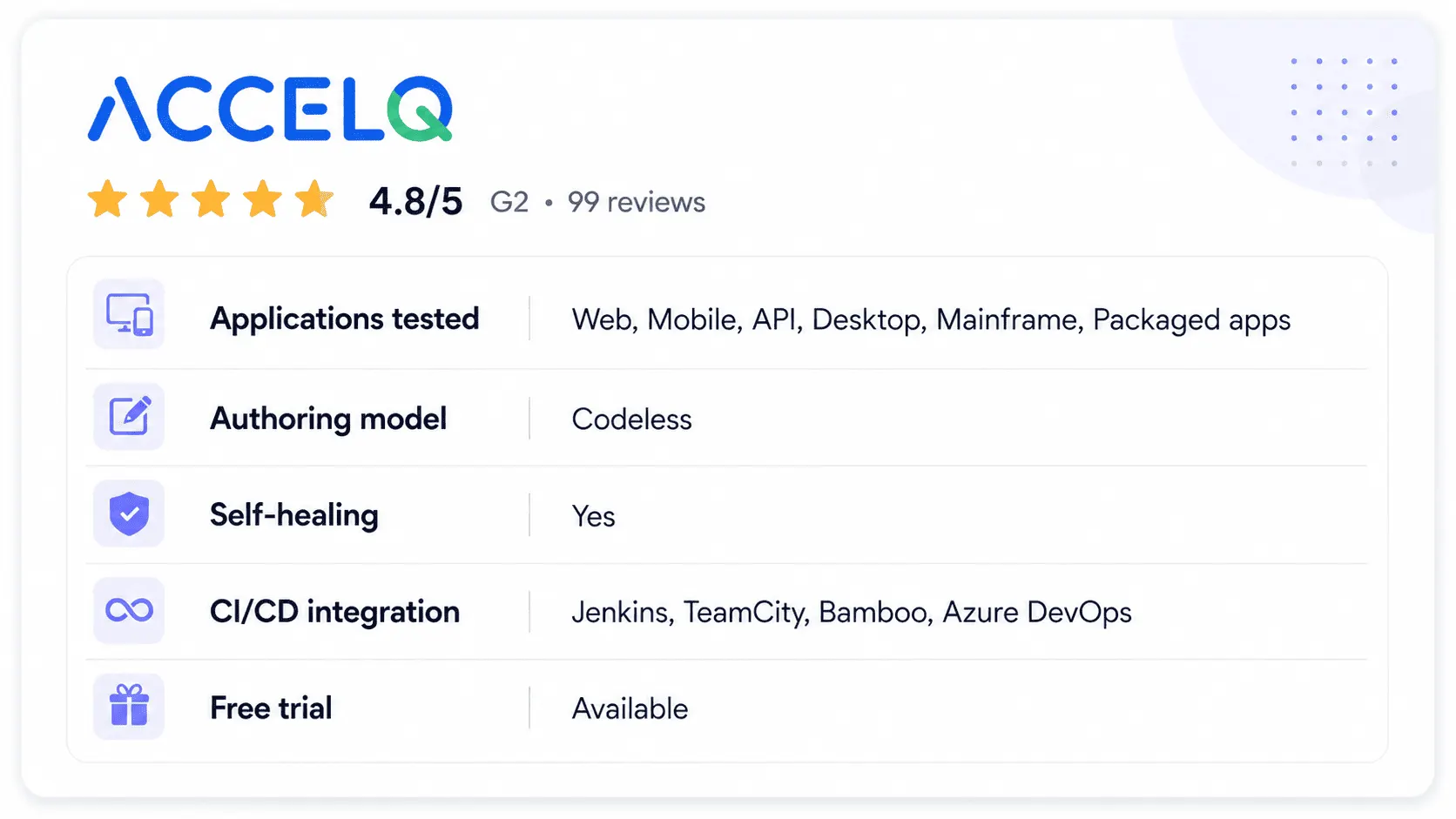
ACCELQ is a cloud-based, AI-powered regression testing automation platform that covers web, API, mobile, desktop, mainframe, and packaged apps from one workspace. Regression suite planning connects directly to requirements and business processes, so teams can track which test cases cover which business flows rather than maintaining that mapping manually.
Self-healing test automation adapts to interface changes without manual locator fixes, which directly addresses the locator rot problem described above. ACCELQ Autopilot’s generative AI layer takes this further by autonomously discovering application workflows and generating regression test cases from them, removing the need for an automation engineer to write tests from scratch, which is the constraint that leaves most teams exposed after a Selenium suite collapses. Parallel execution runs across Windows, Linux, and Mac on cloud or on-premise labs, and built-in CI/CD plugins for Jenkins, TeamCity, and Bamboo mean regression suites run on every build without custom integration scripts.
Features:
- AI-powered self-healing automatically adjusts to UI changes between releases without manual locator updates
- Regression suite planning with requirements traceability links test coverage to specific business processes
- CI-driven regression suite execution through native plugins for Jenkins, TeamCity, and Bamboo
- Unified coverage across web, API, mobile, desktop, and packaged applications from a single platform
- Parallel execution on cloud and on-premise labs across Windows, Linux, and Mac
- Actionable real-time reporting that refreshes during execution rather than waiting for a run to complete
Pros & Cons
- Covers web, API, mobile, desktop, and packaged apps in one platform, removing the multi-tool maintenance burden that grows with application scope
- Self-healing locator identification removes the predictable maintenance cycle caused by locator rot after every release
- Requirements traceability connects regression coverage directly to business processes, which matters in audited environments
- Subscription-based pricing with no permanently free tier means teams specifically looking for a zero-license-cost entry point will need to evaluate the trial and commit to a paid plan
- Cloud-first architecture requires additional planning before rollout in fully air-gapped or strictly on-premise regulated environments
- Teams with a mature, developer-maintained Selenium framework already in production will need to weigh the migration investment against the long-term reduction in maintenance overhead
Pricing: Contact ACCELQ for enterprise pricing.
2. Selenium
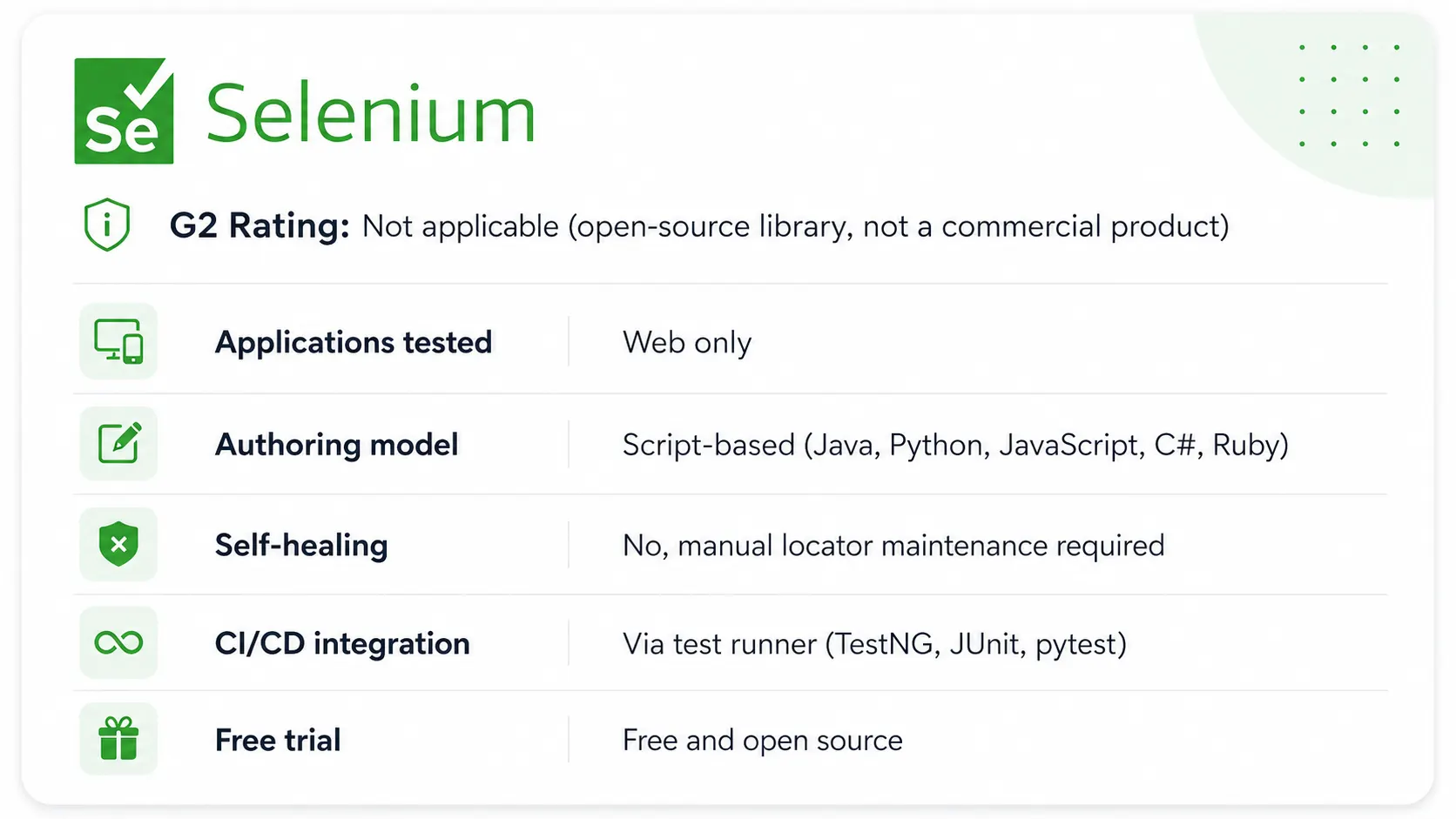
Selenium is a free, open-source library for automating web browsers, and the most widely used foundation for web-based regression test suites. Selenium WebDriver drives browsers directly through language-specific bindings available in Java, Python, JavaScript, C#, and Ruby, which means teams can use their existing language expertise without switching stacks.
Selenium Grid enables parallel test execution across multiple machines, browsers, and operating systems simultaneously, which is the mechanism most teams rely on for large-scale web regression coverage. The WebDriver BiDi protocol introduced in recent versions adds bidirectional communication for more precise browser control.
Features:
- Browser-level automation through WebDriver bindings in Java, Python, JavaScript, C#, and Ruby
- Selenium Grid for parallel execution across multiple browsers, operating systems, and machine configurations
- WebDriver BiDi protocol for bidirectional browser communication and more precise test control
- Cross-browser coverage across Chrome, Firefox, Edge, and Safari
- Integrates with TestNG, JUnit, pytest, and other test runners for structured suite organization
- Broad CI/CD compatibility through existing test runner integrations
Pros & Cons of Selenium
- Free and open source with the largest community of any web test automation project
- Multi-language support means teams use existing engineering skills without retraining
- Selenium Grid provides scalable parallel execution without a platform license
- No built-in self-healing, reporting, object management, or test management; teams build or integrate all of these separately
- Locator maintenance is entirely manual; every UI change requires an engineer to find and fix broken references
- Requires scripting proficiency; not suitable for manual QA teams without automation engineering support
Pricing: Free. Open source.
SUGGESTED READ - How to use Selenium Testing with ACCELQ?
3. Virtuoso QA
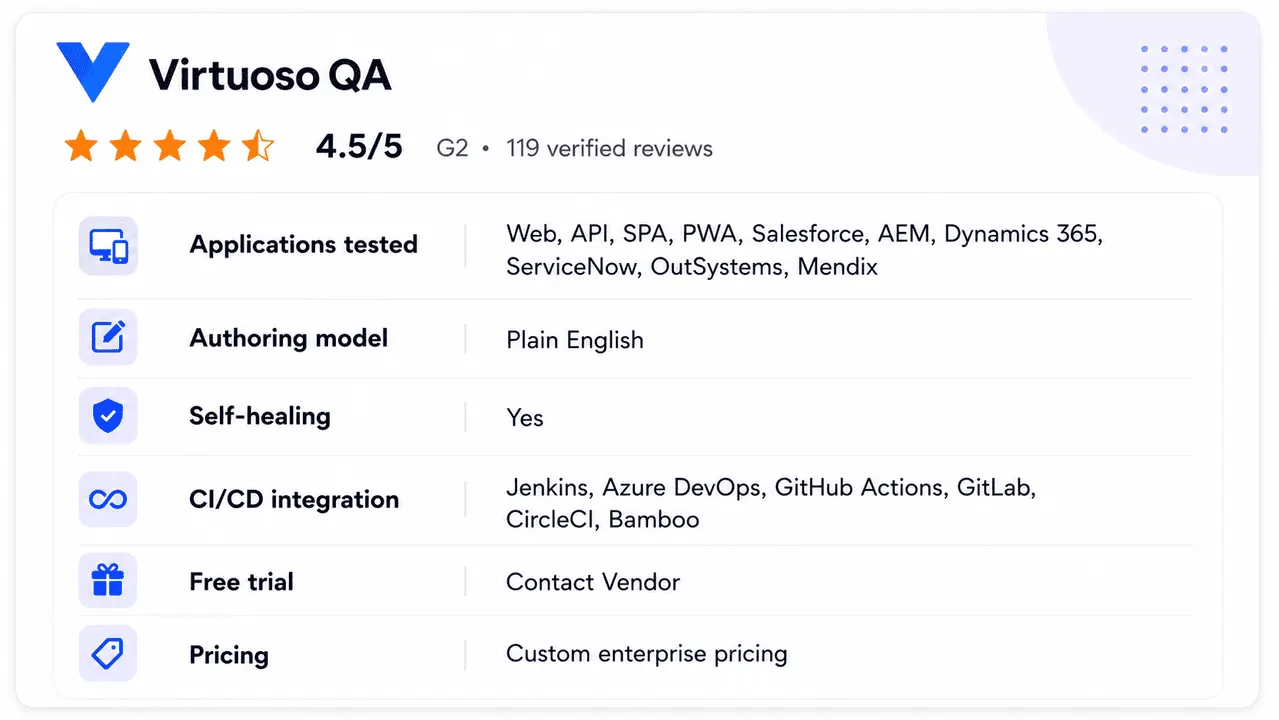
Virtuoso QA is an AI-native, codeless platform for regression testing across web, API, and enterprise applications. Tests are written in plain English and self-heal as the UI changes, so regression suites stay stable across releases with minimal maintenance.
Features:
- Plain-English test authoring with no scripting required.
- Self-healing element identification that automatically adapts regression tests to UI changes.
- Combined UI, API, and database validation in a single end-to-end journey.
- Visual regression to catch unintended UI changes.
- Native CI/CD integration with Jenkins, Azure DevOps, GitHub Actions, GitLab, and CircleCI.
Pros & Cons
- Self-healing AI automatically adapts to UI and application changes, keeping regression suites stable across releases.
- Codeless test authoring lets non-developers create, execute, and maintain regression tests without requiring extensive programming skills.
- Unified UI, API, and database coverage supports true end-to-end regression.
- Designed for broader enterprise testing capabilities, which may be more comprehensive than teams focused solely on basic web regression require.
- Commercial licensing is required, unlike open-source alternatives, requiring an upfront licensing investment.
- Lack of native mobile testing capabilities, so organizations with extensive mobile testing needs would require additional specialized tools.
Pricing: Custom enterprise pricing

4. TestDevLab
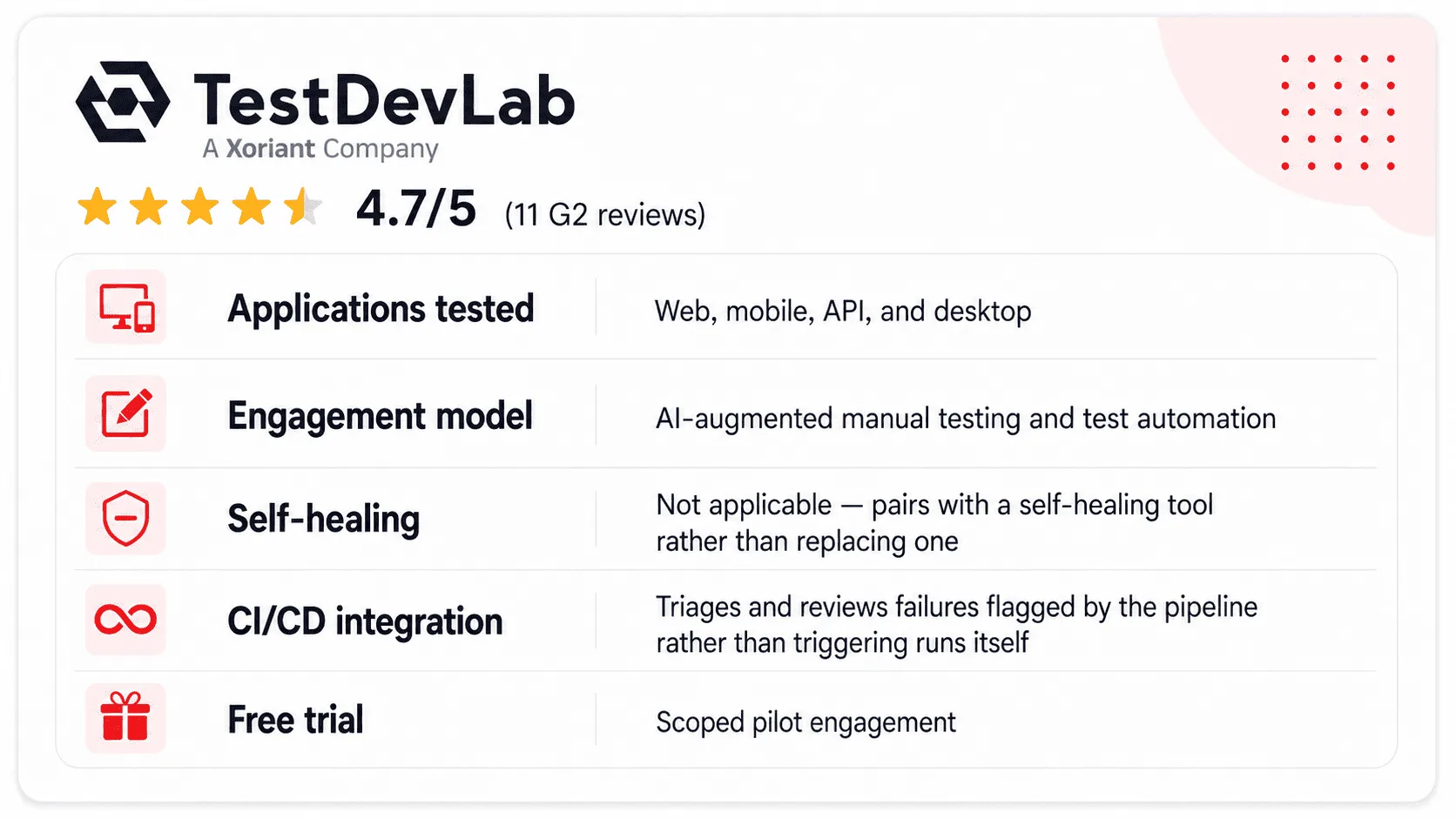
TestDevLab is an AI-augmented regression testing service that pairs automated suite execution with ISTQB-certified QA engineers, aimed at teams that want regression coverage without owning the maintenance burden in-house. Rather than replacing a regression tool, TestDevLab works alongside one, reviewing self-healing suite output, triaging false positives, and covering edge cases that automated locators and scoring metrics tend to miss.
This model is built for teams past the point where a tool alone solves the problem: when a regression suite has grown large enough that flagged failures need human triage before every release, or when the in-house engineer who understood the suite has left and no one owns it anymore.
Features:
- ISTQB-certified engineers review and triage regression suite failures alongside automated execution
- AI-augmented testing reduces regression cycle time by 50-70% compared to fully manual re-verification
- Coverage across web, mobile, API, and desktop applications, supported by 5,000+ real devices for mobile and cross-browser testing
- Works alongside existing regression tools rather than requiring a platform switch
- Closes coverage gaps automatically by combining automated execution with manual edge-case review
- Flexible engagement model for teams needing ongoing suite maintenance or short-term coverage during a migration or engineer transition
Pros & Cons
- Removes the maintenance burden of triaging and fixing a growing regression suite without hiring a dedicated in-house engineer
- Pairs with any existing regression tool rather than requiring teams to migrate their automation stack
- ISTQB-certified engineers catch edge cases and false positives that automated self-healing and scoring metrics don't flag on their own
- Adds an external service layer rather than a single-license purchase, which changes the procurement conversation compared to buying a tool outright
- Best suited to teams that already have or are evaluating a regression tool, rather than teams looking for a tool replacement
- Engagement and onboarding take longer to stand up than activating a SaaS trial
Pricing: Contact TestDevLab for a quote.
5. OpenText UFT One
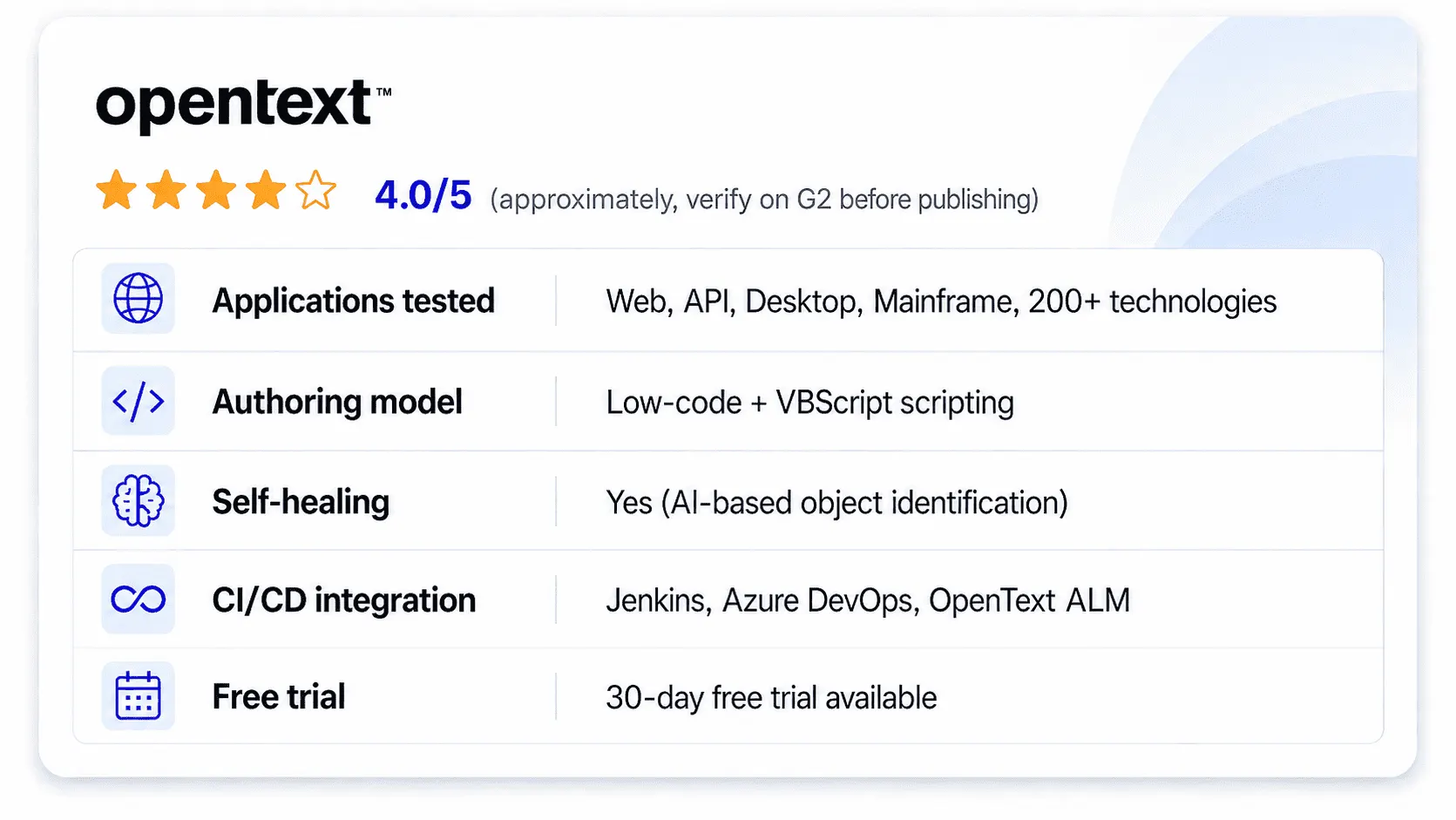
OpenText UFT One (formerly HP UFT and Micro Focus UFT) supports regression testing across more than 200 technologies, including legacy Windows applications, mainframe and terminal emulators, SAP, web, and modern mobile apps. For enterprise organizations running a mixed application portfolio that includes legacy systems alongside modern web and mobile surfaces, UFT One is the broadest single-platform option available.
An AI-based object identification engine improves recognition for complex, multilayer, and legacy interfaces that traditional locator strategies struggle with. The centralized object repository supports reuse across large test suites, and integration with OpenText ALM provides scheduling, centralized execution management, and traceability across distributed teams.
Features:
- Coverage across 200 plus technologies including mainframe, legacy Windows, SAP, web, mobile, and API
- AI-based object identification for complex and legacy application interfaces
- Centralized object repository for reuse across large, long-running test suites
- Integration with OpenText ALM for scheduling, centralized execution, and distributed team management
- Low-code scripting option alongside a more advanced VBScript scripting path for complex scenarios
- 30-day free trial available
Pros & Cons
- Unmatched technology breadth for organizations with legacy, mainframe, and modern applications running in parallel
- Mature centralized object repository model is well-suited to large enterprises maintaining thousands of test cases
- Two-decade track record means extensive documentation, community knowledge, and proven enterprise deployment patterns
- License costs are consistently flagged as high in user reviews, a real barrier for budget-conscious teams
- Resource-intensive on large suites, with some users reporting memory and performance issues at high test volumes
- Despite added low-code features, complex scenarios still require scripting, which raises the engineering skill bar for full adoption
Pricing: Contact OpenText for enterprise pricing. 30-day free trial available.
6. testRigor
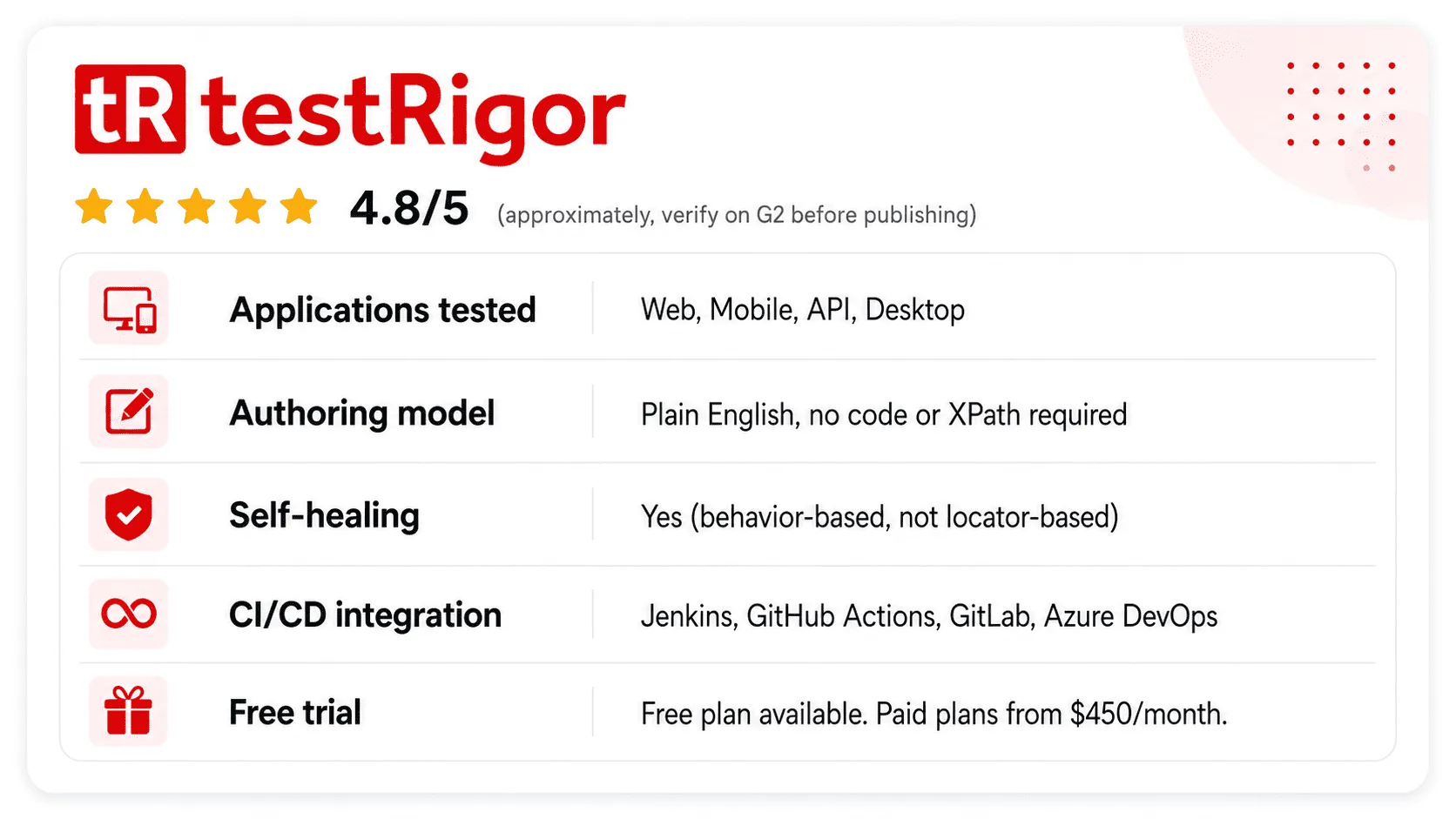
testRigor is an AI-native regression testing platform that lets teams write test cases in plain English rather than code, XPath selectors, or CSS locators. Tests describe what a user would do in natural language (“log in with the admin account,” “click the submit button,” “verify the confirmation message appears”), and testRigor interprets and executes those instructions against the application.
Because tests reference user-facing behavior rather than internal element IDs or coordinates, they don’t break when the underlying implementation changes. A button that moves from the left side to the right side of a screen doesn’t break a test written as “click the Submit button,” the way it breaks a test written against a specific XPath.
Features:
- Plain-English test authoring with no coding, XPath, or CSS locators required
- AI-based execution interprets natural-language steps against the live application
- Test generation from existing manual tests, user stories, and Jira tickets
- Cross-platform coverage including web, mobile, API, and desktop
- Automatic handling of application changes without manual locator updates
- CI/CD integration with Jenkins, GitHub Actions, GitLab, and Azure DevOps
Pros & Cons
- Plain-English authoring genuinely removes the scripting barrier for manual QA teams, business analysts, and product teams
- Tests written against user behavior rather than element IDs survive most UI changes without maintenance
- Conversion from existing manual test documentation to automated regression coverage accelerates adoption for teams with large manual suites
- AI interpretation of plain-English instructions occasionally requires step refinement for complex, multi-condition test logic
- Smaller community and ecosystem compared to Selenium-based tools, which means fewer community-built integrations and extensions
- Newer platform with a shorter enterprise track record than Tosca or UFT One; teams in heavily regulated industries may require additional vendor vetting
Regression Testing Tools for CI/CD Workflows
A regression testing tool that can’t run unattended in a pipeline isn’t an automated tool. It’s a manually triggered one. For CI/CD workflows, the minimum viable requirement for any regression tool is the ability to trigger execution on a commit or merge event and report pass/fail results back to the pipeline without human intervention.
Beyond that minimum, the features that matter most in a CI/CD context are:
Execution speed. Parallel execution across agents or cloud instances determines whether a regression suite gives feedback in 5 minutes or 45. Tools that only run serially become pipeline bottlenecks that teams work around by running tests less often.
Selective execution. Smart test selection runs only the tests relevant to the files changed in a given commit rather than the full suite every time. This keeps feedback loops short without sacrificing coverage for high-risk changes.
Failure attribution. When a test fails in a CI run, the tool should identify which code change triggered the failure and what exactly failed, not just “test failed.” Detailed, actionable failure reports are what allow developers to fix defects in the same sprint rather than queuing them for later investigation.
Among the tools reviewed, ACCELQ, Mabl, Virtuoso QA, and testRigor all provide native CI/CD plugins with documented integration for the major pipeline platforms. Selenium requires teams to build their own CI integration around a test runner, which works but adds setup time and infrastructure maintenance.

Which Tool Fits Your Situation?
Run your application scope and team profile through these scenarios:
If your team has no dedicated automation engineer and most testers come from a manual QA background, codeless platforms are the only realistic path to adoption. ACCELQ and testRigor both remove the scripting barrier entirely. ACCELQ covers the full stack; testRigor is the right pick if the team already has a large backlog of manual test cases it wants to convert rather than rewrite.
If your stack is web-only and the team has strong Python or Java engineers who are comfortable maintaining scripts, Selenium is a defensible choice. Budget for the surrounding infrastructure (test runner, reporting, grid) before committing. If locator maintenance starts consuming more than a sprint per quarter, that’s the signal to evaluate a platform with self-healing.
If your application portfolio includes SAP, Salesforce, or other packaged enterprise systems alongside modern web and mobile, Virtuoso QA and OpenText UFT One are the only two tools in this list with documented, production-grade support for that combination. Tosca if the team is willing to learn its model-based approach. UFT One if the team already has VBScript or HP QTP history and wants continuity.
If the primary regression requirement is web and API, with a need to catch visual and performance regressions alongside functional ones, Mabl’s built-in accessibility and performance checks within the same test run reduce the total number of tools in the stack without requiring a full platform migration.
If the question is whether to stay on the current tool or switch, apply TRACE as a scoring exercise: rate the current tool 1 to 5 on each dimension, then rate two or three alternatives. The gaps become the conversation with leadership, not the feature list.
Conclusion
The right regression testing tool is the one that survives your release cadence without generating a maintenance backlog that consumes the time it was supposed to save. Evaluate every option in this list against the TRACE framework before comparing price or brand name.
ACCELQ was built specifically to address the locator rot, scope creep, and cadence mismatch problems that cause regression suites to fail on a predictable schedule. Self-healing identification, unified coverage across every application surface, and native CI/CD execution are built in rather than assembled from separate tools. Start a free trial to validate it against your own regression requirements.
FAQs
What are automated regression testing tools?
Automated regression testing tools re-run a defined set of test cases against an application every time code changes, verifying that existing functionality still works after new code goes in. They remove the need for a manual tester to re-verify hundreds of flows before every release and integrate into CI/CD pipelines so regression runs happen on every build.
What are the most common software regression testing tools used in modern projects?
ACCELQ, Selenium, Virtuoso QA, Mabl, OpenText UFT One, and testRigor are among the most widely used regression testing tools in 2026. Selenium is the most common open-source foundation for web regression suites. ACCELQ, Virtuoso QA, and OpenText UFT One see the broadest enterprise adoption for teams that need unified coverage across web, mobile, API, desktop, and packaged applications.
Which tools are most effective for regression testing with Selenium?
Selenium is most effective for regression testing when combined with a test runner (TestNG, JUnit, or pytest), a reporting layer, and a grid or cloud execution environment for parallel runs. Teams that want Selenium-style scripting without building and maintaining that surrounding infrastructure typically use a managed cloud grid or a unified platform like ACCELQ that handles execution infrastructure, reporting, and self-healing without requiring raw Selenium scripts.
Which regression testing tools would you recommend for a CI/CD workflow?
ACCELQ, Mabl, Virtuoso QA, and testRigor all have native, documented CI/CD integrations with Jenkins, GitHub Actions, Azure DevOps, and other major pipeline platforms. For teams on Selenium, the CI/CD integration is built into the test runner rather than the tool itself, and requires additional setup. The key CI/CD requirements for regression tools are: unattended trigger execution, parallel test runs, and actionable failure attribution back to specific commits.
What tools and frameworks are most effective for regression testing across different technology stacks?
For mixed technology stacks combining web, mobile, API, and desktop, unified platforms like ACCELQ and Virtuoso QA cover the broadest range from one workspace. For web-only stacks, Selenium, Mabl, and testRigor are strong options depending on whether the team needs scripting control, ML-based maintenance, or plain-English authoring. For stacks that include legacy mainframe or packaged enterprise applications like SAP or Salesforce, Virtuoso QA and OpenText UFT One have the deepest native support.
What are the best tools for regression testing in software development for enterprise teams?
ACCELQ, Virtuoso QA, and OpenText UFT One are the strongest options for enterprise regression testing. All three support packaged enterprise applications, built-in governance and access control, and parallel execution at scale. The trade-off is cost and onboarding time: Tosca and UFT One carry a real learning curve alongside enterprise pricing, while ACCELQ offers codeless authoring that reduces the engineering skill requirement.
What should reliable regression testing automation services provide?
Reliable regression testing automation services should provide self-healing or adaptive test maintenance so suites don’t break on a schedule, CI/CD pipeline integration with documented support for your specific pipeline platform, parallel execution to keep suite runtime compatible with release frequency, and coverage across every application surface your team actually needs to test, not just the surface the vendor’s marketing page emphasizes.
What is the difference between regression testing tools and other software testing tools?
Regression testing tools are specifically designed to re-verify existing functionality after code changes. Other testing tools focus on different phases: unit testing frameworks validate individual code components, performance testing tools measure load and throughput, and exploratory testing tools support unscripted manual investigation. Many platforms like ACCELQ cover multiple testing types within one workspace, but the regression-specific value is in suite management, change-resilient identification, and CI/CD execution at cadence.



Geosley Andrades
Director, Product Evangelist at ACCELQ
Geosley is a Test Automation Evangelist and Community builder at ACCELQ. Being passionate about continuous learning, Geosley helps ACCELQ with innovative solutions to transform test automation to be simpler, more reliable, and sustainable for the real world.


You Might Also Like:
 Emulator Vs Simulator Vs Real Device: Mobile Testing
Emulator Vs Simulator Vs Real Device: Mobile Testing
 Batteries Included with Usability Testing Methods
Batteries Included with Usability Testing Methods
 Network Testing Tools: Monitoring, Alerts, and Test Intelligence Compared