





How to Build a Scalable Mobile App Testing Strategy in 2027

- What Is a Mobile App Testing Strategy, and Why Does Mobile Need Its Own?
- How Do You Align Testing with Business Risk First?
- What Does a Modern Mobile Testing Pyramid Look Like?
- Which Types of Mobile Testing Belong in Your Coverage Map?
- How Do You Build a Risk-Driven Device Matrix?
- What Should Your Mobile Test Strategy Document Include?
- Which Mobile Test Automation Tools Should You Choose?
- Build your mobile testing strategy around business risks, prioritizing crashes, payment failures, data loss, and app store rejections.
- Use a five-layer testing pyramid covering unit, component, feature, application, and release candidate tests.
- Automate around 80% of regression testing and reserve manual testing for exploratory checks, gestures, animations, and first-time user experiences.
- Create a risk-driven device matrix based on your users, OS versions, device performance, hardware features, and network conditions.
- Document release gates, CI/CD triggers, regression scope, and known exclusions, and review the strategy quarterly or after major changes.
What Is a Mobile App Testing Strategy, and Why Does Mobile Need Its Own?
A mobile app testing strategy defines which risks to test, which testing layers to use, which devices to cover, when tests run, and what a build must pass before release.
Your test plan defines what to test in a particular release, while your device matrix identifies the hardware and OS combinations to cover. Both should follow the strategy rather than exist as standalone checklists.
Mobile needs its own strategy because four web assumptions don’t hold:
- Locators have no stable DOM: Mobile UIs have no stable Document Object Model (DOM), so selectors break when an OS update changes how screens render. SwiftUI and Jetpack Compose screens also lack stable element IDs unless developers add “accessibilityIdentifier” or “testTag”. Without those, tests fall back to slow, brittle XPath. Make test IDs a coding standard from day one.
- Device fragmentation makes full coverage impossible: Android alone runs on more than 25,000 distinct device models across OEMs, screen densities, and OS versions, so it is very tough for teams to cover the whole matrix.
- The OS controls the app lifecycle: iOS kills suspended apps under memory pressure, and OEM battery managers on Xiaomi, Samsung, and OPPO stop background work. Every critical flow needs a test for an app killed mid-task.
- Releases can be paused, never recalled: A shipped bug stays shipped: phased rollouts on both stores can be halted, but installed versions stay on users’ phones while the fix waits on App Store and Google Play review and on every user choosing to update.
You can tell the strategy is working when Google Play’s Android vitals stay under the bad-behavior thresholds (1.09% user-perceived crash rate, 0.47% ANR rate) and your defect escape rate reduces release over release.
How Do You Align Testing with Business Risk First?
Before you choose a framework or a device, decide which failures your business can’t absorb. That ranking determines everything that follows.
Rank Failure Classes by Financial Impact
Score each failure class on two factors: how many users or how much revenue it hits, and how long recovery takes once it reaches production. On mobile, recovery is slow, so the ranking usually comes out like this:
-
Crash on launch or first use. New users uninstall within the session, and you lose that acquisition spend.
-
Payment and in-app purchase failures. Every failed transaction is lost revenue, and users with unreliable entitlements request refunds.
-
Data loss or sync corruption. Users can forgive a crash. They rarely forgive lost data.
-
Store policy rejection. Common triggers include a missing in-app account deletion option, an incomplete Apple privacy manifest, and a missed Google Play target API deadline. Each one delays the whole release.
Reorder the list for your app.
Eg: A banking app might rank sync corruption first, and a game might rank payments first.
Map Each Failure Class to the Cheapest Layer That Catches It
| Failure class | Cheapest catching layer | Final safety net |
|---|---|---|
| Launch crash | Release Candidate (RC) smoke test on the minified build, where R8 or ProGuard stripping causes crashes that debug builds hide | Staged rollout with crash monitoring |
| Payment failure | Unit tests on pricing and entitlement logic, plus StoreKit Testing and Play Billing license testers | Manual purchase on real payment rails |
| Data loss | Unit tests on database migrations | Feature tests for sync conflicts |
| Policy rejection | Automated pre-submission checks for manifests and permissions | Manual review against store guidelines |
How Is AI Changing the Mobile Testing Pyramid?
The traditional 3-tier testing pyramid is too broad for mobile teams, grouping different tests under labels like “integration” and “E2E.” In the AI era, mobile testing needs a more precise structure that accounts for differences in cost, execution time, reliability, and automation.
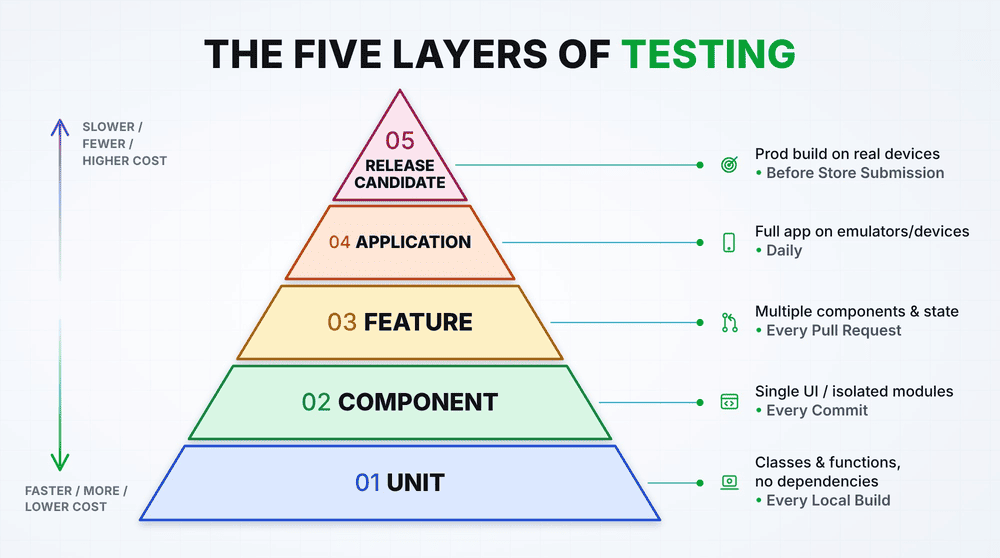
A five-layer pyramid defines each layer more clearly, helping teams organize their tests, manage testing effort, and avoid overloading any single layer.
-
Unit: Tests individual classes and functions without external dependencies. These are the fastest and cheapest tests, run on every local build.
-
Component: Tests individual UI components or modules in isolation, including visual rendering. Run these on every commit.
-
Feature: Tests multiple components working together, including state changes and interactions with mocked services. Run these on every pull request.
-
Application: Tests the complete app across devices, screen sizes, OS configurations, and critical interactions. Run these daily using emulators and selected real devices.
-
Release Candidate: Tests the production build against staging or production backends, validating critical user journeys and performance on real devices before each store submission.
Health check: If most defects surface during application testing, your feature-level tests may be too thin. Move more checks to lower layers, where they run faster and produce more reliable feedback.
The 80/20 Split: What to Automate and What to Keep Manual
Automate 80%: Focus on stable, repeatable regression tests such as login, navigation, form validation, and API checks.
Keep 20% manual: Use human judgment for exploratory testing, gestures, animations, and first-time user experience.
Go beyond execution: Agentic AI can also investigate failures, identify broken locators, and maintain test assets as the application evolves, reducing the manual effort involved in keeping regression suites reliable.
Which Types of Mobile Testing Belong in Your Coverage Map?
Each testing type below comes with the failure it exists to catch and the layer where it belongs. You can skip any type that doesn’t map to a ranked risk from your list.
1. Functional and iOS/Android Parity Testing
The same feature behaves differently because each OS enforces different rules. If a user denies a permission on iOS, the app can’t ask again and must send them to Settings.
Android 11+ offers an “Only this time” option and auto-resets permissions for unused apps. Android 13+ also requires a runtime prompt before the app can send notifications. Write parity tests around these divergence points, since identical screens rarely break in identical ways.
2. Integration and Data Validation Testing
Third-party Software Development Kits (SDKs) for analytics, push notifications, and authentication change behavior in minor version updates.
Pin SDK versions and run contract tests against them at the Feature layer, then exercise the real SDKs at the Application layer.
For apps with a web companion, test cross-surface consistency. A change made on the web should appear on mobile after a push or a foreground refresh, and a stale cache shouldn’t hide it.
3. Hardware and Sensor Testing
Use real devices to test biometric authentication, camera focus and exposure, GPS accuracy, and NFC interactions. Test interruptions, such as an incoming call during checkout, and verify that the app resumes correctly.
On iOS, changing a privacy permission in Settings can terminate the running app, so check that the app relaunches and restores the user’s progress correctly.
4. Network Variability and Offline Testing
The worst bugs happen during transitions between connection types. Test a Wi-Fi to cellular handoff mid-upload, a captive portal that returns HTML where JSON is expected, and a retry after a timeout.
If a timed-out “Place order” request is retried without an idempotency key, the customer gets charged twice. Use iOS Network Link Conditioner and the Android emulator’s network profiles to make these cases repeatable.
5. Performance Testing
Start performance testing early by setting clear performance limits and failing CI builds when they exceed them. Treat cold starts of five seconds or more as too slow, and continuously track startup time, frame rates, response times, CPU, and memory usage.
Gradually increase the load to test how the app handles heavy concurrent usage and sudden traffic spikes. Finally, run a 20-minute endurance test on a mid-range device to catch memory leaks, performance slowdowns, and thermal throttling that may not show up on flagship devices.
6. Security and Compliance Testing
Use the Mobile Application Security Verification Standard (MASVS) as your checklist. Decompile your own release build and look for hardcoded keys. Confirm that tokens live in Keychain or Keystore, and not in UserDefaults or SharedPreferences.
Check that logs don’t leak personal data. Also verify that your Google Play Data safety form matches what your SDKs actually collect, because a mismatch can lead to enforcement.
7. Localization and Accessibility Testing
Test layouts with longer text and right-to-left languages before translations are finalized. Check that text fits, buttons remain usable, and layouts adapt correctly. For accessibility, verify readable text, clear labels, sufficient contrast, and logical focus order.
Include a manual screen reader check with VoiceOver and TalkBack before each release to catch issues automated checks may miss.
8. Beta and Crowd Testing for Real-World Edge Cases
Beta testers find what labs can’t reproduce: carrier-specific networks, real data volumes, and OEM quirks on devices you don’t own. Set exit criteria before inviting testers, for example a crash-free rate above your production baseline for three consecutive days. Use crowd testing for regions, languages, and payment methods your team can’t cover in-house.
How Do You Build a Risk-Driven Device Matrix?
Start with your highest-risk failure scenarios, then select devices that help reproduce them. If data loss is a major concern, include a low-storage, low-ARM device where the OS may kill the app mid-write.
For payment-critical apps, test devices with Google Pay and Apple Pay configured. If camera functionality matters, include OEM devices where CameraX or AVFoundation may behave differently.
Tailor your matrix to your users. Use Play Console and App Store Connect data to identify the devices and OS versions that account for most of your active sessions, rather than relying on market-share reports alone. Consider these factors:
- Device manufacturers: In Southeast Asia, include relevant models from Xiaomi, Vivo, OPPO, realme, and Samsung to account for differences in background processing, notifications, and permissions. In the US and Western Europe, prioritize the Apple, Samsung, and Pixel devices most common among your users.
- OS versions: Cover the latest and previous major iOS versions, plus the lowest Android API level your minSdk supports and the Android versions most widely used by your audience. Test against iOS and Android developer betas before major OS releases reach users.
- Device performance: Include at least one low-end Android device with 3–4 GB RAM to expose memory and performance issues that may not appear on flagship phones.
SUGGESTED READ - Emulator vs Simulator vs Real Device: Mobile Testing
What Should Your Mobile Test Strategy Document Include?
Keep the document to two pages. The first five sections record decisions from earlier in this guide, and the last three cover decisions most teams never write down.
1. Ranked failure classes. List your failure classes in order of business impact, and give each one a maximum tolerance. For example: “Launch crash: zero allowed in RC smoke tests.”
2. Layer assignment. For each failure class, name the layer that catches it first and the layer that acts as its safety net. Example: “IAP failure: unit tests on entitlement logic first, manual real-payment check at RC.”
3. Release gate and borderline-build owners. Name the person who owns technical risk, the person who owns business risk, the escalation owner, and the deadline for an escalation decision after the RC cut.
4. Device and OS matrix. List each device and OS version, and write next to it the risk it covers. A device with no risk next to it is a candidate for removal.
5. CI/CD trigger schedule. For each trigger, write what runs, its time budget, and whether a failure blocks the merge or submission.
6. Regression scope. Split it in two:
- Every-release list: flows tied to your top-ranked failure classes. This list never shrinks to save time.
- Change-scoped list: each module mapped to the flows it can break. A change to the coupon module triggers checkout regression, and a settings-screen change doesn’t.
7. Known exclusions. Every strategy leaves something untested, such as tablets, Android Go devices, or a legacy OS version used by a small share of users. Record each exclusion with the reason, the person who accepted the risk, and the condition for revisiting it. When a bug escapes in an excluded area, the team can then point to a documented decision.
8. Review cadence and triggers. Review the strategy every quarter. Also review it immediately after any of these:
- A major iOS or Android release, or a new store policy deadline.
- A new payment provider, SDK, or login method.
- An architecture shift, such as a move to Compose, SwiftUI, or a cross-platform framework.
- Expansion into a market with a different OEM mix.
- A production incident in a top-three failure class.
Which Mobile Test Automation Tools Should You Choose?
The right mobile test automation approach depends on your app, testing needs, and maintenance effort. Native frameworks offer close platform integration, cross-platform frameworks help teams share test logic, and agentic AI platforms can reduce the effort required to create and maintain large regression suites.
| Approach | Best fit | Strength | Trade-off |
|---|---|---|---|
| Native automation | Apps built specifically for Android or iOS | Deep platform integration and reliable access to native UI elements | Separate test suites are typically needed for each platform |
| Cross-platform automation | Teams testing across iOS and Android | Shared testing logic across platforms | Synchronization, locators, and platform-specific behavior can increase maintenance |
| Agentic AI automation | Teams managing large, frequently changing regression suites | Adapts to UI changes and can reuse test intent across platforms | Commercial licensing, and AI-driven changes need review |
Consider a suite of 400 UI tests running 10 times a day. At a 3% flake rate, it produces 120 false failures daily. At five minutes of triage per failure, that amounts to 10 engineering hours spent every day confirming that nothing is broken. Over time, teams may start ignoring failed builds, allowing genuine regressions to slip through.
Agentic AI can reduce this maintenance burden by identifying UI elements through multiple signals, including labels, roles, visual appearance, position, and surrounding context. When the interface changes, the AI can identify the most likely match and adapt the test. Teams can also define a user journey once and execute it across iOS and Android.
How ACCELQ’s Agentic AI Strengthens Your Mobile Testing Strategy
ACCELQ uses agentic AI to help teams build, execute, and maintain mobile tests with less manual effort. It supports native, hybrid, and mobile web apps across iOS and Android, with capabilities that address common challenges in mobile test automation:
- Autonomous test creation: Discover application workflows and build test logic for critical user journeys, reducing the effort required to create regression tests.
- AI-driven self-healing: Identify UI elements using multiple signals and adapt tests when interface changes break existing locators, with teams reviewing healing decisions.
- Cross-platform test automation: Automate mobile journeys across iOS and Android while reducing duplicated test logic and maintenance.
- End-to-end testing: Connect mobile interactions with web applications, APIs, and backend services in a single workflow.
- Flexible test execution: Run tests on cloud-hosted or local devices and integrate execution into CI/CD pipelines.
By combining these capabilities, ACCELQ helps teams strengthen regression coverage, reduce test maintenance, and keep mobile releases moving as applications and operating systems evolve.
Ready to strengthen your mobile testing strategy with agentic AI? Start your free ACCELQ trial today.
FAQs
What is the difference between a mobile test plan and a mobile test strategy?
A mobile test strategy sets which risks matter, which test layer catches each one, and who signs off a release. It changes only when your architecture, markets, or business risks change. A test plan applies the strategy to one release: its scope, people, and schedule. If you rewrite your “strategy” every release, you have a test plan.
How many devices do I need to test on?
There’s no universal number. Start with one device for each ranked risk, such as a low-RAM Android for data loss or an OEM device for background-task behavior. Then add the devices that cover most of your active sessions in Play Console and App Store Connect. Run the long tail in a cloud device farm.
What percentage of mobile testing should be automated?
About 80% of regression execution is a practical target. Measure it by execution time, not by test count, because 50 automated smoke tests can still leave hours of manual regression. Keep exploratory sessions, gesture and animation checks, and features whose UI still changes every sprint manual.
Should I use emulators or real devices?
Use both, in about a 60/40 split. Emulators and simulators give fast, parallel feedback on pull requests and layout checks. Real devices are required for OEM skin behavior, performance, thermal throttling, real carrier networks, and Release Candidate regression. A strategy that relies only on emulators misses the bugs your crash reports will show later.
How often should I update my mobile testing strategy?
Review it every quarter, and also right after a trigger event: a new payment provider or SDK, an architecture change, a new market, or a major production incident. Schedule one review when the iOS and Android developer betas come out in early summer. That gives you about three months to adjust before the fall OS releases.
Is Appium still worth using in 2026?
Yes, if your team needs one framework and one language across iOS, Android, and hybrid apps. Appium 2’s driver model (UiAutomator2, XCUITest) keeps it current with both platforms. The cost is maintenance: there’s no built-in UI sync, and locators break when UIs change. Many teams keep Appium for stable flows and move high-churn regression suites to AI-driven platforms with self-healing.




You Might Also Like:
 What is Selenium? What are the challenges in Selenium Automation?
 Network Log Automation: The Signals Modern Test Suites Ignore
 Testing Guidewire’s Autopilot and Claims Intel: A New QA Problem