





Testing AI Applications: How Test Automation Has to Change

Testing AI applications is the practice of measuring whether a system that gives variable, probabilistic answers also stays accurate, safe, and on task across many runs and inputs. A pass or fail is decided by scores and thresholds over a sample of runs, because a single output cannot represent the whole system.
Most test automation was built for software that returns the same result for the same input. AI applications do not. The checks that worked for a login form or a payment API need to be extended before they can be trusted on a chatbot, retrieval assistant, or an agent.
This guide covers what to test, how to test AI applications, how hallucination testing works, and what has to change in your automation. Use this if your team is choosing an approach or a tool and wants a clear picture first.
- What Is Testing AI Applications?
- What Is the Difference Between AI Testing and Testing AI?
- Why Traditional Test Automation Breaks on AI Applications
- What to Test in AI Application Testing
- How to Test AI Applications
- Hallucination Testing
- AI Model Testing and How to Test AI and ML Applications
- AI Agent Testing
- Test Automation for AI Applications: What Has to Change
- How to Automate Testing of AI Applications with ACCELQ
- Where to Start
- Diagnose: AI applications return variable answers, so exact-match assertions fail, and one passing run proves very little.
- The Fix: Score outputs on metrics such as faithfulness and hallucination. Set thresholds by risk. Run each case more than once. Calibrate the scores against human review.
- Decide: Choose a tool that runs these checks in the same pipeline as your API and UI tests. It should also report aggregate results for every run.
What Is Testing AI Applications?
Testing AI applications applies to any software where a machine learning model or large language model (LLM) drives some of what the application does.
Examples would be customer support chatbots, search assistants that answer from company documents, recommendation engines, and agents that take actions on a user’s behalf.
For a conventional feature, one correct result closes the case. For an AI application, you need a range of results, scored against clear criteria, to show the system behaves well often enough for its level of risk.
The ISTQB lists challenges such as self-learning, bias, ethics, complexity, non-determinism, transparency, and explainability. Each one maps to a test your team will need to plan.
What Is the Difference Between AI Testing and Testing AI?
| Testing AI | AI testing | |
|---|---|---|
| Meaning | Testing a system that contains AI | Using AI to help with testing work |
| Example | Checking that a support chatbot gives accurate, safe answers | Using an LLM to draft test cases or repair broken locators |
| Who owns it | QA and engineering teams shipping an AI feature | QA teams looking to speed up their own process |
| Core question | Can we trust this system’s output? | Can AI make our testing faster? |
The industry has started to separate them formally. The ISTQB’s current AI Testing syllabus (version 2.0) concentrates on testing AI-based systems, including generative AI and LLMs.
The content on using AI for testing was removed. Using generative AI to support testing relates to a separate certification.
This article is about the first column: testing AI. Many teams need both, and the two meet at one point. A good tool can use AI to build your tests while also scanning the AI inside your product.
ACCELQ’s documentation describes an MCP server that lets a connected AI assistant propose a test plan, create tests after you approve it, run them, and analyze results across runs. That is AI helping with testing a.k.a AI testing.
Why Traditional Test Automation Breaks on AI Applications
A standard automated test has an input, an expected output, and an equality check. Four properties of AI applications weaken that pattern.
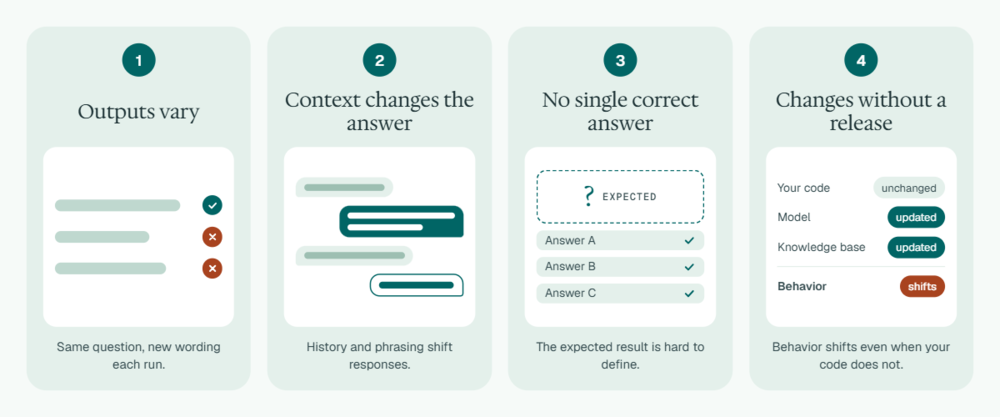
Outputs vary
ACCELQ’s LLM testing documentation lists non-deterministic outputs first among the quality challenges. In other words, the same question can produce different wording on each run. An exact-match assertion will fail on a correct answer that is phrased differently.
Context changes the answer
Responses shift with conversation history and small changes in input. A test that works with one phrasing may not work if you ask the same thing another way.
There is often no single correct answer
Testers call this the oracle problem. The ISTQB syllabus includes test oracles for AI-based systems as its own topic because the expected result is hard to define beforehand.
The system can change without a release
A model provider can update a model. Your knowledge base can change. Behavior shifts even though your code did not change. A release-time check alone will miss all of these.
Don’t just put in exact-match tests and add nothing else. You’ll end up with suites that either fail constantly or pass without checking anything useful.
What to Test in AI Application Testing
Pick the dimensions important for the use case, then attach a metric to each. Here’s a practical list to start with:
| Dimension | Question it answers | Example metric |
|---|---|---|
| Relevance | Does the answer address what was asked? | Answer Relevancy |
| Factual reliability | Does the answer stay true to the source material? | Faithfulness, Hallucination |
| Retrieval quality | Did the system pull and use the right context? | Contextual Precision, Contextual Recall, Contextual Relevancy |
| Instruction following | Did it respect format and scope rules? | Prompt Alignment |
| Safety and fairness | Is the output free of harmful or biased content? | Toxicity, Bias |
| Conversation quality | Does it hold its role and remember earlier turns? | Role Adherence, Knowledge Retention, Conversation Completeness, Conversation Relevancy |
| Security | Can an attacker redirect it? | Prompt injection and related tests |
The OWASP Top 10 for LLM Applications 2025 names ten risks: prompt injection, sensitive information disclosure, improper output handling, excessive agency, system prompt leakage, and misinformation. Treat this as the starting checklist for your security tests.
Performance and cost also need attention. Response time, behavior under concurrent users, and token usage belong in the plan, since they shape the user experience as much as accuracy does.
How to Test AI Applications
These are the methods most teams settle on. They work for chatbots, retrieval assistants, and most LLM features.
Define quality criteria by risk
Decide what “good” means for each use case before you write a test. A general FAQ bot can accept more variation than a tool that explains benefits or medical information.
Build a test dataset
Collect real questions, then add edge cases, adversarial inputs, and examples where the right behavior is to decline. Keep this dataset under version control. Review it like code. Include the reference context the answer should be based on; factual checks depend on it.
Choose metrics and set thresholds
ACCELQ’s threshold guidance suggests running your test set against the current production model and using the average scores as your first baseline.
Start with factual metrics such as Faithfulness and Hallucination at 0.85 to 0.95, relevancy metrics at 0.75 to 0.85, and safety metrics at 0.90 to 0.98. Then, raise thresholds by 2 to 5% per release.
Score automatically, and check the scoring against people
Automated scoring lets you run thousands of cases. But also run human evaluations on a sample and aim for 85 to 90% agreement with the automated results. If agreement is low, adjust the thresholds or the metric before trusting those numbers.
Run security and misuse tests
Use the OWASP list to build test cases that check for vulnerabilities. Look out for prompt injection, data leakage, and attempts to extract system instructions. For this, you might need specialist security tooling alongside your functional automation.
Re-run tests on every change, and keep monitoring in production
Trigger the suite when the model, prompt, retrieval data, or application code changes. Compare scores across versions. After release, sample live conversations and feed failures back into the dataset.

Hallucination Testing
Hallucination testing checks whether an AI application gives false or unsupported answers. NIST’s Generative AI Profile (AI 600-1) calls this risk “confabulation” and lists it among twelve risks that are unique to or made worse by generative AI.
The most reliable way to test for it is to give the checker something to compare against. If an application answers from documents, that is the retrieved context. Retrieval-augmented generation (RAG) systems make this possible, since each answer should be traceable to a source passage.
A workable approach:
- Write questions whose correct answers exist in your documents.
- Add questions whose answers do not exist in your documents, and the correct application behavior is to say so.
- Score each response for Faithfulness against the retrieved context, and for Hallucination.
- Set a high threshold, since a wrong answer carries financial cost.
- Read the failures manually. Patterns point to retrieval problems, prompt problems, or missing content.
Here’s an example of a test: a customer service chatbot is asked about a phone’s battery capacity. The response is verified for Faithfulness against the product specification as retrieval context, with a threshold of 0.9.
AI Model Testing and How to Test AI and ML Applications
Two layers need to be tested:
AI model testing
This looks at the model itself. For a machine learning model you build, this means checking input data quality, evaluating performance on new data, and checking for bias across groups.
The ISTQB’s current syllabus describes a lifecycle approach covering input data testing, model testing, and ML development testing. If you use a model from a provider, you usually cannot run these tests yourself. You’ll have to rely on the provider’s published evaluations and test your own use of the model.
AI application testing
This looks at everything around the model: prompts, retrieval, tool connections, business rules, the interface, and the integrations. Most QA teams own this layer, and it is also where most production failures come from.
So the answer to “how to test AI models” depends on whether you build or buy the model.
- If you build it, test data and model performance directly.
- If you buy it, test the application’s behavior with your data, your prompts, and your users’ questions. Re-run those tests whenever the provider updates the model.
For machine learning applications such as fraud scoring or recommendations, the same test layers work. Just with one addition: monitor for drift after release, since real-world data changes over time.
AI Agent Testing
An agent doesn’t just answer questions. It also decides which tool to call, in what order, and with what values. It may even change data in other systems. That raises the stakes and adds test targets.
For AI agent testing, check these areas:
- Tool choice: did the agent pick the right tool for the request?
- Parameters: were the values it passed correct and complete?
- Boundaries: does it stop at its permissions, step limits, and approval rules? OWASP lists excessive agency as a named risk.
- Outcomes: did the real result land in the downstream system, such as the right record in the right database?
- Recovery: what happens when a tool fails or returns unexpected data?
You can verify an agent’s effects through the same API and database checks you already run. ACCELQ’s API verification supports status code, header, and JSON body assertions. Automate API is built for REST, SOAP, and backend testing. These checks confirm what the agent did, even when its wording varies.
Test Automation for AI Applications: What Has to Change
Test automation for AI applications keeps the structure of your existing suite and changes how results are judged. To implement the same, you need to shift on six parameters.
| From | To |
|---|---|
| Exact-match assertions | Metric scores checked against thresholds |
| One run per test | Repeated runs, judged by pass rate or average score |
| Hand-written expected values | Curated datasets with reference context, versioned like code |
| Pass or fail per test | Aggregated reports with averages, medians, and trends |
| Separate tools for UI, API, and AI checks | One flow covering all three |
| Checks at release time | Checks on every model, prompt, or data change, plus production sampling |
Repeated runs. Because outputs vary, a single pass is weak evidence. Running the same case several times and tracking the pass rate gives more dependable evidence. You have to decide the acceptable rate for each risk tier in advance.
One flow for all layers. A real user journey might start in a web page, call an API, query an AI service, and write to a database. If AI tests exist in a separate notebook or script, they are hard to put in a pipeline. Keep them in the same suite as your other tests. That way, they run on the same schedule and show up in the same reports.
How to Automate Testing of AI Applications with ACCELQ
If you are comparing tools, use criteria that match the changes above:
- Does it run AI checks in the same suite as functional, API, and UI tests?
- Does it provide metrics for hallucination, relevancy, safety, and conversation quality?
- Can you set thresholds per metric?
- Can it evaluate whole conversations as well as single answers?
- Does it aggregate results into a report?
- Can people without coding skills build and maintain the tests?
ACCELQ is a codeless platform for web, API, and mobile testing, and ACCELQ Unified brings these layers into one place. Its documentation describes an LLM verification library with three commands:
- Verify LLM Response Metric scores a single response. Available metrics are Answer Relevancy, Faithfulness, Contextual Precision, Contextual Recall, Contextual Relevancy, Bias, Toxicity, Summarization, Prompt Alignment, and Hallucination. You enter a pass threshold between 0 and 1.
- Verify LLM Conversational Metric scores a whole conversation passed in as structured turns. Metrics are Role Adherence, Knowledge Retention, Conversation Completeness, and Conversation Relevancy.
- Generate LLM Metrics Report summarizes earlier verifications, showing pass and fail counts, average values, and median scores, at either test case level or test job level. Place it in a teardown action, so it runs after the tests finish.
The commands use an LLM to perform the verification, so you supply your own API key for a supported provider. OpenAI and Claude are supported.
The scoring is model-based. The human calibration step described earlier still applies.
Note
ACCELQ might not cover specialist security testing for prompt injection and similar attacks, or deep reviews of an agent’s reasoning steps. Plan for dedicated tools or manual review there.
Use ACCELQ for the functional, regression, and reporting layers.
Where to Start
- Pick one AI feature with real user impact.
- Build a dataset of 50 to 100 realistic questions.
- Choose three or four metrics.
- Baseline your current performance.
- Then add the suite to your pipeline so it runs on every change. Expand to conversations, agents, and security once the first loop is working.
FAQs
What is testing AI applications?
Testing AI applications is the process of checking that a system with a machine learning or LLM component stays accurate, safe, and useful across many inputs and runs. Since outputs vary in each test run, results are judged by metric scores and thresholds. No one answer is always correct.
What is the difference between AI testing and testing AI?
Testing AI means checking a system that contains AI, such as a chatbot or an agent. AI testing means using AI to support testing work, such as generating test cases. The ISTQB now treats them separately: its current AI Testing syllabus focuses on testing AI-based systems.
How to test AI applications?
Define quality criteria by risk. Build a test dataset with edge cases. Choose metrics and thresholds. Score results automatically. Validate the scores against human review, run security tests, and re-run the suite whenever the model, prompt, or data changes.
How to automate testing of AI applications?
Add scored checks to your existing automation suite. Use metrics for relevancy, faithfulness, hallucination, and safety. Set a threshold for each. Run cases repeatedly, and collate results in a report. Run the suite in your CI pipeline so every change passes through checks.
What is hallucination testing?
Hallucination testing checks whether an AI application states false or unsupported information. Teams compare responses against retrieved source content, score them for faithfulness and hallucination, and review failures to find whether the cause is retrieval, prompting, or missing content.
How to test AI and ML applications?
Test two layers. For the model, check input data, performance on unseen data, and bias. For the application, check prompts, retrieval, integrations, and user flows. For machine learning systems in production, monitor for drift as real-world data changes.
How to test AI models?
If you build the model, test its data quality, accuracy on held-out data, and fairness across groups. If you use a provider's model, test how your application behaves with your data and prompts. Re-run those tests whenever the provider releases an update.
What is AI agent testing?
AI agent testing checks how an agent chooses tools, passes parameters, respects permission limits, and affects downstream systems. Verify agent outcomes through API and database checks. Test failure handling when a tool returns an error.
Can the same tool test regular applications and AI applications?
Yes, if the tool supports scored verifications along with standard functional, API, and UI checks. Using one platform keeps AI tests in the same pipeline and reports as the rest of your suite.




You Might Also Like:
 AI-Powered Root Cause Analysis for Better Testing Outcomes
 Gen AI Use Cases: Practical Applications and Enterprise Framework
 How Can Copilot Give Your Test Automation a Super Boost?