







What Is MCP Testing? A Practical Guide to Model Context Protocol in Test Automation

Quick Answer:
MCP testing is the practice of using Model Context Protocol (MCP) for software testing. MCP is an open standard launched by Anthropic in November 2024 to connect an AI agent to real testing tools like browsers, APIs, databases, and CI systems. Instead of only generating test code, an MCP-connected agent can run it, check results, and act on what it finds. MCP is a connection protocol, not a testing tool or framework.
- What Is MCP Testing?
- Why MCP Matters for Test Automation
- How MCP Works: The Architecture
- Types of MCP Testing and MCP Servers Used in QA
- What a Full MCP Test Covers
- How ACCELQ Approaches MCP Testing
- Benefits of MCP for Test Automation
- Limitations and Open Questions
- MCP Testing vs Traditional Test Automation Approaches
- How to Improve Test Automation Using MCP Servers
- What Teams Should Evaluate First: Quick Checklist
- FAQs
MCP gives an AI agent the ability to act on a testing tool instead of only describing what it would do. But that means a test can pass for the wrong reason: an agent can land on a correct-looking answer after calling something it never should have.
- MCP standardizes how an agent talks to a tool, but coverage, governance, and what counts as “done” still have to be defined by the team.
- Judging an agent’s output against a rubric is great for open-ended responses. But you need a separate check on which tools the agent called to get the answer.
- MCP-based agent testing is fast for one-off exploration. But scaling it into a governed regression suite, with audit trails and reusable design, requires more. This is where a platform like ACCELQ comes in handy.
What Is MCP Testing?
MCP testing is the practice of using the Model Context Protocol to connect an AI agent directly to the tools a testing team currently uses. That way, the agent can carry out testing actions instead of only describing them.
Model Context Protocol, or MCP, is an open standard that Anthropic introduced in November 2024. It gives AI applications a consistent way to talk to external tools and data sources.
Before MCP, if you wanted an AI model to interact with a browser, a database, and a CI pipeline, someone had to build a custom connection for each one. MCP gives any AI application a single, shared way to connect to any compatible tool.
With the right MCP server connected, an AI agent can open a browser, click through a user flow, check the result, query a database to confirm the data changed correctly, and report back, in one continuous session.
MCP is not a testing tool, a test framework, or a QA methodology. It is a connection layer. Its value comes from what it connects to, and whether you can verify what the AI agent did with that connection.
Why MCP Matters for Test Automation
AI models have gotten very good at writing test code. But someone still has to run it, check whether it passed, and decide what to do next.
An MCP server for test automation lets an AI agent click, type, query, and verify. It moves AI from a code generation assistant to a participant in testing.
MCPs are NOT a replacement for how teams think about test strategy. A well-designed test suite, clear coverage goals, and proper governance are still important. What changes is that testing an AI agent’s behavior is now part of the job too.
How MCP Works: The Architecture
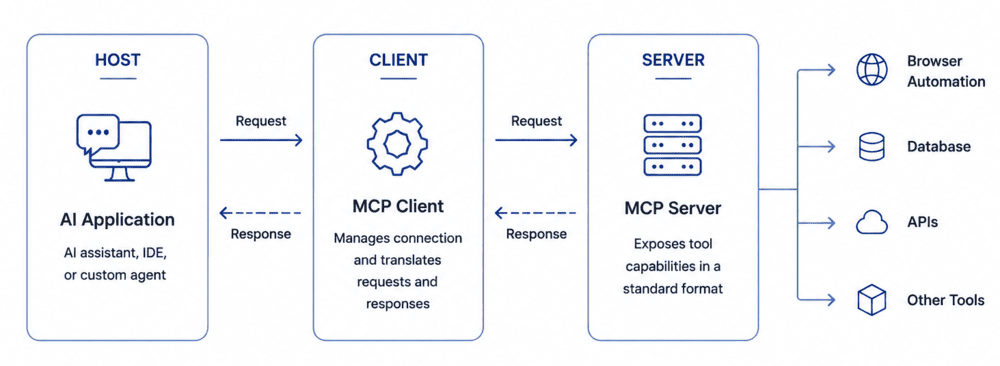
Host: The AI application the person interacts with. It can be an AI assistant, an IDE, or a custom agent built for a specific workflow.
Client: The client lives inside the host and manages the connection to an MCP server. It translates what the AI wants to do into requests the server understands. It also translates the server’s responses into something the AI can understand.
Server: The server exposes a tool’s capabilities in a standard format. A browser automation server exposes actions like navigate, click, and read page content. A database server exposes the ability to run queries. Each server focuses on one tool or one category of tool.
A team doesn’t need to build a custom integration when it wants an AI agent to work with a new tool. It only needs an MCP server for that tool; then any MCP-compatible AI application can use it.
A Walkthrough Example
A tester asks an AI agent connected to a browser automation MCP server to check that login works on a staging environment.
The agent opens a browser, navigates to the login page, and reads the page’s structure. It identifies the username and password fields, enters test credentials, and clicks submit.
It reads the resulting page to confirm the user landed on the expected dashboard, then reports back what it did and what it found.
No developer had to write a script, and no human had to manually click through the flow. The MCP server gave the agent a standard way to see the page and act on it.
 Also Read: Agentic Testing with ACCELQ
Types of MCP Testing and MCP Servers Used in QA
If you’re looking for the right MCP server for testing your stack, most fall into these categories.
- Browser and UI testing MCP servers: Drive real browser sessions, read page structure, click, type, and validate results.
- API testing MCP servers: Generate and execute GET, POST, PUT, and DELETE requests against real endpoints. They also check the responses.
- Database testing MCP servers: Query and validate data directly as part of a test, verifying if an action changed the underlying data correctly.
- File system MCP servers: Give an agent the access needed to read and write test data, configuration files, and logs.
- CI/CD MCP servers: Let an agent trigger pipelines, monitor build status, and react when something fails.
- Test management and reporting MCP servers: Connect an agent to test case data and results, so it can pull existing information or route new results into a shared system.
- Device and browser farm MCP servers: Offer agent access to real devices or cross-browser environments.
- Performance and load testing MCP servers: Let an agent run load tests and extract performance results.
- Agent conversation testing: Tests what an agent does across a full natural language exchange.
- Agent behavior and trace testing: Checks how an agent got to its answer: which tools it called, in what order, and whether it avoided everything it shouldn’t have touched. This is separate from whether the final answer was correct.
What a Full MCP Test Covers
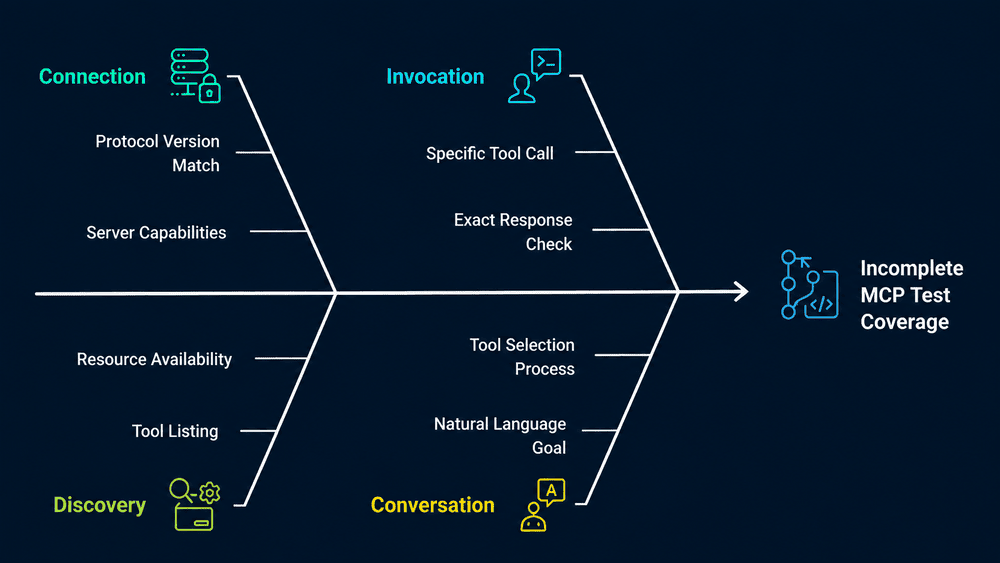
A complete MCP test usually moves through several distinct stages:
Connect
Establish a session with the MCP server and confirm the protocol version and server capabilities match what’s expected.
Discover
List the tools, resources, and prompts the server actually exposes, rather than assuming what’s available.
Invoke directly
Call a specific tool with known arguments and check the exact response. This validates that an individual capability works in isolation.
Run a real conversation
Give the agent a natural language goal, such as “check my account balance,”. Let it decide which tools to call to satisfy that goal.
Judge the outcome
Evaluate how well the agent’s final result satisfies the goal. Check the result against a specific expectation instead of just marking pass or fail.
- Check the trace: Confirm the agent used the right tools, in the right order, and didn’t call anything it shouldn’t have. An agent can get a correct-looking answer while taking an unauthorized action.
- Validate arguments: Confirm that the agent called each tool with correctly structured data.
- Monitor health and performance: Check that the connection remains stable and that tools respond within an acceptable time.
A script either passes or fails. An agent can produce a technically correct answer while following a process you never intended.
How ACCELQ Approaches MCP Testing
ACCELQ builds MCP testing in as a native part of test scenario design.
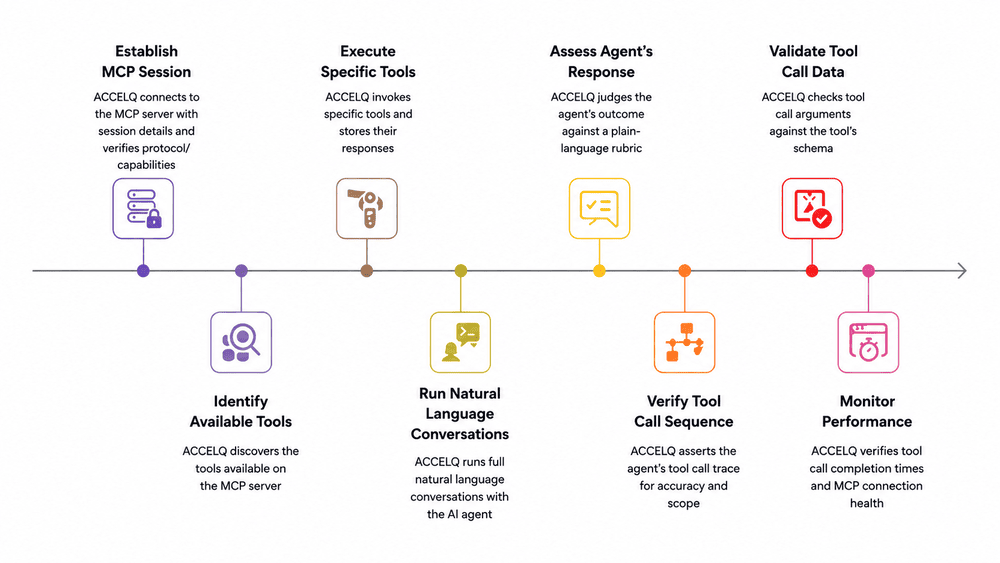
In a sample banking application, a scenario connects to an MCP server as it would connect to any other system under test. Then, it works through each stage described above as a visible test step:
- First, ACCELQ connects to the MCP server with a session name, server URL, and bearer token. It verifies that the negotiated protocol version and server capabilities match what’s expected.
- It discovers the tools available on the server, then invokes specific tools and stores each response.
- It runs full natural language conversations with the agent. For example, asking it to “check balance” or “transfer 50 from checking to savings.” Each conversation can specify a particular model and a maximum number of tool calls. Or, you leave the model as default.
- Each agent outcome is judged against a plain-language rubric, such as confirming the user received the accurate current balance or that a transfer completed successfully. It is scored against a pass-or-fail threshold rather than a single hardcoded value.
- Separately, the scenario asserts the agent’s tool call trace for a given conversation. It checks that it calls the right tools, in the expected order. It also explicitly checks that it did not call a tool outside its intended scope.
- It checks tool call arguments against the tool’s schema to confirm the agent is sending correctly structured data.
- Finally, it verifies that a specific tool call completes within a set time limit. It also separately measures average response time across tool calls, alongside monitoring the MCP connection’s health and stability.
See how ACCELQ tests MCP servers and AI agents directly, linking to a demo request.
Benefits of MCP for Test Automation
MCP test automation does quite a bit to make life easier for QA teams:
Less custom integration work
QA teams no longer have to wait for a bespoke connection for every AI tool paired with every testing tool.
Access to live application data
An agent working through MCP interacts with the application as it actually is right now. It doesn’t have to depend on static training knowledge. This provides more reliable, real-world-backed answers.
Faster early-stage testing
Exploratory checks and first draft scripts can be produced faster than writing them by hand. Just describe what you want in plain language, and ACCELQ will create executable scripts based on your instructions.
Reduced vendor lock-in
Because MCP is an open standard, the same agent can work with different tools without being tied to one vendor’s proprietary integration.
Scoring replaces guessing at exact-match assertions
When an agent’s output is a natural language answer (not a fixed value), scoring it against a written rubric is more practical than trying to hardcode every acceptable answer along with every phrasing variation.
If you feel like a deep dive, try How Vibe Testing Changes the Way Teams Think About Quality
Limitations and Open Questions
MCP testing brings real advantages, but it also introduces failures that all teams may not plan for with scripted automation.
- The ecosystem is still maturing: Tooling, documentation, and best practices around MCP are evolving quickly. Quality varies across servers, especially open-source, community-maintained ones.
- Security needs more attention: An MCP server can give an AI agent access to real data and the ability to take real actions. But QAs have to keep scoping what an agent can see and do, and reviewing that scope regularly. This is because MCP is different from a script that only runs in a sandboxed test environment.
- Rubric-based judging introduces subjectivity: Scoring an agent’s output against a threshold is nothing like a deterministic assertion. To manage this subjectivity, thresholds need to be set and reviewed periodically as agents and prompts change.
It’s a connection layer, not a strategy: MCP does not decide what to test, how much coverage is enough, or how to manage test assets over time. Humans still have to decide that.
MCP Testing vs Traditional Test Automation Approaches
| Approach | Best for | Trade off |
|---|---|---|
| Scripted automation (Selenium, Playwright, etc.) | Stable, well-defined regression suites | Needs ongoing upkeep as the UI or data changes |
| Codeless, AI-augmented platforms (such as ACCELQ) | Natural language test design, native MCP testing, and governance at scale | Requires adopting a dedicated platform |
| MCP-based agent testing (ad hoc) | Fast, conversational, exploratory testing | Not built, on its own, for large regression suites that need audit trails and governance |
Scripted automation is still the right call when you need something that runs the same way, every time, and holds up under an audit.
MCP-based agent testing works when you want to poke at something quickly, without setting up a whole test first.
A platform like ACCELQ isn’t really a competitor to either. It facilitates both, using the same natural language test design you’d use for a UI or API test.
How to Improve Test Automation Using MCP Servers
Once you’ve got the basics down, using MCP for automation testing comes down to a few practices:
- Start with one MCP server tied to your primary stack. If most of your manual effort goes into browser-based testing, start there. Don’t connect several servers at once.
- Scope permissions narrowly. Give the agent access only to what a specific test task needs.
- Use MCP for exploratory work and draft generation first. Whatever proves to be stable gets to go into your maintained, governed test suite.
- Pair MCP-generated tests with a structured test management layer. Results should be tracked and reportable, not just something that happened in a chat session.
- Check the trace, not just the answer. Assert which tools an agent called and confirm it didn’t call anything out of scope.
- Treat MCP servers like any other dependency. Version them, monitor them, and review them the same way you’d review a library your test framework stands on.
What Teams Should Evaluate First: Quick Checklist
- Which part of your stack causes the most manual testing overhead today: UI, API, or data validation?
- Does your team have a security and governance review process ready? You’ll need it when you start giving an AI agent access to real tools and real data.
- Is the immediate goal exploratory speed? Or are you going for long-term, maintainable regression coverage? This decides if MCP alone is enough, or whether it needs to sit inside a structured platform.
- If your team is already building or using AI agents, do you have a way to verify the actions they take to get to each answer?
FAQ's
What is MCP in software testing?
MCP, or Model Context Protocol, is an open standard that lets an AI agent connect directly to testing tools such as browsers, APIs, and databases. It allows the agent to run and verify tests rather than only writing test code.
What is an MCP server used for in test automation?
An MCP server exposes a specific tool's capabilities, such as browser control or database access, in a standard format that any MCP-compatible AI agent can use without requiring a custom integration.
Is MCP the same as AI test automation?
No. MCP is a connection protocol, not a testing methodology. AI test automation refers to the broader use of AI to design, generate, or maintain tests. MCP is one piece of infrastructure that helps AI agents interact with real tools during that process.
What is MCP test automation, with an example?
MCP test automation uses the Model Context Protocol to let an AI agent operate real tools instead of only generating scripts. For example, an agent connected to a browser automation MCP server can open a login page, enter credentials, submit the form, and confirm the user lands on the correct dashboard without anyone coding or running that check manually.
What is the difference between MCP and codeless test automation?
MCP connects an AI agent to individual tools for direct action. Codeless test automation, as used in platforms like ACCELQ, is used for designing, organizing, and maintaining test assets in natural language with built-in structured governance. They solve different problems and can work together.
Do I need to code to use MCP for testing?
Using an existing MCP server does not require writing code in most cases, since interaction happens through natural language instructions to an AI agent. However, building a new MCP server for a tool that does not already have one requires significant development effort.
Is MCP testing secure enough for enterprise QA?
MCP is a standard, not a guarantee of security. Enterprise readiness depends on how carefully a team scopes the data and actions an agent can access, along with how well MCP servers are reviewed and monitored.
How do you test what an AI agent actually does, not just what it says?
You do this by checking the agent's tool call trace along with its final answer. Tests should confirm that the AI agent used the right tools, in the right order, and avoided actions outside its intended scope. The final result should also be scored against a defined expectation.



Nishan Joseph
VP Sales Engineering
Nishan is a tech strategist with expertise in Test Automation and roles at giants like TCS, Microfocus, and Parasoft. At ACCELQ, he champions Strategic Alliances, cultivating global tech partnerships. Educated at Leeds University and Symbiosis Pune, he also possesses an engineering background from Bangalore.


You Might Also Like:
 Conversational AI for Test Automation | ACCELQ Converse
Conversational AI for Test Automation | ACCELQ Converse
 TestOps: Implementation & Quality
TestOps: Implementation & Quality
 Role of Quality Engineering in Automation Testing