




Testing MS Dynamics 365 with ACCELQ: A Complete 2026 Guide

ACCELQ tests MS Dynamics 365 through an agentic testing automation platform built to handle Dynamics 365’s nested iframes, dynamic object IDs, and frequent release-wave UI changes. Testers build and maintain tests visually, without scripting, while AI self-healing and the pre-built Dynamics Universe asset library keep regression suites stable across releases.
A tester writes a script against a field buried three iframes deep on a Dynamics 365 Sales form. It works. Three weeks later, a routine UI update shifts that field’s runtime-generated ID, and the script fails. The business process is fine. The automation was pointed at a single brittle address, and that address moved. Multiply that across a few hundred test cases, and a QA team’s real job quietly becomes locator maintenance.
Testing MS Dynamics 365 with ACCELQ was built to solve this specific, well-documented problem. This guide covers the mechanism behind it, step by step.
- What Makes Dynamics 365 Hard to Test?
- How Do You Handle Nested iFrames and Dynamic Object IDs in Dynamics 365 Tests?
- Codeless Agentic AI Testing for Dynamics 365: What “No Coding” Actually Means
- Which Dynamics 365 Testing Tools Have AI Self-Healing?
- How Does ACCELQ Test MS Dynamics 365 End to End?
- How Do You Build a Dynamics 365 Regression Suite in ACCELQ?
- When Should You Run Each Test During a Dynamics 365 Release Wave?
- Why Do Teams Choose ACCELQ Over Script-Based Alternatives?
- Conclusion
- Testing MS Dynamics 365 with ACCELQ addresses the main cause of failed Dynamics 365 tests: scripts tied to a single locator that breaks after a UI update.
- ACCELQ identifies each Dynamics 365 element by multiple properties and traverses nested iframes automatically, so tests keep working when object IDs change.
- ACCELQ includes native AI self-healing. Tricentis Tosca sells it as a separate Vision AI license, while RSAT, EasyRepro, Playwright, and Selenium need custom frameworks.
- Codeless, natural-language test design lets functional consultants and business analysts build Dynamics 365 tests without scripting.
- A Dynamics 365 regression suite in ACCELQ takes five steps: record, tag by module, add data variation, connect CI/CD, and validate through a release wave.
- ACCELQ integrates with Azure DevOps and CI/CD tools to trigger regression runs automatically during each release.
- Microsoft ships two Dynamics 365 release waves a year. Test in four windows: early access, release plan review, pre-update, and post-update.
- ACCELQ’s self-healing log from early access shows where Microsoft changed the UI.
- When a control changes what it does, a person has to update the test’s intent.
What Makes Dynamics 365 Hard to Test?
Dynamics 365 is harder to test than a typical business application because its UI is deeply nested, its object IDs change at runtime, and Microsoft ships release waves on a fixed schedule. Six challenges come up on almost every QA team:
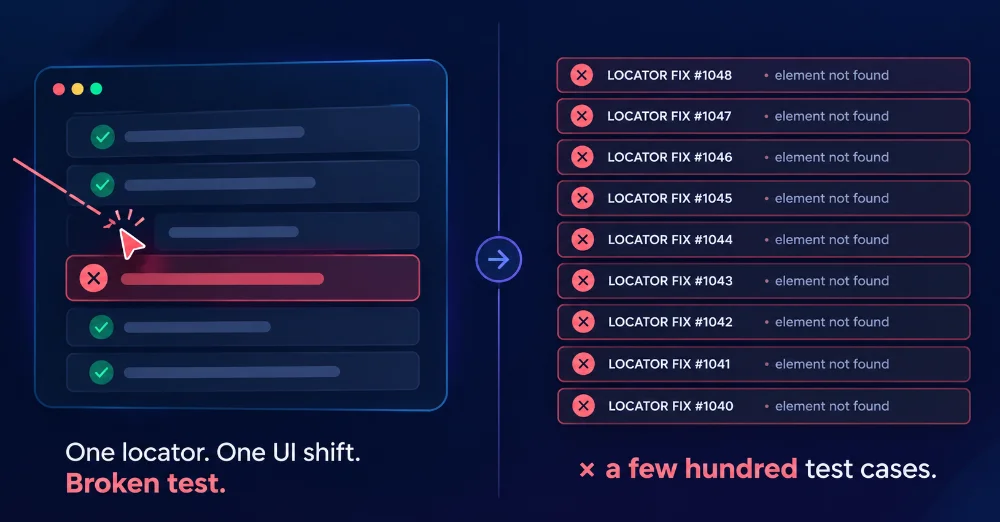
Dynamics 365 testing challenges caused by brittle single-locator scripts
-
Deep object trees, dynamic object IDs, and nested iframes: Sales, Customer Service, and Finance and Operations render controls inside layered iframes with IDs that regenerate at runtime. A script anchored to one of those IDs, or to a fixed position in the object tree, is fragile from day one.
-
UI and markup differences across the suite: An automation approach that works in Sales often needs a substantial rebuild for Customer Service or Supply Chain Management, because markup and navigation patterns differ from app to app.
-
Manual regression cannot keep pace: Every bug fix or feature technically warrants a regression pass. Release frequency outruns manual effort, and adding testers does not close that gap.
-
Cross-browser and cross-device inconsistency: Rendering differences cause failures unrelated to business logic, and separating real defects from browser quirks eats investigation time.
-
Data and configuration risk during upgrades: Version changes and migrations can cause data loss or misconfiguration, which functional UI checks alone do not catch.
-
Coverage capped by engineering time: When test creation requires scripting, developer availability sets the pace of coverage growth.
Test automation for Dynamics 365 covers these at a strategic level. The sections below explain how ACCELQ handles each one as a platform.
How Do You Handle Nested iFrames and Dynamic Object IDs in Dynamics 365 Tests?
ACCELQ handles nested iframes and dynamic object IDs by identifying each element through several properties at once and by traversing iframe context automatically, so a deeply nested control is addressed the same way as a top-level one.
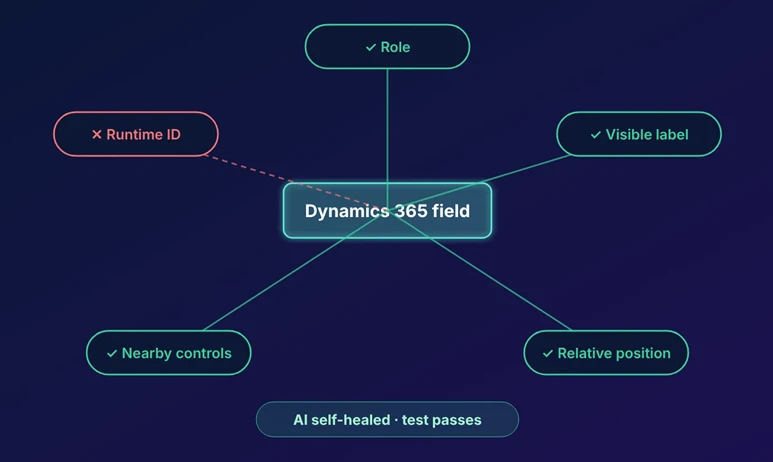
A traditional script locks onto one attribute: an XPath, a CSS selector, or a runtime-generated ID. When Dynamics 365 regenerates that ID or restructures the iframe, which happens routinely across release waves, the script has nothing left to match and fails.
ACCELQ’s object recognition builds a fingerprint from multiple properties: role, visible label, position relative to nearby controls, and more. If one property changes, the others still identify the element. AI-based self-healing then recalculates the drifting match against the remaining fingerprint and updates it automatically, which prevents a false failure. ACCELQ’s support documentation explains the full logic in Self Healing: Comprehensive approach to adaptive element identification.
Recording is visual and model-based for the same reason. It captures how a business user interacts with a screen. An iframe restructure or a renumbered form section therefore does not invalidate the test on its own.
No approach removes test maintenance entirely. A control that changes in function still needs a human to update the test’s intent. This approach removes the high-frequency failure where the business process stayed the same and the automation broke anyway.

Codeless Agentic AI Testing for Dynamics 365: What “No Coding” Actually Means
Codeless agentic AI testing for Dynamics 365 means building and maintaining tests through visual, model-based design and natural-language steps, with AI agents handling object recognition and maintenance. Nobody writes or debugs scripts in a programming language.
In ACCELQ, a tester records a business process the way a user performs it, then edits that flow in a visual editor using plain-English steps. Functional consultants, business analysts, and QA generalists can all build and maintain Dynamics 365 coverage. This matters because on most Dynamics 365 implementations, deep knowledge of the business process sits with people who are not software engineers.
Codeless has limits worth stating plainly. Complex API chaining or custom backend logic still benefits from someone who understands that logic, even without traditional scripting. What codeless removes is the dependency on engineering headcount for test authorship and maintenance, which is usually the real bottleneck on Dynamics 365 coverage.
The Dynamics Universe adds pre-built, business-process-modeled assets and templates for common Dynamics 365 scenarios. Teams start from an existing regression foundation.
Which Dynamics 365 Testing Tools Have AI Self-Healing?
Among the tools commonly evaluated for Dynamics 365, ACCELQ, Tricentis Tosca, and TestComplete offer AI self-healing to some degree. RSAT, Microsoft’s EasyRepro, Playwright, and Selenium do not include it natively and rely on manual locator maintenance.
| Tool | Native AI self-healing | Notes |
|---|---|---|
| ACCELQ | Yes | Built into the platform; shares one object model with iframe handling and dynamic ID resilience |
| Tricentis Tosca | Add-on | Delivered through Vision AI, sold as a separate license |
| TestComplete | Yes, recently added | Vision AI capability [editor: verify release date before publishing] |
| RSAT | No | Task Recorder playback with no self-healing layer |
| EasyRepro | No | Script-based; healing requires a custom framework |
| Playwright | No | Script-based; healing requires a custom framework or add-on |
| Selenium | No | Script-based; healing requires a custom framework or add-on |
ACCELQ’s self-healing is native to the platform and runs on the same multi-property object model described above. Iframe handling, dynamic ID resilience, and self-healing work as one connected capability.
For a full comparison across module coverage, CI/CD depth, and pricing, see 8 Dynamics 365 Automated Testing Tools Compared.
How Does ACCELQ Test MS Dynamics 365 End to End?
ACCELQ tests MS Dynamics 365 end to end by combining four connected capabilities: CI/CD integration, risk-based test planning, cross-platform automation, and automated object library updates.
• CI/CD alignment with Dynamics 365 releases. Test execution plugs into the CI pipeline, so testing runs in-sprint alongside development and regression runs trigger automatically during each release.
• Risk and defect-based test planning. Coverage analysis and traceability show which business processes are covered, which defects map to which test cases, and where new coverage matters most.
• Cross-platform reach. ACCELQ automates Web, API, Mobile, and Power Platform scenarios from one platform, so a Dynamics 365 process that hands off to an integrated system stays in a single test.
• Automated object library updates. As Microsoft ships each release wave, the object library updates to match, which cuts manual re-mapping.
SUGGESTED READ - Tie regression testing to Dynamics 365’s release calendar.
How Do You Build a Dynamics 365 Regression Suite in ACCELQ?
You build a Dynamics 365 regression suite in ACCELQ in five steps, and the sequence is the same whichever app in the suite you start with.
Steps to build a Dynamics 365 regression suite in ACCELQ
-
Record the business process: Record a real end-to-end scenario, such as a sales order through invoicing or a case through resolution, exactly as a user performs it. Model-based recording captures the business steps.
-
Tag by module and business process: Dynamics Universe assets come pre-tagged to specific F&O and Customer Engagement processes, and custom recordings can follow the same pattern. You can then filter and prioritize the suite by what changed in a given release.
-
Add data variation before adding scale: Parameterize test data so one modeled process runs across the entities, currencies, and configurations a multi-entity or multi-geography implementation needs.
-
Connect the suite to CI/CD once core flows are stable: Wiring execution into the pipeline is a configuration step. Validate a process inside ACCELQ first, then automate its trigger points.
-
Run through a full release wave before judging maintenance load: The real test of any automation approach comes after the next wave ships. Object recognition and self-healing are designed for that moment.
When Should You Run Each Test During a Dynamics 365 Release Wave?
Run tests in four windows across every Dynamics 365 release wave: early access, preview, pre-update, and post-update. Microsoft ships two release waves a year. Wave 1 rolls out from April and Wave 2 from October, and each opens with an early access period about two months before general availability. Most guides tell you to “test before the update.” This calendar tells you what to run and when.
| Window | Timing | What to run in ACCELQ | Goal |
|---|---|---|---|
| 1. Early access | ~8 weeks before GA (Feb / Aug) | Full regression suite in a sandbox with early access features turned on | Find breaking UI and process changes first |
| 2. Release plan review | ~6 weeks before GA | Filter the suite by tagged modules named in Microsoft’s release plans | Focus effort on the areas Microsoft is changing |
| 3. Pre-update | 1–2 weeks before your scheduled update | Smoke + critical business process runs; review self-healed objects | Confirm fixes and approve healed locators |
| 4. Post-update | Within 24–48 hours of the update | Full regression triggered from CI/CD in production-like environment | Prove the business still runs correctly |
Pro tip: Review the self-healing log after Window 1. Every element ACCELQ healed shows you exactly where Microsoft changed the UI, which gives you a ready-made change map for the rest of the wave.
Why Do Teams Choose ACCELQ Over Script-Based Alternatives?
Teams choose ACCELQ because engineering time is what usually limits Dynamics 365 test coverage. Scripts against a platform that changes on a frequent, fixed schedule consume that time fast. ACCELQ removes scripting from test authorship and maintenance and removes single-locator fragility from object recognition, which addresses both constraints directly.
Independent analysts back this up. ACCELQ has been recognized as a leader in independent evaluations of continuous testing platforms.
Conclusion
Testing MS Dynamics 365 with ACCELQ comes down to one connected idea. Identify objects by more than one property, traverse iframe context automatically, let AI self-healing absorb release-wave changes, and give test authorship to the people who understand the business process. That combination turns Dynamics 365 testing from a recurring maintenance project into a routine check that the business runs correctly.
Start a free trial and test your Dynamics 365 implementation with codeless agentic AI and self-healing automation built for this platform.
Frequently Asked Questions
How do you handle nested iFrames and dynamic object IDs in Dynamics 365 tests?
ACCELQ identifies elements using multiple properties at once and automatically traverses iframe context, so nested controls are addressed the same way as top-level controls. When one property changes, AI self-healing re-matches the element against the rest of its fingerprint, and the test keeps running.
Which Dynamics 365 testing tools have AI self-healing?
ACCELQ has native self-healing. Tricentis Tosca offers it through a separately licensed Vision AI capability, and TestComplete has recently added Vision AI. RSAT, EasyRepro, Playwright, and Selenium do not include it natively.
Does ACCELQ require coding knowledge to test Dynamics 365?
No. Tests are built and maintained through visual, model-based design and natural-language steps. Complex custom backend logic can benefit from someone who understands it, but standard process automation needs no scripting.
Does ACCELQ support Dynamics 365 Business Central alongside F&O and Customer Engagement?
ACCELQ’s Dynamics coverage spans the Dynamics 365 suite and Microsoft Power Platform. For scope specific to your Business Central implementation, talk to the ACCELQ team.
When should you test during a Dynamics 365 release wave?
Test in four windows: early access (about eight weeks before GA), release plan review, one to two weeks before your scheduled update, and within 48 hours after it. ACCELQ’s module tagging and self-healing logs make each window faster.
Does ACCELQ integrate with Azure DevOps and other CI/CD tools?
Yes. ACCELQ integrates with Azure DevOps and other common CI/CD tools to trigger automated regression runs as part of each release.




You Might Also Like:
 Test Data Management: Complete Guide
 Top 9 Principles of Automation Testing
 What is Test Automation? Types, Challenges, and Benefits