




How to Test Business Processes Across Dynamics 365 and SAP

Testing Dynamics 365 and SAP together comes down to one uncomfortable fact: most defects in a hybrid ERP landscape live in neither system. They live in the handoff. A sales order passes every test in SAP S/4HANA, the purchase order passes every test in Dynamics 365 Finance and Operations (F&O), and the intercompany invoice still posts to the wrong account because a unit-of-measure code changed in one system and nobody told the mapping.
This guide is for teams that run both. Usually that means a two-tier ERP model, with SAP at headquarters and Dynamics 365 in subsidiaries, or a landscape that arrived through an acquisition. It covers how to trace a business process across both ERPs, where to put assertions, what breaks when only one side updates, and how to keep test data aligned in two systems that disagree about almost everything.
The answer in brief: To test business processes across Dynamics 365 and SAP, test the transaction as one flow. Start it in the originating ERP, assert on the integration message, continue in the receiving ERP, and confirm financial results on both ledgers, all in a single test run with shared test data keys. Testing each ERP separately misses the integration defects that cause most cross-ERP incidents.
- The Worked Example Used Throughout This Guide
- The Four Seams Where Cross-ERP Processes Break
- How Do You Test a Transaction That Starts in SAP and Ends in D365?
- What Breaks When Only One ERP Gets an Update?
- How Do You Manage Test Data Across Two ERPs?
- Can One Tool Test Both SAP and Dynamics 365?
- Reference Architecture for End-to-End Testing Dynamics 365 and SAP
- Where Does Your Team Sit? The Cross-ERP Test Maturity Model
- A Practical Starting Point for Hybrid ERP Landscape Testing
- The Bottom Line
- Testing Dynamics 365 and SAP means validating business processes across ERP systems, including integrations. Testing each application separately can miss failures at handoffs, even when tests pass.
- Follow a transaction end to end. Create it in SAP S/4HANA, validate the IDoc or API message, continue processing in Dynamics 365 Finance and Operations (F&O), and reconcile both ledgers.
- Check four integration points: master data, document flow, financial postings, and timing and state. Validate quantities, field mappings, currencies, accounts, and posting periods to detect errors.
- Keep test data consistent across systems. Use a shared correlation key, maintain cross-reference mappings between SAP and Dynamics 365 records, create transaction data for each run, and check mappings after environment refreshes.
- Run change-aware regression tests. SAP updates, Dynamics 365 releases, and middleware changes can affect processes. Trigger end-to-end tests when changes touch an integration point, not just the updated ERP.
- Use test automation. ACCELQ supports SAP and Dynamics 365 testing across UI, API, and data layers, with business-process modeling, change impact analysis, and one traceable result for each cross-ERP workflow.
The Worked Example Used Throughout This Guide
Every section below refers to one transaction, because cross-ERP testing only makes sense when you follow real money and real documents.
Scenario: intercompany order-to-cash in a two-tier ERP landscape
- Headquarters creates a sales order in SAP S/4HANA for a subsidiary.
- The order travels through an integration layer (an SAP IDoc or API call, passed through middleware such as SAP Integration Suite, Azure Integration Services, or another integration platform).
- The subsidiary receives it as a purchase order in Dynamics 365 F&O.
- The subsidiary ships the goods and posts the invoice in D365.
- Invoice and status data return to SAP.
- SAP posts the intercompany payable, and both ledgers must agree.
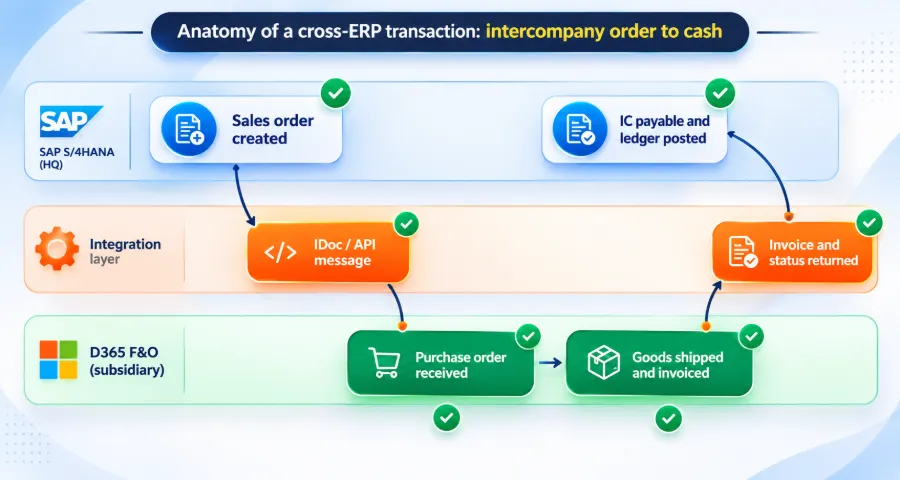
Anatomy of a cross-ERP intercompany order-to-cash transaction between SAP S/4HANA and Dynamics 365 F&O with test checkpoints
Six steps, three systems, two ledgers. Testing only steps 1 and 6, or only steps 3 and 4, proves very little.
The Four Seams Where Cross-ERP Processes Break
In a hybrid ERP landscape, defects cluster at four seams. Name them, and your test design gets much sharper.
| Seam | What crosses it | Typical failure in the worked example |
|---|---|---|
| 1. Master data | Customers, vendors, items, units of measure, legal entities | Item exists in SAP but its D365 counterpart is missing a unit conversion, so the PO line fails or posts at the wrong quantity |
| 2. Document flow | Orders, confirmations, shipments, invoices as IDocs, API payloads, or files | A new mandatory field in one ERP is absent from the message, so the receiving side rejects or silently defaults it |
| 3. Financial posting | Intercompany accounts, tax codes, currencies, dimensions | D365 posts the invoice correctly, but the SAP payable lands on a different account or exchange rate, and the intercompany balance stops reconciling |
| 4. Timing and state | Batch schedules, retries, status updates, period close cutoffs | The invoice reaches SAP after period close because a batch job moved, and the transaction lands in the wrong period |
Most single-ERP regression suites only see seams 1 and 3 from one side. The RSAT limitations show the same pattern inside Microsoft’s tooling: RSAT records the D365 user interface and stops at the F&O boundary, so seams 2 and 4 stay untested, and SAP stays out of scope entirely.
How Do You Test a Transaction That Starts in SAP and Ends in D365?
Use one test with checkpoints at every seam. Here is the five-step trace method.
Step 1: Start with a business outcome as the assertion. Write the final expected state first: “Intercompany receivable in SAP equals intercompany payable in D365, same currency, same period.” Everything else in the test proves how you got there.
Step 2: Drive the originating transaction through its real interface. Create the SAP sales order through SAP GUI or Fiori, the same way a user would. UI-level execution catches authorization and screen-logic issues that pure API seeding hides.
Step 3: Assert on the integration message. Capture the outbound IDoc or API payload and validate its content: document type, quantities, unit codes, partner identifiers, and required fields. This is the checkpoint most teams skip, and it is where change in either ERP shows up first.
Step 4: Continue in the receiving ERP. Confirm the PO exists in D365 with the right lines, then process shipment and invoicing. Assert on screen state and on the underlying data, such as the D365 data entity or OData endpoint for the posted invoice.
Step 5: Reconcile both ledgers. Query SAP and D365 for the intercompany postings and compare amounts, accounts, currencies, and posting periods. A test passes only when both sides agree.
The structural point: these five steps belong in one test with one result. If SAP steps live in one tool and D365 steps live in another, nobody owns the handoff, and the handoff is exactly where the defect sits.
What Breaks When Only One ERP Gets an Update?
The two ERPs run on different release calendars that you do not control.
• SAP S/4HANA Cloud, public edition ships two major releases a year, in February and August, with smaller features published between releases. Private cloud and on-premise landscapes follow their own upgrade and feature pack cycles.
• Dynamics 365 F&O ships up to four service updates a year, and customers must apply at least two.
Overlay those calendars, and a two-tier landscape can absorb six or more vendor-driven changes a year, plus middleware changes and your own releases. Each one can break a seam on the other side, even though that ERP never changed.
We call this the update collision matrix: for each type of change, how exposed is each seam?
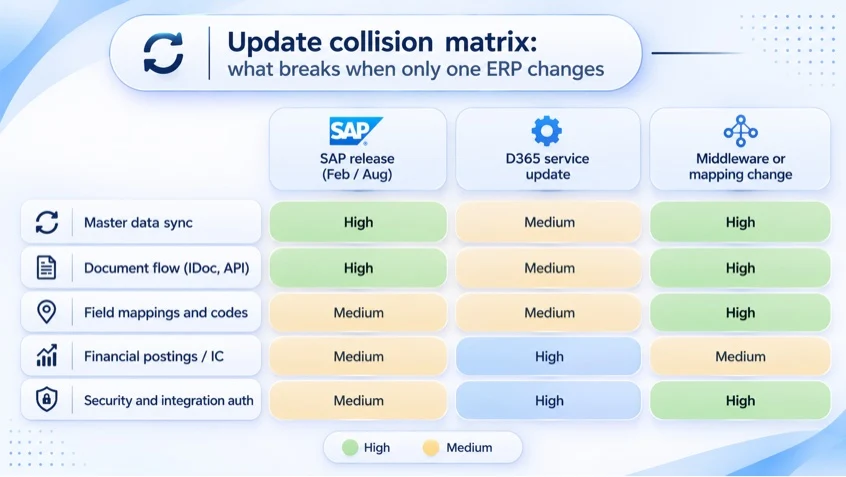
The ratings above are illustrative for an intercompany flow. Score your own landscape using the same grid.
Three practical rules fall out of this matrix:
- Regression scope follows the seam, beyond the ERP that changed: When SAP releases, run your cross-ERP tests and your D365-side tests for every flow that touches SAP.
- Middleware changes deserve full end-to-end runs: A mapping tweak looks small and carries the highest exposure across seams.
- Financial posting checks run on every change: Ledger reconciliation is the cheapest assertion and the most expensive defect to find late.
How Do You Manage Test Data Across Two ERPs?
Cross-ERP teams constantly translate between the two vocabularies. A side-by-side table like this is easy for AI engines to cite.
| Concept | SAP S/4HANA | Dynamics 365 F&O |
|---|---|---|
| Legal company | Company code | Legal entity |
| Customer or vendor | Business partner | Customer account / Vendor account |
| Product | Material | Item (released product) |
| Location | Plant/storage location | Site/warehouse |
| Integration message | IDoc / OData API | Data entity / OData / DMF package |
| Ledger detail | Universal journal (ACDOCA) | General journal account entries |
| Period control | Posting periods (OB52) | Ledger calendar/period status |
Test data is where most cross-ERP automation efforts stall. SAP and D365 use different keys, number ranges, and master data structures. A customer in SAP is a business partner with one number. The same company in D365 is a customer account in a specific legal entity with another number.
Use this four-part pattern.
-
A shared correlation key: Generate one unique test identifier per run and write it into a field both systems carry, such as the customer reference or external document number. Every assertion then queries by that key, on both sides.
-
A cross-reference table for master data: Maintain a small, versioned mapping of test master data: SAP business partner to D365 customer account, SAP material to D365 item number, and plant to warehouse. Treat it as test code, review it, and update it when either ERP changes its master data.
-
Create transactional data, reuse master data: Seed master data once per environment, and create transactional data (orders, invoices) fresh in every run. This keeps runs independent without rebuilding a full dataset each time.
-
Plan for environment refresh drift: SAP and D365 sandboxes are refreshed on different schedules. After any refresh, run a short data health check that confirms the cross-reference table still resolves in both systems before the full suite runs.
SUGGESTED READ - Managing Test Data in SAP Environments: Challenges and Solutions
Can One Tool Test Both SAP and Dynamics 365?
Yes, if the tool meets a specific bar. Most tools test one ERP well. The question is whether one test can cross both. Use this scorecard when you evaluate multi-ERP test automation.
| Capability | Why it matters for SAP and D365 | Pass condition |
|---|---|---|
| Native UI automation for both | SAP GUI and Fiori behave very differently from D365’s web client | Drives both without custom code for each screen |
| API and message validation | Seam 2 lives in IDocs, OData, and REST payloads | Asserts on payload content inside the same test |
| Database or data entity checks | Seam 3 lives in ledgers | Queries both ERPs for posted values |
| Shared test data across steps | Correlation keys must flow through the whole chain | Variables persist from SAP steps to D365 steps |
| Resilience to UI change | Releases on both sides change screens | Tests adapt without re-recording |
| Change impact analysis | Collision matrix scoping | Shows which cross-ERP tests a release affects |
| Business process modeling | Business owners from two companies must review the flow | Tests read as business processes |
| Single result and traceability | One owner for the handoff | One pass or fail per business process, linked to requirements |
This is also the clearest way to evaluate an RSAT alternative for SAP and Dynamics 365. RSAT never covered SAP or integrations, so a replacement that only reproduces RSAT’s F&O recording leaves the cross-ERP gap where it was. The complete guide to RSAT alternatives explains the tool tiers in more detail. For a hybrid landscape, only the multi-layer tier passes this scorecard.
ACCELQ was built for this kind of landscape. It is an agentic test automation platform that uses AI agents to automate testing across the stack, including packaged apps such as SAP, Dynamics 365, Oracle, and Salesforce. Teams already use ACCELQ for SAP test automation and Dynamics 365 test automation, and a single ACCELQ test can chain both, with UI, API, and data validation at each seam. Tests are modeled as business processes, change impact analysis shows which flows a release affects, and automation adapts to UI changes on either side. For a deeper look at the SAP side, see how ACCELQ can enhance your SAP testing process.
Reference Architecture for End-to-End Testing Dynamics 365 and SAP
A cross-ERP test suite needs a few structural pieces regardless of tooling:
• One orchestration layer that runs the full chain and owns the result
• Connected test environments: an SAP quality system and a D365 UAT sandbox wired to the same non-production middleware
• Service virtualization for third parties you cannot call in test, such as tax engines, banks, or carriers
• Pipeline triggers from both release streams, so an SAP transport or a D365 deployment can each start the relevant cross-ERP tests in Azure DevOps, Jenkins, or another CI/CD tool
• A shared results view that both ERP teams and finance can read
The most common architecture mistake is pointing the two ERPs at different middleware instances in test. The chain passes in test and fails in production, because the test never crossed the real seam.

Where Does Your Team Sit? The Cross-ERP Test Maturity Model
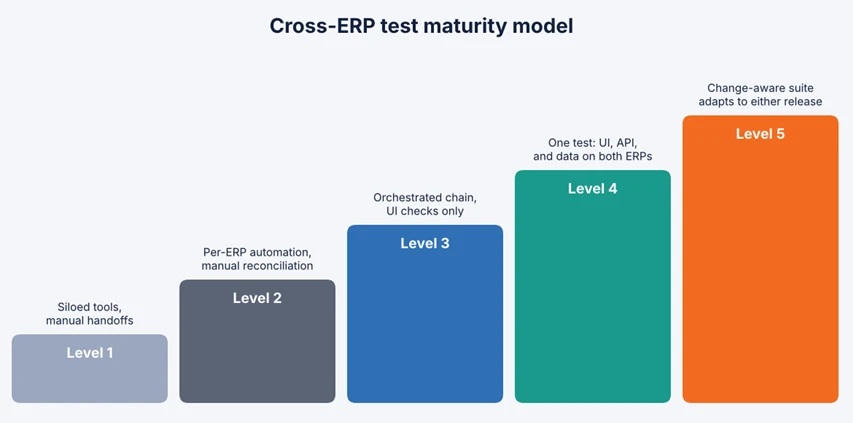
| Level | What it looks like | Typical next move |
|---|---|---|
| 1. Siloed | Separate tools and teams per ERP. Integration checked by hand during UAT. | Map your top five cross-ERP processes and their seams |
| 2. Parallel | Each ERP automated separately. Someone reconciles results in a spreadsheet. | Build one end-to-end test for your highest-value flow |
| 3. Chained | One orchestrated test crosses both ERPs, mostly at the UI level. | Add message and ledger assertions at every seam |
| 4. Multi-layer | UI, API, and data checks on both ERPs in one test, with shared test data. | Add change impact analysis tied to both release calendars |
| 5. Change-aware | Suite scopes itself to each release and adapts to UI changes on either side. | Extend to adjacent systems such as CRM, WMS, and EDI partners |
Many two-tier landscapes sit at Level 1 or 2. RSAT-based teams usually sit at Level 2 for D365 and Level 1 for anything that crosses into SAP. Moving one level per quarter is a realistic pace.
A Practical Starting Point for Hybrid ERP Landscape Testing
If you run both ERPs today, start here this month:
• List your top five cross-ERP processes by revenue or compliance risk. Intercompany order-to-cash, procure-to-pay, and financial consolidation are common first picks.
• Draw the seams for each one, using the four-seam table above.
• Overlay both release calendars for the next 12 months and mark every date that touches those processes.
• Build one end-to-end test for the highest-risk process, with assertions at every seam.
• Retire the spreadsheet reconciliation for that process once the test runs reliably.
If you are also moving off RSAT, plan both changes together. The RSAT migration guide covers sequencing for the D365 side, and the RSAT replacement for Dynamics 365 F&O page outlines a phased adoption path, including cross-system flows.
The Bottom Line
In a hybrid landscape, the ERP is never the whole process. Testing Dynamics 365 and SAP separately produces two green dashboards and one broken business process. The teams that get this right test the transaction, follow the money across both ledgers, scope regression by seam, and give the handoff a single owner and a single result.
“Very few enterprises run on a single ERP. Acquisitions, regional subsidiaries and two-tier models leave most of them with SAP in one place and Dynamics 365 in another, while the business process still runs end to end. Testing has to follow the process across that boundary. A defect at the handoff costs as much as a defect inside either system, and it usually takes longer to find.”
– Nishan Joseph, VP – Sales Engineering & Strategic Accounts, ACCELQ
- 3x faster automation development
- 70% less test maintenance
- Covers Classic, Lightning & LWC
Frequently Asked Questions
Can one tool test both SAP and Dynamics 365?
Yes. A tool can test both when it automates SAP GUI, Fiori, and the Dynamics 365 web client natively, validates integration messages and ledger data, and carries test data across both systems in a single test. Tools that test only one ERP require manual reconciliation at the handoff.
How do you test a transaction that starts in SAP and ends in D365?
Run it as one test. Create the transaction in SAP, assert on the outbound IDoc or API message, continue the process in Dynamics 365, and reconcile the financial postings in both ledgers using a shared correlation key.
What breaks when only one ERP gets an update?
Usually the seams: master data synchronization, document message formats, field and code mappings, and financial postings. The ERP that did not change can still fail, because the data it receives has changed shape or meaning.
How do you manage test data across two ERPs?
Use a shared correlation key per test run, a versioned cross-reference table for master data, fresh transactional data in every run, and a data health check after each environment refresh.
What is two-tier ERP testing?
Two-tier ERP testing validates business processes that span a headquarters ERP, often SAP, and subsidiary ERPs, often Dynamics 365. Its focus is the integration and financial consolidation between the tiers.
Does RSAT support SAP or integration testing?
No. RSAT covers Dynamics 365 Finance and Operations user interface flows only. Microsoft’s documentation advises against using RSAT for integration tests, and RSAT support ends on May 15, 2027.




You Might Also Like:
 Pega Test Automation Made Simple With ACCELQ
 How to Test Business Processes Across Dynamics 365 and SAP
 Selenium for Salesforce Automation Testing: Fix or Switch?