








Salesforce DevOps Testing in 2026: Change & Release Tracking, and AgentForce

In 2026, Salesforce environments will no longer be monolithic CRM deployments. They are interconnected digital platforms spanning industry clouds, external integrations, and AI-driven workflows. Without intelligent change validation, every release increases risk. The methods that worked in 2024 or 2025 will not keep up with the level of automation, intelligence, and release orchestration Salesforce is pushing forward.
DevOps Center is maturing. Change and release tracking is becoming central to change visibility. AgentForce is introducing intelligent automation into the release pipeline. Together, they reshape how teams build, deploy, and test Salesforce applications.
This article explains what is changing and how teams can build a testing strategy that fits the new DevOps reality.
- What Is Salesforce DevOps Testing?
- Why DevOps Is Changing for Salesforce in 2026?
- The Role of Salesforce DevOps Center
- CRT: Change and Release Tracking
- Traditional Regression Approach vs Intelligent DevOps Testing
- AgentForce and AI in Salesforce DevOps
- Testing Implications for Salesforce DevOps
- Key Challenges
- Testing Strategy for 2026
- Use Case Example
- Salesforce DevOps Center Best Practices
- How ACCELQ Helps Salesforce Teams?
- The Future of Salesforce DevOps Testing
- Conclusion
What Is Salesforce DevOps Testing?
Salesforce DevOps testing is the structured validation of metadata, configurations, integrations, and custom logic within Salesforce release pipelines to ensure stability, compliance, and business continuity across environments.
Teams test to keep business processes stable, avoid regressions, catch issues early, and move changes through the pipeline without creating delays. The discipline includes continuous testing, shift left validation, automated regression cycles, test data management, and environment governance.
Salesforce has three major releases each year, and most enterprise teams deploy far more frequently. Salesforce DevOps testing tools provide the structure to support that pace while protecting quality.
Why DevOps Is Changing for Salesforce in 2026?
Salesforce test automation is evolving its DevOps ecosystem in three important ways.
1. DevOps Center is becoming the default workflow
More teams will move away from change sets and manual spreadsheets. DevOps Center provides version control, automated pipelines, release stages, and change tracking in a single place.
2. ACCELQ is emerging as the record of change
Change and Release Tracking gives teams clarity on what changed and the associated risk. This is essential for test planning and automated regression triggers.
3. AgentForce is entering release automation
AgentForce introduces intelligent agents that can assist with validation, metadata analysis, test creation suggestions, and issue triage.
What this really means is that testing can no longer sit outside the DevOps pipeline. It must move in sync with how Salesforce orchestrates development and delivery.
The Role of Salesforce DevOps Center
What is Salesforce DevOps Center and how does it improve testing?
Salesforce DevOps Center centralizes change management, connects metadata directly to version control, organizes work items, and manages deployment pipelines. For testing, this creates a predictable and visible path for how work moves from development to production.
Here is how DevOps Center improves Salesforce DevOps testing:
- It gives clarity on which work items require testing
- It attaches validation steps earlier in the process
- It reduces manual release errors
- It aligns testing cadence with deployment cadence
Teams get structure. Testers get context. Releases become repeatable instead of reactive.
 Also Read: Salesforce Integration Testing
CRT: Change and Release Tracking
CRT is becoming one of the most important signals in Salesforce DevOps pipelines.
It captures:
- What changed?
- Who changed it?
- When the change occurred?
- How does it relate to ongoing release work?
For Salesforce DevOps testing, this provides two advantages.
1. Better risk targeting
Testers know where to focus. When metadata moves or an automation changes, ACCELQ highlights the impact so teams can trigger relevant tests.
2. Reduction of metadata drift
Sandbox drift is one of the biggest challenges in Salesforce DevOps testing. ACCELQ makes these inconsistencies visible, allowing teams to resolve them before the next validation cycle.
With ACCELQ as a trigger, testing becomes intentional rather than broad and wasteful.
🚀 Ready to scale your Salesforce DevOps with confidence? See how AI-powered test automation can make your DevOps pipeline smarter, faster, and more reliable.
Traditional Regression Approach vs Intelligent DevOps Testing
Traditional Salesforce regression cycles rely on full-suite executions and manual impact analysis. Teams often test everything because they cannot confidently identify what changed.
Modern DevOps testing shifts toward metadata-aware validation. Change tracking tools, AI-assisted impact analysis, and pipeline-integrated testing allow teams to validate only what matters, without compromising coverage.
AgentForce and AI in Salesforce DevOps
AgentForce brings AI agents into the release process. These agents can help with:
- Early test creation suggestions
- Metadata analysis
- Change impact predictions
- Automated validations
- Deployment triage
1. How AI is changing Salesforce DevOps testing?
AI introduces new patterns of speed and accuracy.
- Risk-based test selection becomes possible
- Regression suites adjust dynamically
- Self-healing automation reduces false failures
- Agents can perform continuous checks across environments
AI will not replace the tester. It will remove repetitive steps so testers can focus on logic, coverage, and process quality.
Ready to revolutionize your Salesforce DevOps QA?
👉 Download the free “Get Started with AI-Codeless Salesforce Testing” playbook by ACCELQ
Testing Implications for Salesforce DevOps
The rise of DevOps Center, CRT, and AgentForce changes how teams plan, design, and execute tests.
1. Continuous Testing in Salesforce DevOps Pipelines
Salesforce continuous testing is becoming a requirement rather than a recommendation. The pipeline now expects:
- Automated smoke checks in early environments
- Triggered regression tests based on CRT events
- Automated functional validations inside the pipeline
- Frequent refreshes of test data to maintain accuracy
Testing keeps pace with development instead of waiting until the final stage.
Agentic Automation That Learns and Innovates
Redefine Your Testing Game with AUTOPILOT
Key Challenges of Salesforce DevOps Testing in 2026
Salesforce DevOps testing still faces several challenges. These include:
- Frequent releases across Salesforce and connected systems
- Metadata drift between sandboxes
- Test data inconsistencies
- Slow or unstable sandbox refresh cycles
- Complex flows across API, UI, and automation layers
- High volume of changes pushing incomplete test coverage
Teams that do not plan for these challenges often rely on last-minute regression testing cycles that slow delivery.
Testing Strategy for 2026
A strong Salesforce DevOps testing strategy should align with Salesforce release schedules, internal development timelines, and the capabilities of DevOps Center and CRT.
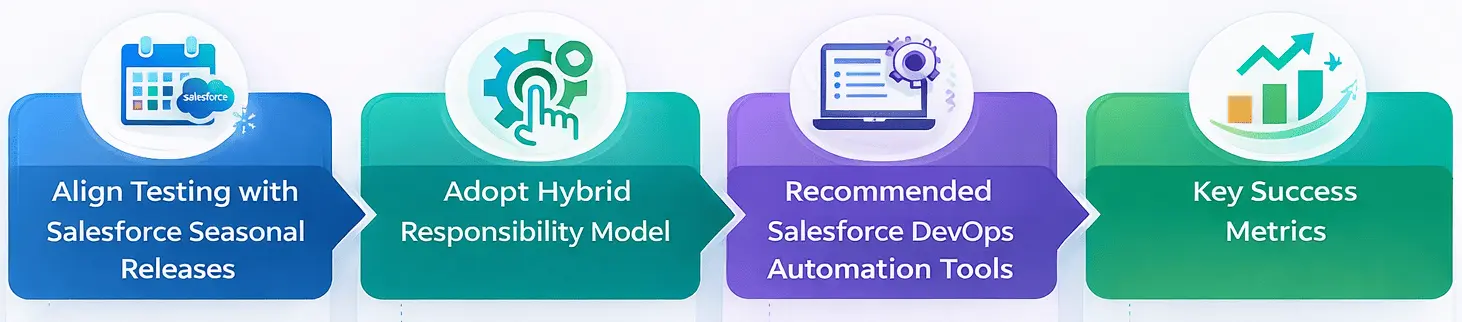
1. Align testing with three Salesforce seasonal releases
Each release introduces platform-level changes. Teams must plan regression cycles that validate:
- Core business processes
- Custom automation
- Lightning components
- Integrations
- API behavior
2. Adopt a hybrid responsibility model
Admins, developers, QA engineers, and DevOps teams share responsibility.
- Dev builds components
- QA validates logic and integration
- Admins test configuration and flows
- DevOps manages the pipeline triggers and checks
3. Recommended Salesforce DevOps automation tools
Teams typically use combinations of:
- ACCELQ
- Autorabbit
- Gearset
- Jenkins
- Flosum
- Flaxagon
- Git based version control
- Monitoring tools such as New Relic or Splunk
The goal is not to choose many tools. The goal is to create a unified workflow where all tools integrate cleanly.
4. Key success metrics
Healthy DevOps testing pipelines measure:
- Release frequency
- Test cycle time
- Automated test coverage
- Defect escape rate
- Mean time to detect issues
- Mean time to restore service
Metrics keep teams grounded in reality and aligned with business expectations.
Use Case Example: How a Global Enterprise Operates in 2026?
Imagine a global financial services organization that manages dozens of Salesforce clouds, hundreds of automations, and multiple integration points.
Here is how their pipeline might work in 2026.
1. Work items created in DevOps Center
Each change links to a user story and appears in the pipeline.
2. ACCELQ detects metadata updates
ACCELQ maps which components changed and triggers the appropriate regression suite.
3. AgentForce reviews metadata and suggests risks
Agents highlight flows, triggers, and API actions that may break.
4. Automated testing runs in parallel
Smoke tests validate the build. Regression tests validate business logic.
5. Deployment gates stop risky releases
If tests fail or coverage drops below policy thresholds, the release pauses.
6. Teams collaborate on fixes
QA, developers, and admins resolve the issues before promoting to production.
Common pitfalls to avoid
- Over-reliance on manual checks
- Ignoring sandbox governance
- Poor communication between DevOps and QA
- Skipped regression cycles due to time pressure
- Test data that does not reflect real scenarios
Enterprises that avoid these pitfalls move faster than those that do not.
Accelerate Your Testing ROI
Leverage AI-powered automation to reduce testing time by 70%.
Salesforce DevOps Center Best Practices
Here is a practical checklist for any team adopting Salesforce DevOps Center.
1. Treat DevOps Center as the source of truth
All changes start here. No side workflows.
2. Connect version control and pipelines early
This prevents drift and confusion.
3. Attach tests directly to work items
This builds accountability and clarity in the pipeline.
4. Use ACCELQ for risk-based regression
Run targeted tests instead of bloated test suites.
5. Standardize sandbox refresh schedules
This keeps test environments aligned.
6.Involve QA early
Shift left only works when QA participates from the start.
7. Monitor the release of health continuously
Pipeline monitoring should be active, not reactive.
Following these best practices keeps teams ready for rapid release cycles while maintaining quality.
- Planning Agent: Reads user stories or requirements and identifies high-risk areas.
- Test Generation Agent: Creates test cases and stores them in a repository.
- Execution Agent: Triggers relevant tests across browsers, APIs, and data layers.
- Validation Agent: Compares results with expected outcomes and flags inconsistencies.
- Reporting Agent: Summarizes outcomes and updates dashboards or Slack channels.
How ACCELQ Helps Salesforce Teams Strengthen DevOps Testing?
ACCELQ has a long partnership with Salesforce, and that relationship plays a practical role in how teams adopt DevOps Center, Change and release tracking, and continuous testing in 2026. The platform aligns closely with Salesforce’s release model, metadata structure, and application behavior, which makes it easier for teams to build a testing workflow that keeps up with rapid changes.
Experience firsthand how ACCELQ’s AI-powered, codeless, and release-aligned automation platform can streamline your Salesforce DevOps testing.
See ACCELQ in Action – Request a Personalized Demo
Looking Ahead: The Future of Salesforce DevOps Testing
Beyond 2025, Salesforce DevOps is moving toward a model that blends AI, automation, and orchestration. Teams can expect:
- AI-assisted test creation
- Predictive release impact analysis
- Agent-driven deployment validation
- End-to-end testing across Salesforce and third-party systems
- Stronger alignment between business process testing and DevOps pipelines
Teams that prepare now will enter 2026 with a significant advantage.
Conclusion
Salesforce DevOps testing is becoming central to how teams deliver value. DevOps Center organizes the workflow. ACCELQ provides clarity and risk mapping. AgentForce brings automation and intelligence into the release lifecycle.
Salesforce DevOps testing is no longer about automating test scripts. It is about governing change in increasingly complex enterprise ecosystems. As Salesforce environments expand across clouds, integrations, and AI-driven processes, release validation becomes a strategic capability rather than a QA task.
Organizations that modernize their DevOps testing approach gain more than speed. They gain confidence in every release.
FAQs
Salesforce DevOps testing is the continuous validation of changes across build, integration, and deployment stages. Teams test to keep business processes stable, avoid regressions, catch issues early, and move changes through the pipeline without creating delays. The discipline includes continuous testing, shift-left validation, automated regression cycles, test data management, and environment governance.
Salesforce DevOps Center centralizes change management, connects metadata directly to version control, organizes work items, and manages deployment pipelines. For testing, this creates a predictable and visible path for how work moves from development to production.
Salesforce DevOps testing still faces several challenges, including frequent releases across Salesforce and connected systems, metadata drift between sandboxes, test data inconsistencies, slow or unstable sandbox refresh cycles, complex flows across API, UI, and automation layers, and a high volume of changes pushing incomplete test coverage. Teams that do not plan for these challenges often rely on last-minute regression testing cycles that slow delivery.



Balbodh Jha
Associate Director Product Engineering
Balbodh is a passionate enthusiast of Test Automation, constantly seeking opportunities to tackle real-world challenges in this field. He possesses an insatiable curiosity for engaging in discussions on testing-related topics and crafting solutions to address them. He has a wealth of experience in establishing Test Centers of Excellence (TCoE) for a diverse range of clients he has collaborated with.

You Might Also Like:
 AI Test Automation for nCino | Powering Fintech Innovation
AI Test Automation for nCino | Powering Fintech Innovation
 Automating Your Salesforce Releases in 2023? Here’s How You Can Do It Successfully!
Automating Your Salesforce Releases in 2023? Here’s How You Can Do It Successfully!
 How To Accelerate Your Salesforce Career