








Omnichannel Testing: Why Passing Every Channel Still Breaks in Production

73% of consumers use multiple channels during their shopping journey, delivering a fragmented digital experience is a conversion killer.
A QA team can pass every single automated test suite and still ship a release where a user saves a draft on the web, only to face a blank screen when they open it on mobile. That is exactly what happened in one staging demo two days before go-live: every channel was green, and the app still failed at the moment of handoff.
This disaster highlights the true definition of omnichannel testing: it is the process of validating a customer’s end-to-end journey as they transition across multiple digital and physical touchpoints,like web, mobile apps, in-store kiosks, and APIs, to ensure data, state, and user context remain synchronized.
When your automation misses this, the resulting gap is a runtime and tooling problem: session state gets created in one framework’s context and has no way to migrate to another.
In this guide, we dive deep into the technical limitations of why tools like Playwright and Appium struggle to share context, how to design a modern omnichannel testing framework, and the strategic approach required to automate seamless cross-platform handoffs.
- What is Omnichannel Testing?
- The Real Technical Problem: Why Playwright and Appium Don't Share Context
- Strategic Approach to Omnichannel Testing
- Toolchain & Automation Frameworks
- Omnichannel Automation Challenges and Prevention
- Case Study: An Example of Omnichannel Testing in Retail
- Best Practices for Omnichannel Testing
- Conclusion
Omnichannel testing ensures customers can shift between web, mobile, APIs, and in-store systems without their data, session, or progress being missed.
A web test can pass. A mobile test can pass. Yet the full journey may still fail when the customer switches channels. The actual risk is hidden in that handoff.
Teams find the most critical cross-channel journeys, catch the session or transaction information created in one channel, move it into the next, and confirm that the same data is available and right.
QA teams, DevOps, and product teams can use it to map their customer journeys across many digital and physical touchpoints.
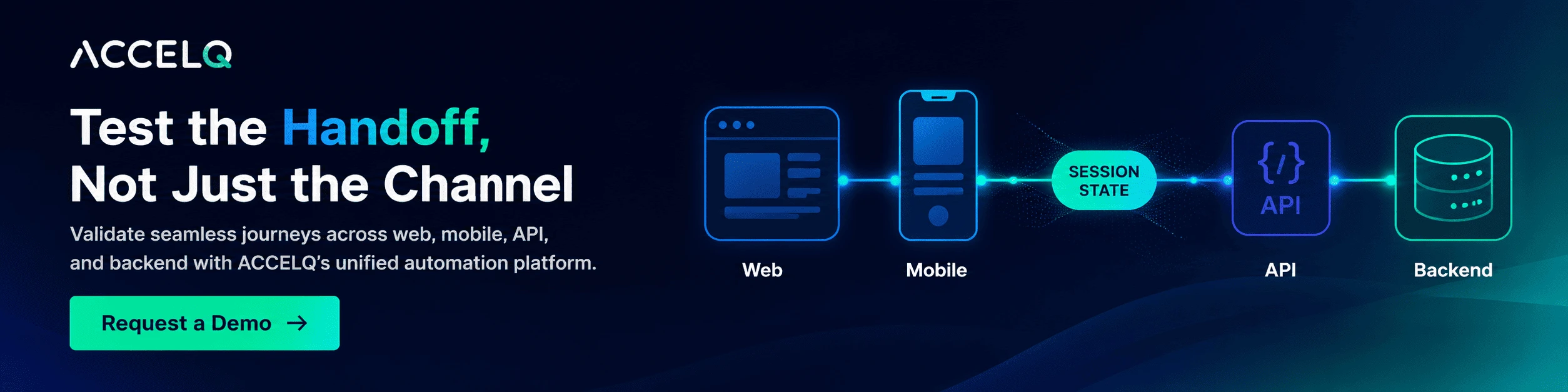
ACCELQ brings web, mobile, API, desktop, and backend testing into a unified platform for teams to test cross-channel handoffs without depending on separate scripts or fragile code between tools
What is Omnichannel Testing?
Omnichannel testing verifies that a user experience holds together across web, mobile, APIs, in-store systems, voice, and beyond, not just within each one individually. It’s distinct from multichannel testing, which checks that each channel works on its own. Omnichannel testing solutions are specifically concerned with continuity: can a user start something on one channel and finish it on another without data loss, broken state, or inconsistent behavior? That continuity depends on five core omnichannel testing features holding steady across every channel a journey touches:
- Data reliability: Carts, sessions, and preferences stay intact as a user moves between channels.
- Cross-channel performance: Response times hold up during handoffs, not just within a single channel.
- UI/UX consistency: Messaging and interactions feel coherent regardless of the surface.
- Hand-off flows: The actual moment of transition (mobile to web, in-store to app) works, not just the endpoints on either side.
- Business logic alignment: Pricing, eligibility, and workflow rules behave the same everywhere.
Most teams already test each of these within a channel. The failure mode that causes incidents like the staging demo isn’t an issue in any one of these dimensions; it’s what happens at the seam between channels.
The Real Technical Problem: Why Playwright and Appium Don’t Share Context
What happened in that staging demo was structural, not incidental. The web team’s Playwright suite passed. The mobile team’s Appium suite passed. Both teams closed their tickets. And the moment a real user crossed from one to the other, the app forgot who they were.
That’s not a flaky test. It’s a structural gap.
Playwright runs inside a browser context it controls; per Playwright’s documentation, each BrowserContext is isolated like a separate incognito profile, with cookies, storage, and session state walled off from other contexts. Appium runs in a device session bound to a single driver, without a mechanism to receive state injected after it starts. So when a Playwright test saves a draft, the session token resides in the Playwright’s context, and Appium has no built-in path to access, read, and move it into its own session. That’s why coverage is misleading, and a QA team testing channels A and B in isolation never tests what occurs when the same transaction happens between them. The green checkmarks aren’t lying; they’re just answering a narrower question than the one that broke in production.
What does sharing context actually require?
Catching this before staging means doing three steps no single framework does natively:
- Capture the session artifact at creation: Extract the token or transaction ID the Playwright action produces, not just assert that the save succeeded.
- Pass it across the runtime boundary: Inject that artifact into the Appium session (storage, headers, or a backend call) as a precondition, before the mobile test launches.
- Assert against the same state on the other side: Confirm the same draft resolves to the same data, not just that the mobile app loads.
Most teams handle step 1 and step 3 fine, in isolated scripts. Step 2, the actual handoff is where the failure lives. It usually means custom glue code stitched between two separate frameworks and CI jobs, maintained with less rigor than the “real” tests, and the first thing to break silently when either framework updates.
That’s why more device coverage doesn’t fix this. Ten browsers and twenty devices still won’t test the one thing that actually failed: the handoff itself.
The fix isn’t more tests per channel. It’s a test automation architecture where session state, once created, is a first-class object the automation platform tracks and carries across every channel a journey touches instead of something each framework’s suite reinvents or forgets on its own.
Strategic Approach to Omnichannel Testing
Once the handoff problem is visible, the omnichannel testing process looks different. It’s not “cover more channels”; it’s “map where state changes hands, and test that transfer deliberately.”
Start with the journey, not the channel. Identify the end-to-end testing paths that span channels: save on web, resume on mobile; browse on app, buy in-store, and treat each as a one test target, not separate ones.
Map where state changes hands, not just where the UI changes. For each journey, identify the exact point where a session, cart, or transaction moves from one framework’s runtime to another’s. That’s the point that needs explicit testing; the UI on either side is the easy part.
Choose test types per handoff, not just per channel. A handoff typically needs an API-level check (was the state correctly persisted and retrievable) alongside the UI checks on both ends. Skipping the API-level check is exactly how a “both channels pass” release still breaks.
Define success metrics at the seam. Latency during handoff, accuracy of data sync at the transfer point, and error rate, specifically at transitions, not just per-channel uptime, are the numbers that would have caught the staging demo failure before it reached a live room.
Toolchain & Automation Frameworks
Playwright and Appium each own a runtime, and neither shares context with the other by default. That gap is exactly what omnichannel test automation has to close, not by running more tests, but by making session state a shared, portable object instead of re-derived inside each framework.
When evaluating a platform against this specific problem, the questions that matter are:
- Can it capture a session artifact created in one channel’s test and inject it into another channel’s test automatically, without custom glue code?
- Does it give a single object model for a transaction, so “the draft” is one thing the platform tracks, not a Playwright variable and an Appium variable that happen to refer to the same data?
- Does it integrate natively into CI/CD, so a handoff failure surfaces in the same pipeline run as the channel-level tests, not in a separate manual walkthrough?
| Platform / Tool | Channel Coverage | Handles Cross-Framework State Handoff | CI/CD Integration | Best Fit |
|---|---|---|---|---|
| ACCELQ | API, Mobile, Web, Desktop, Backend | Native, shared object model across channels | Native | Teams that need the handoff itself tested, not just each channel |
| Selenium + Appium | Mobile + Web | No; requires custom glue code between suites | Needs orchestration | UI-heavy projects where handoffs are tested manually or skipped |
| API + Playwright | API + Web | No; single-runtime scope | Strong CI support | Developer-led automation within one runtime |
| Commercial Device Clouds | Web + Mobile | No; extends device coverage, not state sharing | Varies | Device/browser matrix coverage |
| Performance Tools (e.g., JMeter) | Backend/API | No; not a functional-state tool | CI-enabled | Load and latency testing |
The distinction that matters isn’t channel count; most of these tools cover similar channels. It’s whether the platform tracks a transaction as one object across every channel, or leaves that to hand-built glue code. ACCELQ takes the former approach: a state created in one step is available natively to the next, so the handoff is asserted automatically.
This matters most at enterprise scale, where handoffs multiply fast. One global retailer consolidated onto ACCELQ across order management, CPQ, ERP, and backend systems, scaling to 3,500 automated test cases with 80%+ regression coverage across 12 country sites, cutting multi-day manual regression cycles down to a few hours (case study).
Teams whose journeys live entirely within one framework’s runtime, web-only, say, won’t need this model and will find lighter, single-runtime tools faster to set up.
SUGGESTED READ - Web Automation Testing: Codeless Solutions with ACCELQ
Omnichannel Automation Challenges and Prevention
-
Testing channels in isolation. Run web, mobile, and backend suites separately, and you get separate green checkmarks, which is like coverage, but isn’t. Each team can hit 100% and still never touch the seam where their systems actually connect, because nothing ever exercised the handoff itself. So don’t test per channel. For every journey that matters, build at least one test that crosses the seam directly.
-
Ignoring the handoff itself. This is the exact gap most teams leave untested: what happens at the transition itself, not just before and after it. Fix it by making the handoff, not the channel, the unit of test design for critical journeys.
-
Inconsistent state across channels. Carts, drafts, and preferences drift out of sync when there’s no shared source of truth for state. Verify backend state directly via API alongside UI checks, rather than trusting that “UI shows the right thing” on both ends independently.
-
Channel-centric performance blind spots. A slow mobile API can degrade a journey that started fast on the web. Test latency across the full journey, not per channel in isolation.
-
Toolchain fragmentation. Disconnected frameworks and dashboards make handoff failures invisible until they reach staging or production. Consolidating into a platform that shares state and reporting natively removes the glue-code maintenance burden entirely.
Case Study: An Example of Omnichannel Testing in Retail
Situation: A retail business operated mobile apps, an e-commerce site, and physical stores in parallel. User drop-off occurred most frequently mid-journey, specifically when a user browsed on mobile and then completed the purchase online or in-store.
Approach: Instead of maintaining three separate channel suites, the QA team selected the single journey with the highest business impact: browse on mobile, buy online, pick up in-store. Automation was built around this journey specifically. Backend state validation was applied at each handoff point, and test assets were built to be shared across channels rather than duplicated per framework.
Challenges: Data synchronization issues appeared early, since state created in one channel’s runtime was not visible to the next channel until explicit capture-and-inject steps were built at each transition. Tooling integration required additional setup time initially, until shared test assets reduced duplicated work.
Outcomes: Drop-offs at channel transitions decreased. Defects that previously reached release were caught in CI instead, where they are less costly to fix. Release confidence increased because tests were validating the handoff itself, not only confirming that each endpoint functioned in isolation.
Lesson: The improvement did not come from adding more devices or browsers. It came from testing the handoff directly.
Best Practices for Omnichannel Testing
- Treat session state as a portable object your automation platform owns and carries, not something each framework’s suite re-derives or forgets independently.
- Map cross-channel journeys and identify every point where session state changes hands between frameworks.
- Build shared, reusable test assets instead of replicating logic across channel-specific suites.
- Automate handoff and transition flows first; they’re the highest-failure-rate zone, not an afterthought.
- Validate backend state directly via API alongside UI checks at every handoff.
- Integrate handoff tests into CI/CD so failures surface in the same pipeline run as channel-level tests.
- Track handoff-specific metrics like latency, sync accuracy, and error rate at transitions separately from per-channel metrics.
Conclusion
The staging demo failure doesn’t trace back to a bad test, a missed device, or a coverage gap. The actual issue was simple and hard to detect as two automation frameworks were doing exactly what they were supposed to do, but neither had a way to tell the other that the users in the Playwright and Appium tests were the same person in mid-transaction.
No coverage checklist will ever surface that. Fixing it means treating the handoff as its own test target, not an assumption you make because two suites happened to pass. You capture the state where it’s created, follow it across the runtime boundary, and check it on the other side. Green doesn’t mean anything if nobody verified what crossed the gap.
Start with one cross-channel journey that is business critical. Trace exactly where session state changes runtime. Build one test that captures the artifact at creation and asserts it on the other side.
If you want to see how ACCELQ handles the capture-and-inject step natively across web, mobile, and API without glue code, request a demo.
FAQs
What is the difference between omnichannel and multichannel testing?
Multichannel testing checks the API, mobile, and web to ensure they work correctly. Omnichannel testing checks whether a user journey survives the handoff between channels. A multichannel suite can show 100% green across every channel and still miss the failure that occurs when session state tries to cross from one framework’s runtime into another. Omnichannel testing mainly targets the seam between channels, not the channels.
Why do cross-channel user journeys fail even when every test suite passes?
Because channel-by-channel suites answer a narrower question than the one that fails in production. Each framework, and a backend runner, owns its own runtime and has no native mechanism to pass session state to the next. When every suite runs in isolation, the handoff itself is never tested. What the green checkmarks confirm is that each channel works on its own. What they can’t confirm is whether the same user, same transaction, survives the move between them.
What does it mean to treat session state as a first-class object in test automation?
It means your automation platform captures the session artifact, the token, cart ID, or transaction reference at the moment of creation in one channel’s test and carries it as a named, trackable object into the next channel’s test automatically. The alternative is custom glue code to extract the artifact manually, passing it through environment variables or a shared backend call, and maintaining that handoff logic separately from the main test suite. Most teams do the latter until a framework update breaks the glue code silently and the failure surfaces in staging.
What should QA teams look for when selecting platforms for omnichannel test automation?
Three questions matter most. First: can the platform capture a session artifact created in one channel’s test and inject it into another channel’s test without custom integration code? Second: does it give a single object model for a transaction so the draft, cart, or session is one tracked thing across every channel, not a separate variable in each framework? Third: does it integrate natively into CI/CD so a handoff failure surfaces in the same pipeline run as channel-level tests, not in a separate manual walkthrough two days before go-live?
How do omnichannel CX testing platforms identify gaps in customer journeys?
They map each journey to the exact points where session state changes runtime on mobile to web, from web to in-store, and test that transition directly instead of testing each channel separately. A gap shows up when a state created on one side of a handoff can’t be found, moved, or checked on the other. That’s the real edge over testing channels one by one instead of a vague “something broke,” you know exactly which handoff failed, what got lost, and where in the pipeline it happened, before any of it reaches a live release.



Prashanth Punnam
Sr. Technical Content Writer
With over 8 years of experience transforming complex technical concepts into engaging and accessible content. Skilled in creating high-impact articles, user manuals, whitepapers, and case studies, he builds brand authority and captivates diverse audiences while ensuring technical accuracy and clarity.


You Might Also Like:
 Test Script Writing: Key Challenges & How to Tackle them
Test Script Writing: Key Challenges & How to Tackle them
 Cross-Platform Testing: New Normal for Digital-First Enterprises
Cross-Platform Testing: New Normal for Digital-First Enterprises
 Boundary Value Analysis in Software Testing: Full Guide