







Why Manual Test Assets Don’t Survive a Majesco Cloud Move (And What to Do Instead)

Quick Answer:
A manual test script written for on-premises Majesco describes a specific screen: where a field exists, what button to click next, what the confirmation message says. Majesco CloudInsurer changes those screens. So, when the environment moves, the old steps no longer match what a tester sees. That is why Majesco CloudInsurer testing looks so different from testing the old on-premises system, and also why many manual test libraries need rebuilding when insurers move to the cloud.
- What Are Manual Test Assets in Majesco Testing?
- Key Components of Majesco Testing
- Why Are Insurers Moving From On-Premise Majesco to Majesco CloudInsurer?
- What Changes During a Majesco Cloud Migration (and Breaks Manual Test Scripts)?
- Why Majesco Regression Testing Is an Ongoing Challenge
- Can Manual Testing Alone Keep Up With Majesco Cloud Releases?
- What Manual Test Assets Carry Forward After a Majesco Cloud Migration?
- How to Rebuild Test Coverage for Majesco's API-First Cloud Core
- Majesco Insurance Testing in Practice: A Case Study
- Majesco Cloud Migration Testing Checklist
- FAQs
- Diagnose the Issue: Manual test scripts written for on-premises Majesco reference screens, fields, and navigation paths. These change once you’re on Majesco CloudInsurer.
- Match the Fix: Keep the business logic worth testing, rebuild the rest, and cover both the UI and the API layer instead of just the UI.
- Ongoing Effort: Majesco ships seasonal cloud releases, so re-validation needs to be ongoing. Do not expect a one-time fix.
What Are Manual Test Assets in Majesco Testing?
When we say “manual test assets,” we mean the materials a QA team uses to test by hand. These could be Excel-based test scripts, Word runbooks, test cases stored in ALM or Jira, screenshots pinned to a specific screen state, and the knowledge a tester carries in their head.
This is different from automated test scripts with code written in tools like Selenium or UFT. Those break during a migration for different reasons. This piece is about the manual side, i.e., the instructions a human follows, step by step.
Key Components of Majesco Testing
Majesco insurance platforms cover Policy, Billing, and Claims for property and casualty insurers, and separately for life, annuity, and health lines. Its customer base includes some of the largest insurance companies in the world. Testing a system with that much reach touches several distinct areas:
- Integration testing: Majesco connects to legacy platforms, third-party applications, and external data sources. Confirming that data moves correctly between all of them takes dedicated integration testing.
- Data management: Insurers handle large volumes of sensitive data, including policy details, claims records, and financial information. You have to test that this data stays accurate and consistent across environments.
- Regulatory compliance: Insurers answer to regulations like GDPR, HIPAA, and Solvency II. Testing has to confirm that security controls, privacy protections, and audit trails hold up after scrutiny.
- Scalability and performance: Test the system to check if it can handle real transaction volumes and peak demand without slowing down.
- User experience: Policyholders, agents, and internal staff use Majesco through different interfaces. Usability and accessibility testing confirm the experience holds up for everyone.
This is what software testing in Majesco involves at scale, and it becomes harder to maintain when the underlying platform changes shape, such as what happens in a cloud migration.
Why Are Insurers Moving From On-Premise Majesco to Majesco CloudInsurer?
Moving from an on-premises Majesco deployment to Majesco CloudInsurer is done for multiple reasons. A few carriers have gone on record about why they made the move.
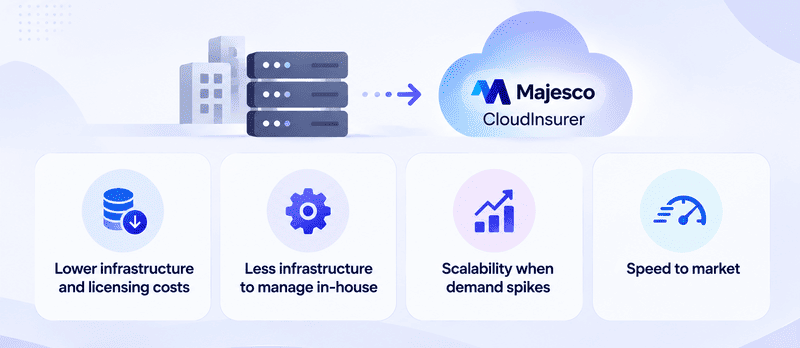
Lower infrastructure and licensing costs
Triple-S Propiedad completed the move to CloudInsurer for Majesco Policy for P&C. It pointed to cost savings, ISO compliance, and access to newer product features as the reasons. (Businesswire, 2020).
Another multinational Insurance Company, moving from an older on-premise version to CloudInsurer, reported meaningful savings on the licensing costs tied to running its own web, application, and database services (Majesco, 2020).
Less infrastructure to manage in-house
Under CloudInsurer, Majesco takes over application availability, platform updates, release management, and incident response on the insurer’s behalf. Companies can also cut down on the manual work of managing their own infrastructure, servers, and networking, freeing up the team to focus on day-to-day business (Majesco, 2020).
Scalability when demand spikes
Heritage Insurance moved its Claims platform to CloudInsurer to improve scalability and security ahead of hurricane season, when its large coastal customer base drives a surge in claims activity (Majesco, 2020).
Speed to market
CloudInsurer’s ready-to-use content and capabilities let insurers accelerate speed to market on new products. (Majesco, 2020). A Majesco and Microsoft executive interview put potential infrastructure cost savings from moving to the cloud at up to 65%, though this depends heavily on timing and how the platform is used afterward (Insurance Innovation Reporter, 2021).
Note: All of these examples are several years old now. They show the reasons behind the pattern are real and consistent across carriers, not that migrations are happening at any particular pace today.
What Changes During a Majesco Cloud Migration (and Breaks Manual Test Scripts)?
Here’s why manual test scripts break during a Majesco Cloud Migration:
Screen layout and navigation change
CloudInsurer is a rebuilt interface. It is not the old on-premises screens moved to a new server. A manual script that says “click Field X on Screen Y” stops matching the interface when that screen looks or behaves differently.
The API and integration layer changes
In a 2021 interview about Majesco’s cloud architecture, Majesco described CloudInsurer as exposing functionality through thousands of APIs, built to the OAS 3.0 standard and delivered through Microsoft Azure’s API gateway (Carrier Management, 2021; Insurance Innovation Reporter, 2021).
That interview is a few years old, and we found nothing more recent confirming the architecture in the same detail. Even so, it points to the fact that integration testing built for the old connection points may not hold up once those points change.
Configuration-driven behavior multiplies what needs testing
Majesco works closely on rules, product configuration, and templates. Not custom code. A single configuration change can impact quoting, endorsements, renewals, claims handling, and billing all at once (TTC Global). Manual scripts written to check one screen at a time cannot catch that kind of ripple across several processes.
Why Majesco Regression Testing Is an Ongoing Challenge
You cannot treat this as a single project in which you rewrite the test scripts once and move on. That undersells what’s happening under the hood.
Moving legacy data and functionality to the cloud commonly produces compatibility issues and slows down operations if it isn’t planned for carefully (ValueMomentum). Separate analysis of core platform migrations across Majesco, Guidewire, and Duck Creek points out testing and QA as one of the areas where gaps show up during and after a move (ASI).
Moreover, every new release can shift screens, workflows, or configuration behavior again. Manual scripts don’t update themselves. There’s no fixed finish line on a SaaS core the way there was with an on-premises system that didn’t have to be upgraded for long stretches of time.
Can Manual Testing Alone Keep Up With Majesco Cloud Releases?
No.
The tester headcount usually doesn’t grow. Majesco itself describes its Fast Upgrade capability as making upgrades faster and less disruptive than before, though we don’t have exact numbers for how long an upgrade takes.
And the test load per release is often larger than it looks, because of how configuration changes apply across different processes.
Manual testing is still important, especially for exploratory checks and judgment calls a script can’t make. But depending on it alone to cover every regression cycle, on a tight schedule, is asking a team to do far too much.
What Manual Test Assets Carry Forward After a Majesco Cloud Migration?
Everything in an old manual test library does not need to be thrown out. Some of it just needs to be separated. Here’s what carries forward and what does not.
- Doesn’t carry forward as written: click-path instructions, screen-specific field references, screenshots tied to the old interface.
- Can carry forward with some rework: the business logic being tested, the expected outcomes, the test data behind each scenario, and the links between requirements and tests. But it’s only possible if the tooling you move to supports rebuilding those links.
ACCELQ’s manual scenario import lets a team bring existing manual test steps, expected results, tags, and requirement or automation links into the platform directly from a spreadsheet (ACCELQ Help Center).
Note: The import file format changed with ACCELQ’s Release 8.0, so check the current format before building an import file. And to be precise, it brings the scenario content into ACCELQ’s format. It does not preserve Majesco-specific screen references, which still need to be checked against the new CloudInsurer interface by manually.
How to Rebuild Test Coverage for Majesco’s API-First Cloud Core
Insurance core system testing has to account for more than screens.
A large share of CloudInsurer’s functionality is described as sitting behind REST APIs. That means coverage built only at the UI layer misses a lot of what’s running underneath. A stronger approach tests both layers: what the user sees and what the system runs behind the screen.
ACCELQ supports this with REST API test automation, including parameterization, API chaining, and response verification (REST API Test Automation; Parameterization; API Chaining; Verifying API Responses). It offers the kind of insurance core system test automation an API-first platform like CloudInsurer needs.
Note: This is not Majesco test automation with a dedicated connector, but a general web and API automation platform capable of covering it. ACCELQ does not have a named Majesco connector or integration. It offers a platform built to test web and API applications, which includes the kind of interface and API layer Majesco CloudInsurer is described as running on.
Majesco Insurance Testing in Practice: A Case Study
ACCELQ has published results from working with a large insurance enterprise running Policy, Billing, and Claims platforms. The numbers speak for themselves: an 87% cut in defect leakage and an 80% reduction in regression cycle time after moving to business-driven, codeless test automation (ACCELQ case study).
Note: This case study is not a Majesco migration. It’s evidence of ACCELQ’s track record on Policy, Billing, and Claims systems generally, not a Majesco-specific result.
If you’re comparing a Majesco testing company, a Majesco testing service provider, or evaluating an in-house build, this kind of track record on comparable core systems is worth considering.
Majesco Cloud Migration Testing Checklist
Before the migration kicks off, know exactly what you’re carrying forward and what you’re rebuilding from scratch. This checklist is a starting point.
- Go through your existing manual scripts and sort them: which ones test business logic? And which ones are really navigation instructions?
- Map your current test coverage against the new API layer, as well as the new screens.
- Set a re-validation cadence that matches Majesco’s seasonal release rhythm. Do not leave it to a one-time sign-off after the migration ends.
- Identify which test data sets and requirement links need to make the move intact.
FAQ's
Does Majesco offer a built-in way to migrate manual test cases to the cloud?
Nothing public confirms this either way. ACCELQ offers a separate documented option to import manual scenarios from Excel or CSV into its platform.
How often does Majesco release updates to CloudInsurer?
Majesco names its cloud releases by season, such as Fall and Spring. Its Fall '22 release covered its entire SaaS portfolio at once. While the same full-portfolio scope has not been independently confirmed for every later release, the seasonal release cadence appears consistent.
Can existing manual test cases be reused after a Majesco cloud migration?
Generally, the underlying test logic and expected outcomes can be reused. However, the literal click-by-click steps usually cannot be reused because they are tied to the previous application screens and workflows.
Does ACCELQ have a dedicated Majesco integration?
No. ACCELQ does not have a named Majesco connector. It tests Majesco CloudInsurer the same way it tests other enterprise web and API applications, using its general UI and API automation capabilities.




You Might Also Like:
 6 ERP Test Automation Tools: Why Most Tools Fail
6 ERP Test Automation Tools: Why Most Tools Fail
 Regression Testing in Dynamics 365: A 2026 Playbook
Regression Testing in Dynamics 365: A 2026 Playbook
 Selenium vs OATS vs ACCELQ for Oracle