








API + UI Test Automation Together: Why Separate Tools Create More Problems Than They Solve

A checkout can pass its UI test, pass its API test, and still break in production because nobody checked what happens between the two layers. Separate API and UI test automation tools create blind spots at these points, allowing many bugs to escape to users.
Teams that combine API and UI testing into one platform find these bugs early. This tactic cuts down on maintenance hours and pushes faster releases. This is because a single test can call an API mid-flow, reuse the response as data, and keep validating the UI. No glue code required.
- Why Teams End Up With Separate API and UI Testing Tools
- API vs UI Automation: What's the Real Difference?
- What Breaks When API and UI Testing Are Handled by Different Tools
- What Unified API and UI Test Automation Looks Like
- Comparison Table: Separate Tools vs. Unified Platform
- What Switching to Unified API and UI Test Automation Takes for QA Teams
- When Would Separate Tools Still Make Sense?
- How to Evaluate a Unified API + UI Testing Platform
- FAQs
Separate API and UI testing tools break at the handoff point between layers. This is where most failures occur. These failures often include duplicated test data, brittle glue scripts, divided maintenance ownership, and inadequate reporting.
- Teams running Selenium or Playwright alongside Postman, RestAssured, or SoapUI usually feel this most during high-pressure releases when a UI failure traces to an untested API change.
- A unified API and UI test automation platform lets one scenario cover both layers, share data directly, and report failures with full context.
- Most teams run both approaches in parallel during a transition.
- Evaluate your tool switch decision on five things: native cross-layer flows, direct data reuse, unified reporting, migration support for existing scripts, and codeless accessibility for non-technical testers.
Why Teams End Up With Separate API and UI Testing Tools
Fragmented test stacks are created by accident. Here’s how it usually works.
API testing and UI testing start off as separate disciplines with separate tools. UI automation matures around Selenium and Playwright. These are tools built by and for developers comfortable writing code against a browser’s DOM. API testing matures around Postman, RestAssured, and SoapUI. Again, these are tools built around request/response validation by devs.
Developers who write the API layer own the API tests. QA engineers who validate user-facing flows own the UI tests. Eventually, “the API team” and “the UI team” are testing the same application without a shared source of truth for what “working” means in the app’s end-to-end flow.
Selenium, Playwright, Postman, and RestAssured are all mature, capable products for what they were built to do. The problem is structural. Two tools, two data models, two teams, and one application being tested.
Unlock Codeless API Automation Testing with ACCELQ.
API vs UI Automation: What’s the Real Difference?
API testing validates the contract between systems. It looks at the request, the response, the status code, the payload structure, and the business logic that runs before a response is returned. It’s fast, doesn’t need a browser, and doesn’t care about what the screen looks like. It runs early in the development cycle, often before the UI even exists.
UI testing validates what the end user experiences when navigating the app/site. It checks whether a button click produces the right screen, whether a form submission shows a confirmation, whether the visual state of the application matches what a user should see. It’s slower, browser-dependent, and closer to how the software is used in the real world.
Neither one, on its own, proves the application works. A payment API can return a perfect 200 response and the UI can still show the wrong confirmation screen because of a front-end mapping bug. A UI flow can look flawless while the API returns stale or incorrect data.
Bugs usually emerge in the handoff points between API testing and UI testing.
What Breaks When API and UI Testing Are Handled by Different Tools
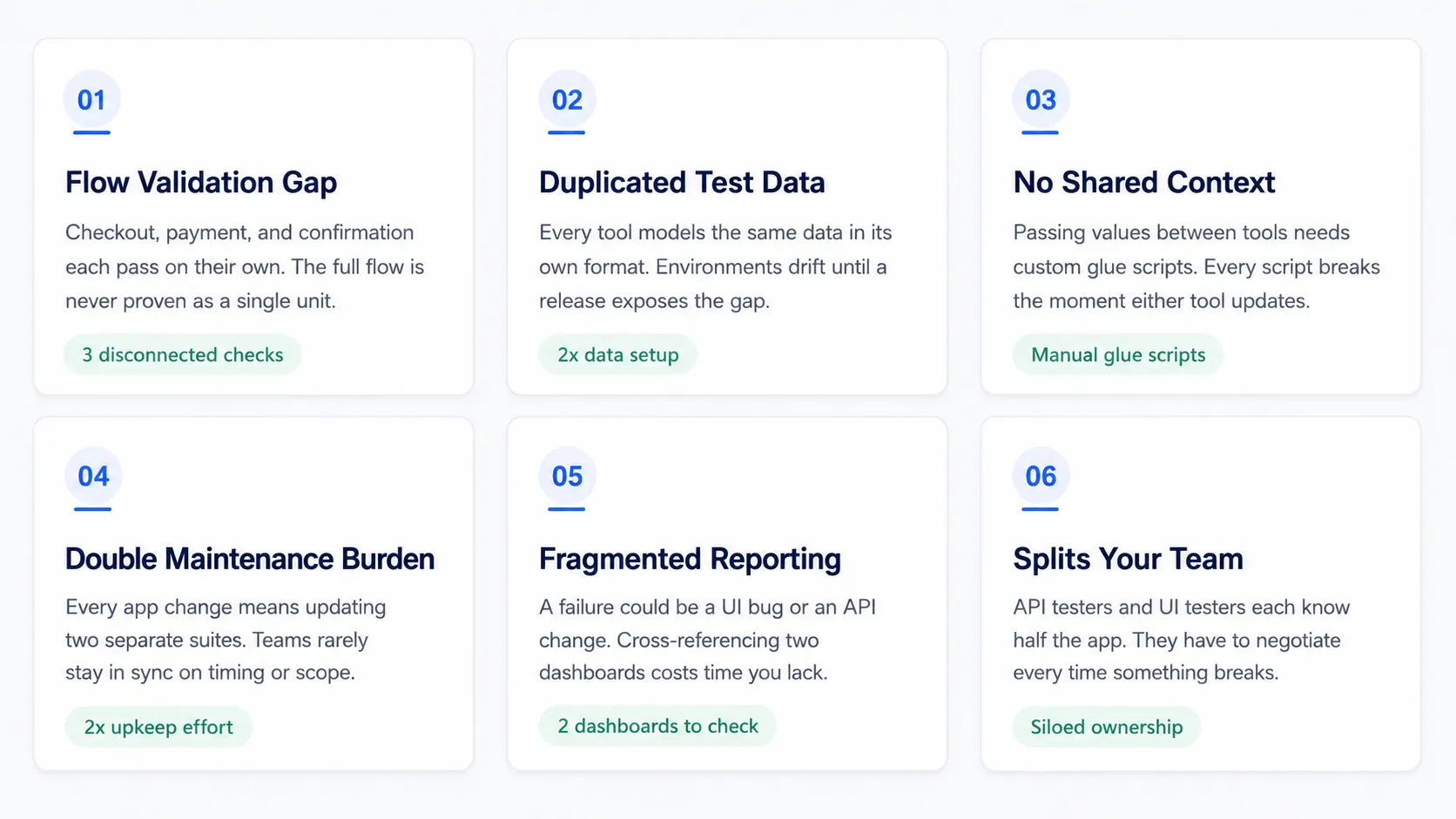
Quick Answer: Separate API and UI testing tools break in multiple ways: full flows can’t be validated as one unit, test data drifts out of sync, data can’t chain between tools without glue scripts, every change means two updates, failures get lost across two dashboards, and the tooling divide splits the team in two.
You Can’t Validate a Full Business Flow
Take a checkout flow. A user adds an item to their cart in the UI, a payment API processes the transaction, the UI shows an order confirmation. Tested separately, you get three disconnected checks:

None of these prove that the confirmation shown actually matches the payment that was processed. The full business flow is never validated as a single unit.
Duplicated Test Data and Environment Setup
Every tool needs its own test data and environment configuration. When API tests stay in Postman and UI tests in Selenium, that data gets modeled twice, once in each tool’s format.
Over time the two copies will drift. A field gets renamed in only one tool. An environment URL changes and someone updates it in only one place. The tests keep passing on stale assumptions until a release shows the bugs.
No Shared Context = No Real Chaining
In a real user journey, data flows forward. A login API returns a token, an order API returns an order ID, and the UI needs that same ID to find the right confirmation page.
Passing that value from an API test tool into a UI test tool requires custom glue scripts to extract, store, and re-inject the data across two distinct frameworks. Every glue script can break when any tool updates.
Two Maintenance Burdens and Two Points of Failure
When the application changes, both suites need updating on separate timelines, often by separate people who might not be communicating at the moment. A single API contract change can mean that your team has to edit Postman collections and RestAssured code and Selenium locators. That is a lot of recurring maintenance work.
Fragmented Reporting Hides Root Causes
When a UI test fails, is it a UI bug, or is it an upstream API that changed underneath? With separate tools, you have to manually cross-reference two dashboards and two sets of logs to get the answer. This is worse if you’re working during a release window, under time pressure.
Splits Your Team
Separate tools reinforce a divide between “API testers” and “UI testers”. Instead of a team that understands the whole application, you get two teams that each understand half of it and have to negotiate every time something breaks.
What Unified API and UI Test Automation Looks Like
Quick Answer: It looks like one platform, one test model, shared context across both layers. This ensures that scenarios don’t stop being “the test” just because it crossed from a screen into an API call.
How the Layers Integrate Seamlessly in ACCELQ
In a unified model, a single test scenario can start in the UI, call an API mid-flow, validate the response, extract a value from that response, and feed it into the next UI step. It doesn’t involve amy glue code.
Here’s how those mechanics work out in ACCELQ:
Codeless REST and SOAP API steps alongside UI steps, in one Action or Scenario
Inside ACCELQ’s logic editor, you can add an API call by clicking the + API button and choosing Insert REST call. This opens a configuration wizard for the endpoint, method, and payload. (REST API Test Automation in ACCELQ)
API chaining without exposing raw data in test logic
A value extracted from one API response, say, a product ID, can be parameterized directly into the endpoint URL of the next call. This checks the second response against the value pulled from the first. (A Step-by-Step Guide to API Chaining in ACCELQ)
Extracting and reusing response data downstream
A token, ID, or field from an API call becomes usable as an Action Parameter or Global Property in a later UI step, instead of being hardcoded or hand-copied between tools. (Extracting Data from REST API Responses in ACCELQ)
Contexts that model UI and API as one system
A Context in ACCELQ represents a state of the application for UI testing, or a container of related functionality for API and database testing. Both layers are built and organized the same way, in the same project, instead of living in separate tools with different mental models. (What is a Context)
One test suite, one report, across both layers
Scenarios that mix UI and API steps still run together in a single Test Suite, in a defined execution order. Results show up in one place instead of two dashboards you have to reconcile. (Test Suites in ACCELQ)
Comparison Table: Separate Tools vs. Unified Platform
| Capability | Separate API + UI Tools | Unified Platform |
|---|---|---|
| End-to-end business flow validation | Manual stitching required | Native, single scenario |
| Data reuse across layers | Duplicated / scripted glue | Shared context, direct chaining |
| Maintenance when app changes | Two updates, two teams | One test model to update |
| Root-cause visibility | Split across dashboards | Single execution trace |
| Team collaboration | Siloed by specialty | Shared, codeless workflow |
What Switching to Unified API and UI test automation Takes for QA Teams
During a transition, most teams hold on to what already works. Existing API specifications , like Swagger or OpenAPI definitions, can typically be used as the reference for rebuilding endpoints in the new platform. Existing test data structures carry over conceptually even if they need to be re-entered in the new system’s format.
A single pilot flow, i.e., one business process rebuilt as a unified API + UI scenario, takes a few days to a couple of weeks for most teams. Codeless platforms enable this by removing the need for testers to learn a new scripting language.
A full migration of an entire regression suite is a longer, staged project. It usually runs in parallel with the legacy tools until the new suite proves that it works in a release cycle.
Because the interface doesn’t require code, testers who could previously only run manual test cases can start contributing automated scenarios directly. This allows a lot more tester participation than a code-first tool like Selenium or RestAssured allows.
When Would Separate Tools Still Make Sense?
There are certain situations where a dedicated point solution still makes sense.
Deep protocol-level load testing or highly specialized performance benchmarking at the network layer, is a different job from functional API and UI validation. A purpose-built tool for that specific job is the right call in this case.
Teams that need heavy, code-level customization of a single layer (for eg., nothing but API, at very large scale, with no UI component) may also find a focused tool like Postman or RestAssured more useful.
However, do not keep two separate general-purpose tools (say, Selenium and Postman) running in parallel indefinitely for regular functional regression testing. That’s where the handoff problem described above shows up most often.
How to Evaluate a Unified API + UI Testing Platform
Before committing to any tool switch, run your oprions through this checklist:
- Can a single test flow span UI and API steps natively, without custom code?
- Can data from an API response be reused directly in a later UI step?
- Is there one report for cross-layer failures, rather than two dashboards to reconcile manually?
- Does it support the protocols you actually use: REST, SOAP, message queues, databases?
- Can it import or coexist with existing Postman or Selenium assets during a transition?
- Can manual testers contribute without learning to code?
If the answer to more than one of these is “no” or “not really,” you should move on to the next tool.
FAQ's
Should I use separate tools for API and UI testing or one platform?
If your goal is validating full business flows (from a UI action into an API call and back) a unified platform is the stronger choice. It removes the manual handoff between separate tools. But. separate tools can still work for single-layer testing needs, like deep API-only load testing.
What breaks when API testing and UI testing are handled by different tools?
The handoff between API and UI layers is the first thing that breaks. With separate tools, full business flows can only be validated in fragments, test data gets duplicated and drifts out of sync. Chaining data between an API response and a UI step also requires brittle glue scripts, and failures get reported in two disconnected dashboards.
How do I pass data from an API test into a UI test?
To do this without unified platform, you need a custom script to extract a value from the API response, store it somewhere accessible, and re-inject it into the UI tool. On a unified platform like ACCELQ, the value is extracted directly from the API response and made available as a parameter or property that any later step, API or UI, can reference natively.
Is there a tool that does both API and UI test automation?
Yes. ACCELQ is designed to combine codeless REST/SOAP API automation and UI automation within the same test scenario, using shared contexts, shared test data, and a single execution report.
What's the best alternative to running Postman and Selenium together?
ACCELQ is an excellent alternative to running Postman and Selenium together. It is purpose-built for cross-layer testing, because it enables API and UI steps to exist in the same test model instead of two disconnected tools. Using ACCELQ removes the need to run Postman and Selenium in parallel for the same business flow.
How long does it take to migrate from Selenium and Postman to a unified platform?
A single pilot flow can usually be migrated in days, or, at most, couple of weeks. Full migration of an entire regression suite is a longer, staged effort typically run in parallel with existing tools until the new suite is proven to work.



Chaithanya M N
Content Writer
A curious individual who is eager to learn and loves to share her knowledge using simple conversational writing skills. While her calling is technology and reading up on marketing updates, she also finds time to pursue her interests in philosophy, dance and music.


You Might Also Like:
 Working with Data Types and Data Lists in ACCELQ: A Complete Guide
Working with Data Types and Data Lists in ACCELQ: A Complete Guide
 What Should You Know About Supertest?
What Should You Know About Supertest?
 Can You Achieve 100% Test Automation (And Do You Really Need It)?