








Test Automation Strategy: A Complete Guide to Planning, Maturity, and Execution

A test automation strategy is a step-by-step plan that gives what to automate, how to automate it, which tools to use, and how to measure success. It isn’t a test cases list, but a decision framework connecting testing to business outcomes like rapid releases, less defects during production, and low quality assurance price.
Test automation programs rarely stall because the tools are wrong. They stall because there was never a real automation test strategy behind them. Teams buy a tool, automate whatever looks easy, and six months later they’re buried in flaky tests with no way to prove ROI.
This guide covers how to build an automation strategy, starting with where your team stands today (maturity model), then the step-by-step framework, the metrics that prove it’s working, and the mistakes that quietly undo it. Use it as a working automation testing strategy template, or as the basis for a formal test automation strategy document.
- The challenge: A large number of teams start off with the automation of their tests without thinking about how they are going to manage them in the future. When the applications change, the scripts become harder to maintain, the tests begin to fail and the costs go up.
- What works: A test automation strategy should check on what’s important to the business rather than just on how many tests a team is able to automate. Set achievable goals and then examine to what level your team presently has automation in place.
- How to measure success: More automated tests don’t always mean better testing. Track critical test coverage, maintenance effort, flaky test rates, defects reaching production, and execution time. These metrics help teams understand whether automation is improving quality and reducing manual effort.
- The takeaway: A transition from manual testing to autonomous testing doesn’t happen all at once, but instead takes place in a series of steps, starting with simple automation and then being enhanced by practical experience, better tools, and AI usage. ACCELQ assists teams in making progress through no-code automation, reusable test design, self-healing, and its ability to support testing on diverse platforms.
- Bottom line: If you want to have a successful strategy, you should test what matters, make sure that maintenance stays manageable, and build up automation so that your team is more confident before each release.
What is a Test Automation Strategy and Why Most Fail Without One
A test automation strategy, an organization-level plan, defines scope, process, metrics, and tools to automate testing the software. Unlike a test automation plan, which covers a single project or release, a software test automation strategy is used again and again across projects. It’s the foundation every individual plan builds on.
A complete strategy answers six questions:
- What business goal does automation serve?
- Which tests deliver the most value automated?
- Which tools and frameworks will the team normalize?
- How do automated tests combine into CI/CD?
- Who owns creation and maintenance?
- How will you measure whether it’s functioning?
Leaving these steps and instead automating ad hoc, here’s what tends to go wrong:
- Wasted effort. Teams automate what’s simple to script. A 30-second login check gets automated while a two-hour checkout flow stays manual.
- Maintenance overload. The top reason automation programs die. Every UI change breaks a locator; teams spend more time fixing tests than expanding coverage.
- No business tie-in. If leadership can’t see faster releases or fewer incidents, the program loses budget regardless of technical quality.
- Can’t scale. What works at 50 tests collapses at 500 without reusable components and early architecture decisions.
- Team misalignment. No shared strategy means developers, QA, and ops each define “coverage” differently.
A test automation plan that is well-defined forces scope, tooling, ownership, metrics, before they rise silently over sprints in a year.
The Test Automation Maturity Model
Not all teams require the same strategy. A team just beginning needs different guidance than an enterprise running thousands of tests across SAP, Salesforce, and a dozen microservices. Before prioritizing anything in your enterprise test automation strategy, find where your team level is today.
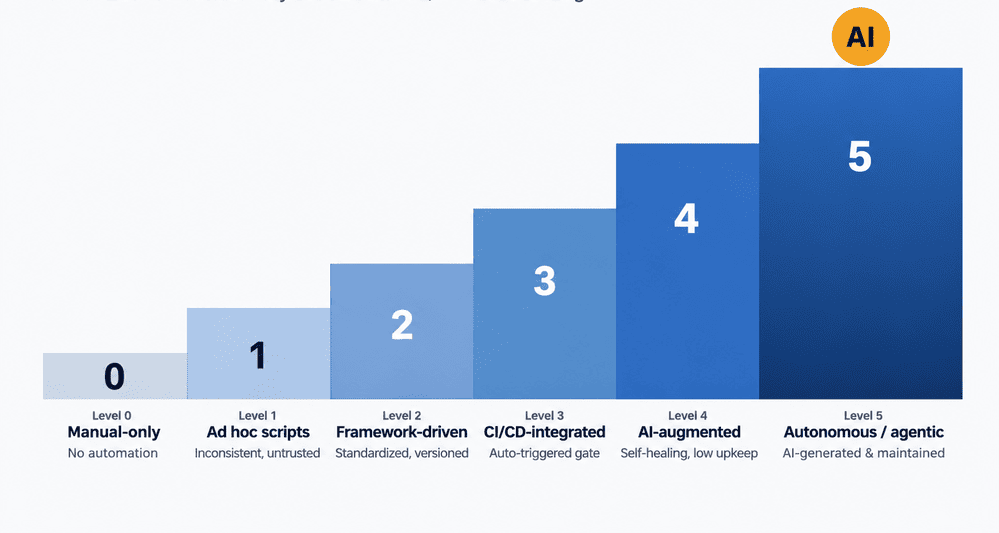
| Level | Stage | What It Looks Like |
|---|---|---|
| 0 | Manual-only | Testing is entirely manual; no automation exists beyond ad hoc scripts an individual engineer maintains privately. |
| 1 | Ad hoc scripts | Automation exists but is inconsistent: scattered scripts, no shared framework, no ownership model. Breaks frequently and isn’t trusted. |
| 2 | Framework-driven | A standardized framework, for example, is Page Object Model, data-driven, or BDD, is in place. Tests are organized and version-controlled. But execution is largely manual or scheduled ad hoc. |
| 3 | CI/CD-integrated | Automated tests run automatically on code commits or builds and act as quality gates. Reporting exists but may still require manual interpretation. |
| 4 | AI-augmented | Self-healing locators, AI-assisted test authoring, and intelligent test selection reduce maintenance overhead significantly. Non-engineers can contribute to test creation. |
| 5 | Autonomous/ Agentic | Test generation, maintenance, and prioritization are hugely AI-driven. Human review focused on business logic and edge cases instead of upkeep of scripts. |
Quick assessment. Rate yourself “yes” or “no”:
- Do you have a documented, and version-controlled automation framework that everyone follows?
- Do automated tests can run automatically in your CI/CD pipeline and not needed manual triggering?
- Does anyone track a maintenance-to-creation time ratio for your test suite?
- Can someone outside your automation engineering team author or edit a test?
- Do broken tests get root-caused and healed without a human manually rewriting a locator?
- Is test coverage reported against business-critical workflows rather than raw test count?
Four-plus “no” answers → you’re at Level 1–2. Priority: standardize a framework, get into CI/CD. Mostly “yes” → your bottleneck is maintenance. Level 4–5 capabilities (self-healing, AI-assisted authoring) are what pay off next.
The framework below isn’t one-size-fits; you can apply each step differently depending on your level.
Building Your Strategy: A Step-by-Step Framework
This is the core of how to build an automation strategy: the sequence of decisions a strategy for a successful test automation plan needs, in order.
Step 1: Define Scope and Objectives
Be specific, don’t automate testing. Instead cut regression time from 3 days to 4 hours or reach 80% coverage of checkout workflows in two quarters. Every later decision traces back to this goal. Document what’s out of scope; that’s what turns a wish into a real test automation strategy document.
Step 2: Prioritize What to Automate
Not all should be automated, and not everything in one-go. Score candidates on:
- Business criticality: Revenue, compliance, or core customer experience.
- Execution frequency: Every release, sprint, or rarely.
- Complexity/risk: Many variables, integrations, and data combinations.
- Manual effort: Slow, repetitive, or error-prone by hand.
- Stability: Settled feature, or mid-redesign where automation breaks fast.
Layer this against the classic test automation pyramid. Many fast unit tests at the base, a solid API/integration at the middle, and a smaller, selective layer of end-to-end UI tests on top. Exploratory testing and early-stage feature checks stay manual. While automation earns its keep on stable, repeatable, high-frequency scenarios.
For an automation strategy for web applications, that usually means checkout and core navigation first, search/browse second, rarely-used or actively-changing screens last.
Step 3: Choose Your Framework Type
The framework shapes everything downstream: write speed, maintenance load, who can contribute.
| Framework | Best For | Trade-off |
|---|---|---|
| Record & Playback | Quick starts, non-technical testers | High maintenance, doesn’t scale well |
| Data-Driven | Applications with frequent, varied input data | Requires stronger technical setup |
| Keyword-Driven | Teams wanting reusable, readable test steps | Time-consuming initial setup |
| Page Object Model (POM) | Long-lived UI test suites | Not portable across projects without rework |
| Modular | Large suites needing independent, reusable pieces | Can duplicate hardcoded data if not managed well |
| BDD (Given/When/Then) | Cross-functional teams, and business-readable specs | Slower test case creation, needs precise requirements upfront |
| Hybrid | Teams wanting flexibility across the above | Requires deeper testing expertise to design well |
Most teams land on a hybrid approach. POM or modular structure for maintainability, layered with data-driven or BDD elements where they provide clarity.
Step 4: Evaluate and Choose Tools
Skip the best tool on the market. Pick the best tool for your team’s skills, stack, and scale:
- Maintenance overhead (percentage of effort fixing vs. expanding tests)
- CI/CD fit with your pipeline (Jenkins, Azure DevOps, and GitHub Actions)
- Cross-browser/cross-platform coverage
- Can team accessibility non-coders contribute?
- Scalability as your app portfolio grows
Pilot two or three tools against an actual test scenario before committing and not a vendor demo.
Step 5: Set Up Your Test Environment and Data
Mirror production as closely as practical. Consistent configurations, isolated test data, and infrastructure-as-code where possible. In regulated industries like financial services, healthcare, insurance, bake in audit-trail and data-masking requirements from first day.
Step 6: Integrate Into CI/CD
Automation is not triggered automatically by anyone; it’s a script collection. Set clear trigger points such as unit/API tests on commit, integration tests on build, full E2E before deployment, and smoke tests after. Running a 6-hour step-wise suite in parallel only delivers feedback once a day, too slow for most release cadences.
Step 7: Define Team Roles and Ownership
Decide who writes tests, maintains them, and who owns the strategy. A common model is a central QA Center of Excellence sets standards and shared libraries. Automation engineers embedded in sprint teams apply them day to day. Write the model down; ambiguity here is how strategies quietly fall apart.
 Also Read: Test Automation Framework
Metrics That Matter and the Mistakes That Wreck Them
A strategy without metrics is only a set of good intentions. Track these consistently:
| Metric | What It Tells You |
|---|---|
| Test coverage | Percentage of business-critical workflows covered measured against defined scope, not raw test count |
| Maintenance ratio | Percentage of effort spent fixing existing tests vs. creating new ones |
| Flaky test rate | Percentage of tests that intermittently pass/fail with no code change; aim to keep this low; high rates erode trust in automation entirely |
| Defect escape rate | Defects found in production vs. caught pre-release should trend down over time |
| Execution time | How long your full regression suite takes directly impacts release velocity |
These mistakes quietly wreck the numbers above, even when a strategy looks solid on paper:
- Chasing 100% coverage. Low-value scenarios inflate the metric, not the risk protection, and add maintenance cost for no return.
- The ice-cream-cone anti-pattern. Heavy, brittle end-to-end UI testing with a thin unit/API base underneath. The inverse of the test pyramid, and expensive to maintain.
- Tolerating flaky tests. Re-running or ignoring “probably flaky” failures erodes trust in the whole suite and in red builds generally.
- No clear ownership. Unassigned maintenance means tests rot quietly until someone notices the suite hasn’t caught a real bug in months.
- Automating before stabilizing. Automating a feature mid-redesign guarantees near-immediate breakage. Check Step 2’s stability criterion first.
How ACCELQ Helps You Move Up the Maturity Curve
Wherever you sit on the maturity model, the friction is usually the same: too much time maintaining tests, too little expanding coverage. ACCELQ’s agentic, codeless platform is built to shift that ratio.
- Level 1 – 2: Codeless test design gets a standardized, maintainable framework in place, no scripting language required, so contribution isn’t limited to automation engineers.
- Level 3: Self-healing test design absorbs UI and locator changes automatically, usually where the maintenance-to-creation ratio flips.
- Level 4 – 5: A unified platform for web, API, mobile, desktop, plus native support for Salesforce, SAP, Workday, and Oracle scales coverage across a huge portfolio without scaling headcount at the same rate.
To see how ACCELQ fits your maturity stage, contact our team.
Also Read: AI Agents in Testing
FAQs
What is a test automation strategy?
A test automation strategy is a structured, reusable plan that defines what to automate, use which tools and frameworks, how tests combine into your development pipeline, and how you measure success. It differs from a test plan, which is scoped to a one project rather than the entire organization.
What should a test automation strategy document actually include?
At minimum, defined scope and objectives, prioritization criteria, selected framework and tools with rationale, environment and test data plan, CI/CD integration approach, team ownership model, and the metrics you'll track to prove it's working. Treat it as a proof of document to revisit each quarter rather than written once and shelved.
How does AI change test automation strategy?
AI shifts strategy priorities from "how do we write more tests faster" to "how do we reduce the maintenance burden that kills most automation programs." Self-healing locators, AI-assisted test authoring, and intelligent test selection are what typically separate Level 4–5 maturity from teams stuck maintaining brittle scripts at Level 2–3.



Chaithanya M N
Content Writer
A curious individual who is eager to learn and loves to share her knowledge using simple conversational writing skills. While her calling is technology and reading up on marketing updates, she also finds time to pursue her interests in philosophy, dance and music.


You Might Also Like:
 How Can Copilot Give Your Test Automation a Super Boost?
How Can Copilot Give Your Test Automation a Super Boost?
 Top 10 Generative AI Testing Tools in 2026
Top 10 Generative AI Testing Tools in 2026
 ChatGPT for Test Automation – What It Can Actually Do in 2026?