







8 Types of Software Bugs: Why They Occur, Escape Testing, and Break Apps

A software bug is a defect in an application that causes incorrect, unexpected, or unintended behavior. These bugs range from minor usability issues to critical failures that disrupt core functionality, compromise security, or damage user trust. In practice, teams don’t just deal with types of software bugs. They deal with when bugs are introduced, why they occur, and why the same issues keep resurfacing after release.
Here’s the real problem.
Most teams track bug counts, not root causes or escape patterns. As a result, they keep fixing the same categories of bugs sprint after sprint, even as test coverage grows.
- 8 Different Types of Software Bugs That Can Break Your App
- Common Causes of Software Bugs
- Why Software Bugs Occur?
- Bugs in Software Testing: When Bugs Are Introduced vs Detected?
- Why Bugs Escape Testing and Reach Production?
- Which Software Bugs Are the Most Critical?
- Bug Report Template (To Prevent Repeat Bugs)
- Improving Bug Detection with Smarter Automation
- Conclusion
8 Types of Software Bugs: Causes, Impact, and Testing Approach
Understanding the different types of software bugs is useful only when each category is clearly defined and distinct. The goal is not memorization. It is faster recognition, better testing decisions, and fewer repeat defects.
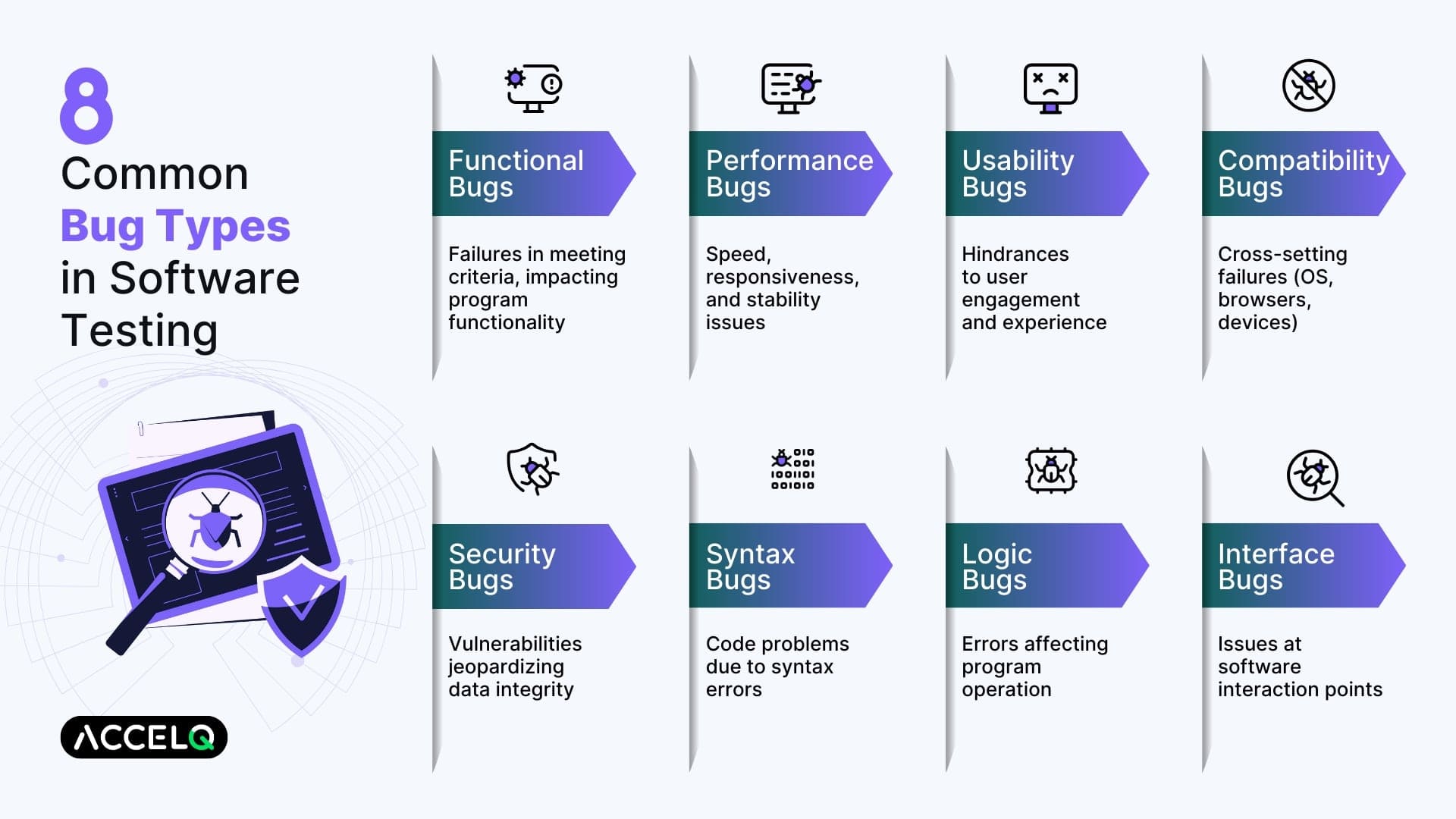
1. Functional Defects: The Backbone of Bug Detection
Functional bugs are one of the most frequent and critical software defects. These programming bugs result in software behaving as not intended: it may crash, but it might also be used to open a security backdoor, trace someone’s activity, scramble data, or serve as a platform for attacks to spread.
| Aspect | Description |
|---|---|
| Sources | Incorrect logic, missed requirements, or integration errors. |
| Impact | Directly affects usability, reliability, and user satisfaction. |
| Testing Approach | Verify each feature against the requirements to ensure functionality aligns with expectations. |
Real-World Example:
- An automated test case design in ACCELQ is designed to validate the login functionality of a web application. The test is broken due to bad validation logic, which locks out valid users.
Pro Tip: During the development cycle, use test-driven development (TDD) principles to capture the functional test software bugs quickly.
Difference Between Functional and Logical Bugs
A functional bug happens when the feature is not working as expected, as per the specs. In contrast, a logical bug happens when the code logic from the developer side is wrong, even though the feature is working in a technical way.
- Functional bugs stem from misinterpreted or incomplete requirements.
- Logical bugs result from faulty reasoning or incorrect implementation of business logic.
- A functional bug might stop a login feature from working altogether, while a logical bug might allow the login but calculate user privileges incorrectly.
- Functional bugs are usually caught during requirement validation; logical bugs often require deeper code and scenario analysis.
- Both can break your app, but they require different approaches to test and fix.
All the discussions about one versus the other really helped the team design better test cases and select the appropriate test techniques for uncovering defects.
2. Performance Issues: Optimizing Speed and Responsiveness
Performance bugs directly affect the speed, stability, and scalability of an application. Unaddressed, these software testing bugs can cause poor user experience and even application outages.
| Aspect | Description |
|---|---|
| Sources | Inefficient code, poor database queries, and a lack of resource optimization. |
| Impact | Reduced application reliability and frustrated users. |
| Testing Approach | Conduct performance testing to measure speed, scalability, and resource usage. Optimize code and queries for efficiency. |
Real-World Example:
- ACCELQ’s automated performance test shows a key transaction on a web app is taking 5 seconds, where it should have been 2 seconds – So it’s time to optimize.
Pro Tip: Leverage JMeter or ACCELQ’s AI-driven capabilities and features to simulate high load and spot bottlenecks.
3. Usability Errors: Ensuring Seamless User Interaction
Usability bugs interfere with the way that a user interacts with an application. While it is not the program bug that causes a crash, it negatively impacts user satisfaction and adoption.
| Aspect | Description |
|---|---|
| Sources | Poor design choices, inadequate UI elements, and unintuitive workflows. |
| Impact | Frustrated users and reduced application engagement. |
| Testing Approach | Conduct usability testing and iterate on designs based on user feedback. |
Real-World Example:
- A web app navigation bar button is slow to react and takes several clicks, which annoys everyone and slows down work.
Pro Tip: Leverage a/b testing to collect feedback from users before and after UI adjustments, and improve usability.
4. Compatibility Failures: Bridging Cross-Platform Gaps
Compatibility bugs occur when software fails to perform uniformly across different environments, including browsers, operating systems, or devices. These software bug examples lead to fragmented user experiences.
| Aspect | Description |
|---|---|
| Sources | Differences in rendering engines, device hardware, and operating systems. |
| Impact | Limited accessibility and potential loss of users. |
| Testing Approach | Test the application across multiple platforms and devices to ensure consistency. |
Real-World Example:
- An automated compatibility test discovered that a file upload feature in a web application is functional in Chrome, but not in Safari, impairing the workflow for some users.
Pro Tip: Utilize cloud-based testing platforms to support cross-platform testing.
5. Security Vulnerabilities: Safeguarding Data Integrity
Security bugs are critical vulnerabilities that could be used to gain unauthorized access to data or attack software. Solving this kind of bug in programming means maintaining the application’s reliability and users’ trust.
| Aspect | Description |
|---|---|
| Sources | Improper input validation, insecure coding practices, and a lack of encryption. |
| Impact | Data breaches, financial loss, and reputational damage. |
| Testing Approach | Perform security testing and implement secure coding standards. Regularly update and patch vulnerabilities. |
Real-World Example:
- An ACCELQ test finds an SQL injection vulnerability in a web application’s login form that could allow an attacker to manipulate the database.
Pro Tip: Include security testing in your CI/CD pipeline to detect types of bugs in software testing earlier.
6. Syntax Errors: Ensuring Code Accuracy
Syntax bugs can happen when a programming language rule is misapplied in such a way that it cannot compile, or that it fails to run. These various forms of software defects are usually simple to spot, but can completely paralyze a development team when they get overlooked.
| Aspect | Description |
|---|---|
| Sources | Typos, missing semicolons, or incorrect syntax usage. |
| Impact | Prevents the application from running, disrupting workflows. |
| Testing Approach | Use static code analysis tools and conduct thorough code reviews. |
Real-World Example:
- One absent semicolon in a JavaScript function and a pivotal script doesn’t run, and your app stops working.
Pro Tip: Automate syntax checks with linters and configure them in your editor.
7. Logical Errors: Correcting Flawed Algorithms
Logical bugs result from incorrect algorithms or flawed decision-making processes within the code. These issues produce inaccurate results and hinder application functionality.
| Aspect | Description |
|---|---|
| Sources | Misunderstood requirements or flawed algorithms. |
| Impact | Leads to inaccurate application outcomes and user dissatisfaction. |
| Testing Approach | Validate algorithms using automated tests and peer reviews. |
Real-World Example:
- An e-commerce solution messes up its promotions logic, thus causing wrong discounts to be applied and generating pricing inaccuracy.
Pro Tip: Divide complex algorithms into smaller segments and test them one by one to identify the problems.
8. Interface Discrepancies: Smoothing System Interactions
Interface bugs arise when different software components fail to interact seamlessly. These software bugs can cause data mismatches and disrupt system operations.
| Aspect | Description |
|---|---|
| Sources | Miscommunications, mismatched data formats, or improper API handling. |
| Impact | Disrupts workflows and data integrity. |
| Testing Approach | Conduct comprehensive interface testing to ensure proper data exchange between components. |
Real-World Example:
- A backend API returns data in an unexpected format, causing a web application to display incorrect information.
Pro Tip: Use contract testing tools like Pact to verify API interactions and ensure compatibility.
Common Causes of Software Bugs
Most bugs trace back to a small set of root causes:
- Programming errors such as incorrect logic, boundary conditions, or assumptions about input
- Compatibility issues caused by OS versions, browsers, devices, or hardware differences
- Software failures including race conditions, memory leaks, and concurrency issues
Fixing bugs without addressing these causes guarantees recurrence.
Why Software Bugs Occur?
Software bugs occur because software is built on assumptions.
- Developers assume expected input.
- Testers assume stable environments.
- Automation assumes deterministic behavior.
Real users break these assumptions through edge cases, timing issues, data variation, and environment differences. That is why bugs persist even in mature systems with extensive test coverage.
Bugs in Software Testing: When Bugs Are Introduced vs Detected?
Here’s an uncomfortable truth.
Most bugs are introduced early in the SDLC but detected late.
- Requirements phase: Functional and logical bugs are introduced
- Development phase: Performance and security bugs are introduced
- Testing phase: UI and integration bugs are detected
- Production: Usability, compatibility, and edge-case bugs surface
Late detection increases fix cost, risk, and user impact.
Why Bugs Escape Testing and Reach Production?
Why do some bugs escape testing and reach production? Because teams focus on fixing defects, not understanding why they survived.
Common escape patterns include:
- Test coverage biased toward happy paths
- Environments that do not reflect production behavior
- Flaky automation masking real failures
- Bug tracking that ignores root cause
This phenomenon is known as bug leakage. Teams fix symptoms, but the same bug types return because the underlying escape patterns remain.
Which Software Bugs Are the Most Critical?
Not all bugs carry the same risk.
- Critical bugs involve security breaches, data loss, or payment failures
- High-severity bugs block core functionality or degrade performance
- Medium-severity bugs affect compatibility and usability
- Low-severity bugs are cosmetic and informational
The most dangerous bugs are often the least obvious ones.
Bug Report Template (To Prevent Repeat Bugs)
A strong bug report helps teams fix the cause, not just the symptom.
- Bug Title: Clear, behavior-focused summary
- Environment: OS, browser, device, version
- Steps to Reproduce: Exact steps without assumptions
- Expected Result: What should happen
- Actual Result: What actually happens
- Severity and Impact: User and business impact
- Root Cause (if known): Logic, data, environment, timing
Capturing root cause is what stops the same bugs from returning.
Improving Bug Detection with Smarter Automation
Modern applications change too fast for brittle, script-heavy testing approaches.
This is where ACCELQ fits naturally. ACCELQ’s AI-powered, codeless automation helps teams reduce flaky tests, improve coverage across UI, API, and system interactions, and identify recurring bug patterns earlier in the lifecycle.
By focusing on intent and behavior rather than fragile scripts, teams can reduce bug leakage and improve release confidence.
Conclusion
Software bugs are not random.
- They follow patterns
- They escape for predictable reasons
- They repeat when teams track counts instead of causes
By understanding types of software bugs, why they occur, when they are introduced, and why they escape testing, teams can move from firefighting to prevention.
The goal is not fewer bugs logged. There are fewer bugs reaching users.



Prashanth Punnam
Sr. Technical Content Writer
With over 8 years of experience transforming complex technical concepts into engaging and accessible content. Skilled in creating high-impact articles, user manuals, whitepapers, and case studies, he builds brand authority and captivates diverse audiences while ensuring technical accuracy and clarity.


You Might Also Like:
 Introduction to Unit Tests for Power BI Visuals Projects
Introduction to Unit Tests for Power BI Visuals Projects
 Unlocking Middleware Testing: What You Need to Know
Unlocking Middleware Testing: What You Need to Know
 Must-Attend Testing Conferences 2026