








Self-Healing Test Automation: A Comprehensive Guide

- What is Self-Healing Test Automation
- Why Traditional Test Automation Breaks
- How Self-Healing Test Automation Works With AI
- Self-Healing Test Automation Tools: Types and Examples
- Self-Healing in Action: A Worked Example
- Benefits of Self-Healing Test Automation
- Challenges of Self-Healing Test Automation
- How ACCELQ Approaches Self-Healing Test Automation
- Conclusion
Self-healing test automation automatically detects when a user interface change breaks a test’s element locator. Then looks for an alternative way to identify that element so the test keeps running without a manual script fix.
- Wrapper libraries like Healenium bolt auto-healing tests onto an existing open-source framework like Selenium or Playwright.
- Codeless Agentic AI platforms like ACCELQ run a full self-healing automation framework natively, fingerprinting elements and scoring fallback matches without extra setup.
- Visual testing tools like Percy catch layout and copy drift but don’t heal locators; they solve a different problem.
Teams that adopt self-healing well see it show up directly in maintenance cost. In one ACCELQ deployment with a leading pharmaceutical company, maintenance cost per test case dropped by 70%. But the benefit only holds if healed steps get reviewed. Treating every heal as automatically correct is where most rollouts run into trouble.
So which type of self-healing tool actually fits your stack and where should a human still be in the loop? That’s what this guide walks through.
What is Self-Healing Test Automation
Self-healing test automation is a testing approach where automated tests detect failures caused by UI or element changes and repair themselves without human intervention. Instead of a test simply failing when it can’t find a button or a locator, a self-healing automation testing system analyzes the current state of the application and tries to locate the correct element using alternative identifiers.
These are sometimes called auto healing tests or a self-healing automation framework, according to the vendor. The underlying idea is the same: keep the test running instead of failing it over a cosmetic UI change.
Why Traditional Test Automation Breaks
Traditional test automation frameworks depend on static locators – XPath, CSS selectors, element IDs to find and interact with UI elements. The concern is that applications aren’t static. Every sprint brings UI changes: a button gets renamed, a form field moves, a developer refactors a class name.
None of these are functional bugs, but each can break a locator-dependent test. Left unaddressed, this creates a compounding cost:
- Rising maintenance load. Every UI change triggers a fresh round of manual script fixes, and the burden grows as the test suite grows.
- Noisy failures. A test suite full of locator-driven failures makes it harder to spot the failure that actually matters. A real regression buried in a pile of false negatives.
- Slower releases. Time spent diagnosing and fixing broken locators is time not spent testing new features, which pushes back release cycles.
- Shrinking coverage over time. When maintenance eats the available QA bandwidth, teams stop expanding and sometimes quietly reduce it just to keep the existing suite green.
Self-healing test automation exists specifically to break this cycle, by absorbing the locator-maintenance work that would otherwise land on a QA engineer’s desk every sprint.
SUGGESTED READ - Test Automation Framework
How Self-Healing Test Automation Works With AI
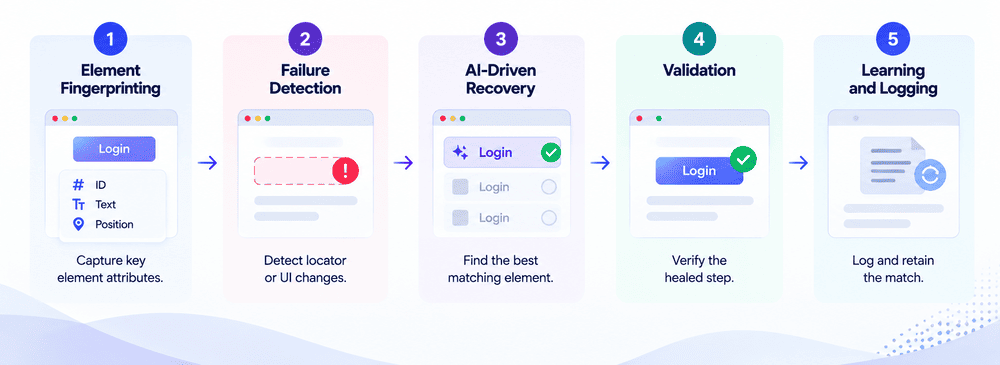
Self-healing follows a consistent cycle, regardless of which platform runs it:
-
Element fingerprinting. On a successful run, the system detects more than the primary locator (ID, XPath, or CSS selector). It also records secondary attributes like class, text label, tag, and relative position on the screen. This fingerprint becomes the element’s reference point for future runs.
-
Failure detection. When a test can’t identify an element from its primary locator, the system doesn’t immediately fail the step. It initially checks whether this looks like a locator break (something in the UI changed) versus a genuine application defect. A distinction that matters for keeping healing accurate rather than papering over real bugs.
-
AI-driven recovery. The system scans the existing UI for elements that most closely match the original fingerprint, scoring candidates by attribute similarity, position, and visual likeness. When it finds a highly relevant match, it uses that element to complete the step.
-
Validation. The healed step runs to confirm the substitution didn’t introduce a false pass; the test still needs to behave correctly, not just avoid a hard failure.
-
Learning and logging. The healing event is logged for review, and the match is retained so the same substitution can be reused if the pattern repeats. After some time, this reduces false positives and repeat healing on the same element.
This turns test maintenance from a reactive, manual fix after it breaks the cycle into a mostly automated one with a human checkpoint at the review stage rather than at every failure.
Self-Healing Test Automation Tools: Types and Examples
Self-healing shows up differently depending on where you place the automation stack. Here’s how the main categories of self-healing test automation tools compare:
| Approach | Examples | How it identifies elements | Where the fix lives |
|---|---|---|---|
| Open-source frameworks | Selenium, Playwright | No native healing; role/text-based locators reduce breakage but don’t recover automatically | Your repository |
| Healing libraries/SDKs | Healenium, Parasoft Selenic | Wraps the WebDriver call and substitutes a backup locator at runtime | Your repository + a locator history store |
| Codeless/AI-powered platforms | ACCELQ, Tricentis Tosca | Multi-attribute fingerprinting (ID, XPath, text, position) with AI-scored fallback matching | Platform-managed, with an audit trail |
| Visual testing tools | Applitools, Percy | Screenshot comparison against a baseline. Catches layout/copy drift but doesn’t heal locators | Vendor-hosted baselines |
These are not mutually exclusive. Many enterprise teams combine a codeless self-healing platform with visual testing to cover functional and visual drift.
Self-Healing in Action: A Worked Example
Scenario: A simple UI label change can break a traditional test, while a self-healing system can adapt and keep execution moving.
| Step | Before Self-Healing | With Self-Healing |
|---|---|---|
| Trigger | Button label changes, so the saved locator no longer matches | Button label changes, so the original locator no longer matches |
| What happens next | The test fails at that step | The system checks the page for the most likely replacement element |
| How the issue is handled | An engineer investigates the failure and verifies it is a UI change, not an actual defect | The system identifies the updated button using context such as position, styling, and nearby elements |
| Test progress | Execution stops until the script is fixed | Execution continues without stopping |
| Follow-up action | The locator is updated manually, and the suite is run again | The replacement is logged so the team can review it later |
| Result | More manual effort and slower recovery | Less maintenance effort and less disruption |
Outcome: No manual script edit is required to keep the test running, no lost time diagnosing a false failure, and a reviewable record of what changed. So if the same button keeps getting renamed, the team can see that pattern and decide whether it’s worth a more stable locator strategy like a data-testid attribute instead of depending on healing indefinitely.
Benefits of Self-Healing Test Automation
Self-healing follows a consistent cycle, regardless of which platform runs it:
-
Saves time on test maintenance. Reduces the need for frequent manual locator fixes, freeing QA teams for test automation strategy and exploratory testing.
-
Reduces false-failure noise. Fewer tests fail purely because of cosmetic UI changes, so CI/CD pipelines stay more stable.
-
Improves test coverage over time. With less maintenance overhead, teams can expand coverage instead of just keeping the existing suite green.
-
Speeds up release cycles. Less time diagnosing broken locators means more time validating new features before release.
-
Strengthens ROI on test automation. Lower ongoing maintenance cost improves the long-term return on an automation investment.

Challenges of Self-Healing Test Automation
Self-healing is a maintenance layer, and not a substitute for good test design or a solution for real bugs. A few challenges teams should plan for:
- It won’t catch functional regressions. If a button is findable and clickable but a workflow behind it is broken, healing won’t flag that the locator resolves fine, so the failure that matters (a wrong total, a broken calculation) still needs to surface.
- Security-sensitive flows deserve manual review. In payment or permissions-related steps, a healed click on the wrong element has real consequences. Require human review before accepting a healed step in these flows.
- It’s not a substitute for visual regression testing. If a test exists to verify exact layout or copy, self-healing can paper over the change you’re trying to catch; pair it with visual testing instead.
- Frequent healing on the same element is a signal. If a step heals every run, the underlying locator strategy needs attention; that’s a symptom of unstable locators or fast-changing UI, not something to leave unaddressed indefinitely.
How ACCELQ Approaches Self-Healing Test Automation
Self-healing in ACCELQ isn’t a standalone repair script bolted onto the runner. It’s the job of a dedicated agent in ACCELQ’s , the Drift Healer, which adapts tests as the application changes by matching on business intent rather than DOM structure. That’s a categorical difference from AI-assisted tools, where a person still reviews every stage and decides what happens next.
Here, Autopilot runs the complete discover → generate → execute → analyze → heal → rerun cycle on its own and reports what it did, and the team reviews the outcome rather than steering the process.
This is what drives ACCELQ’s sourced maintenance figure: 72% lower test maintenance effort, per customer benchmark data, validated in the . Forrester Wave Q4 2025 Autonomous Testing Platforms evaluation.
- On by default, per-run control. Self-healing runs automatically, but you can turn it off from the Run modal. The preference is cached per user and carries forward to future runs.
- Visual healing analysis in the test report. Every run surfaces a dedicated view showing where elements were flagged as flaky and how the application’s UI behavior is changing over time. This is the Drift Healer’s output made inspectable, not a black box. This is where a team would actually spot a step healing repeatedly and know it’s time to fix the locator rather than keep relying on the safety net.
- Continual, project-wide calibration. The Drift Healer recalibrates its self-healing data from ongoing test runs across a project and can prompt for a full project-wide recalibration at login when that’s useful; larger projects may take a few minutes to complete.

Conclusion
Self-healing test automation turns a reactive, manual maintenance cycle into an automated one. But it works best as a single layer of a broader quality strategy. It is not an alternative to good locators or human review. Organizations looking for a scalable self-healing automation framework should verify not just whether a tool heals, but how transparently it reports what it healed and where it deliberately holds back.
FAQ's
What are the best tools for implementing self-healing automation?
There is no single best tool; it depends on your technology stack. Codeless AI platforms like ACCELQ and Tricentis combine multi-attribute fingerprinting with confidence-scored matching and are designed for teams that do not want to maintain a separate healing library. Teams already using open-source frameworks like Selenium or Playwright can use wrapper libraries such as Healenium to add healing capabilities without switching platforms.
Which AI test automation platform offers the best self-healing tests?
Codeless, AI-powered platforms generally provide more complete self-healing capabilities because they fingerprint elements across multiple attributes natively instead of adding healing as an extra layer. The right choice depends on your technology stack, applications under test, and how much visibility you need into what was healed and why.
What challenges might I face with self-healing test automation?
Self-healing addresses locator and identification issues, but it does not detect functional regressions. Security-sensitive flows may still require manual review before accepting a healed step. It is also not a replacement for visual regression testing. If the same element keeps healing repeatedly, it may indicate that the underlying locator strategy needs improvement.
Can self-healing automation improve testing efficiency?
Yes, when implemented with proper review practices. Reducing manual locator-fix cycles is the main source of efficiency improvement. In ACCELQ's deployment with a leading pharmaceutical company, test development and maintenance cost per test case dropped to a third of its previous level, contributing to a 74% overall Cost of Quality savings across more than 1.9 million test executions. This reflects the complete automation platform, including design, execution, and self-healing capabilities. Actual improvements vary based on how healed steps are reviewed and how teams handle recurring healing patterns.
Is self-healing available in ACCELQ by default?
Yes. Self-healing is enabled by default for ACCELQ test runs. It can also be disabled for individual runs from the Run modal when required.
Does self-healing test automation fix bugs?
No. Self-healing only addresses locator and identification issues caused by UI changes. If an application feature is broken, a calculation is incorrect, or a workflow does not complete successfully, that issue should still appear as a test failure.



Nishan Joseph
VP Sales Engineering
Nishan is a tech strategist with expertise in Test Automation and roles at giants like TCS, Microfocus, and Parasoft. At ACCELQ, he champions Strategic Alliances, cultivating global tech partnerships. Educated at Leeds University and Symbiosis Pune, he also possesses an engineering background from Bangalore.


You Might Also Like:
 Test Data Management: Complete Guide
Test Data Management: Complete Guide
 Features to Look While Buying Enterprise Software for Test Automation
Features to Look While Buying Enterprise Software for Test Automation
 Take Your Test Automation Higher