








How to Choose a Test Automation Tool: 6 Criteria Before You Sign

A QA team six months into a new automation rollout can find regression coverage stuck at 40 percent, well short of the 80 percent the pilot projected. The tool that handled a two-week proof of concept with a handful of straightforward scenarios starts generating more maintenance tickets than the manual process it replaced. Half the team still needs a specialist to write a single test.
This happens because most evaluations test a tool under the easiest conditions it will ever face: a short timeline, a small scenario set, one application layer. They skip the conditions that determine whether a tool holds up in production: maintenance load at real scale, the team’s actual skill mix, and integration with the pipeline the team already runs.
This guide covers six criteria to score before selecting a test automation tool, and a method for weighing them against your team’s constraints instead of treating every checklist item as equally important.
- Why a Successful Pilot Can Still Fail in Production
- Criterion 1: Technology Stack and Platform Coverage
- Criterion 2: Team Skill Fit, Codeless or Code-Based
- Criterion 3: CI/CD and Pipeline Integration
- Criterion 4: Total Cost of Ownership, Including Maintenance
- Criterion 5: Scalability at Production Volume
- Criterion 6: Vendor and Community Support
- Quick Reference: The Six Criteria
- How to Weigh and Score a Shortlist
- Bottom Line
A stalled rollout, coverage plateaued at 40 percent, tickets piling up, half the team locked out of writing tests, rarely means the tool itself is broken. It usually means the evaluation never tested for one of six specific gaps, and switching tools without naming that gap just moves the same failure into a new interface.
- Diagnose the Real Problem: Every stalled rollout traces back to one of six gaps: a layer the current tool can’t reach (SAP, Salesforce, mobile), locators breaking on every redesign, non-technical testers shut out of a code-only suite, no native CI/CD gate, a platform untested past today’s volume, or a support tier that leaves the on-call engineer alone at 2 a.m.
- Score Each Criterion Separately: Weighting coverage, skill fit, and maintenance cost independently, instead of scoring a tool as generically “good,” is what surfaces which single criterion is dragging the rollout down.
- Consolidate When Gaps Stack: A team hitting three or four gaps at once needs a platform like ACCELQ that covers web, API, mobile, and enterprise systems natively, closing multiple criteria instead of trading one gap for another.
Why a Successful Pilot Can Still Fail in Production
A proof of concept typically runs two to four weeks against a small set of test cases, often chosen because they show the tool at its best. That window rarely surfaces three things: how much manual work is needed to keep tests passing as the application changes, how the tool behaves once test count grows tenfold, and whether teams working across web, API, mobile, and enterprise systems such as SAP or Salesforce can share one test asset instead of maintaining four separate ones.
Running a separate tool for each layer is a common setup: one for web, one for API, one for mobile. Each has its own reporting format, its own object model, and its own maintenance cadence, and none of them share data with the others by default. A failure in the API layer doesn’t indicate which downstream web or mobile test it affects, so someone has to trace the failure by hand across systems that were never built to connect. Three tools that each work well on their own can still add up to three times the maintenance work and no shared visibility across the pipeline.
The six criteria below are built to catch this gap before a contract is signed.
Criterion 1: Technology Stack and Platform Coverage
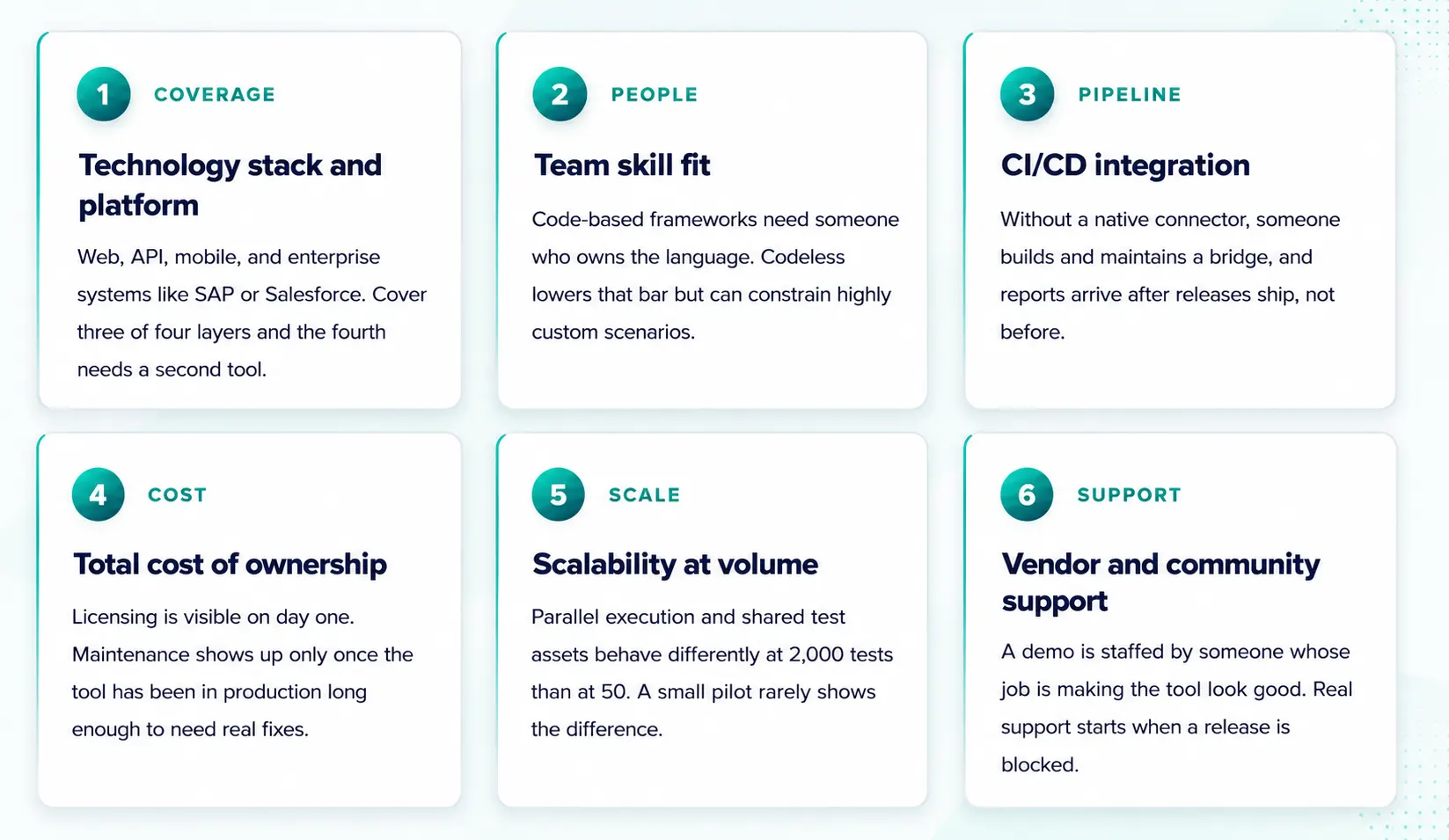
Check whether the tool covers every layer your applications touch: web, API, mobile, and any enterprise systems such as SAP, Salesforce, or Oracle. A tool that covers three of four layers well leaves the fourth layer needing a second tool, which restarts the fragmentation problem described above.
Questions to ask a vendor: does one test asset work across multiple layers, or does each layer require a test built from scratch? Can a single test validate an end-to-end transaction that spans a web front end, an API call, and a backend enterprise system?
Criterion 2: Team Skill Fit, Codeless or Code-Based
Code-based frameworks such as Selenium and Playwright give engineering teams full control over test logic and a large developer community to draw on. That control comes with a requirement: every test is code, and someone has to own it, review it, and fix it when it breaks. That person needs to already know the language the framework runs on.
Codeless platforms lower that requirement. Testers without a programming background can build and maintain coverage on their own. The tradeoff shows up in complex, highly custom scenarios, where a codeless interface can feel more restrictive than writing code directly.
The decision comes down to who on the team writes and maintains tests day to day. An engineering-heavy team that wants to own every line of logic is well served by a code-based framework. A team that includes manual testers or business analysts without programming backgrounds needs codeless options to keep those people contributing. Most enterprise teams include both profiles, which is why a platform supporting both approaches tends to serve them better than one built for a single skill level.
SUGGESTED READ - 10 Benefits of Codeless Test Automation
Criterion 3: CI/CD and Pipeline Integration
A tool that runs cleanly in a sandboxed demo answers a different question than the one that matters in production: does it connect to the CI/CD pipeline the team already runs, such as Jenkins, GitHub Actions, Azure DevOps, or GitLab CI, without a custom integration layer.
Without a native connector, someone on the team has to build and maintain a bridge between the test tool and the pipeline. That bridge is another component that can break silently when either side updates. If test execution can’t trigger on a pull request or a deployment gate, the tool is producing test reports after the fact rather than gating releases before they ship.
Ask whether test runs can block a release before it goes out, and press for a specific answer instead of a general claim about “integration support.”

Criterion 4: Total Cost of Ownership, Including Maintenance
Maintenance is the cost most likely to be missing from an initial evaluation, because a short POC rarely runs long enough to reveal it. Licensing and training costs are visible on the vendor’s pricing page from the start. Maintenance cost usually becomes visible only after the tool has been in production long enough to need real fixes.
Here is how it plays out. A team builds 200 tests in a quarter. The application changes on every release, and a portion of tests break each time, some from real bugs, most from a locator or a UI element that moved. Someone has to triage each failure and fix the ones that need fixing. At small scale this is a minor task. At the scale most enterprise teams reach, hundreds or thousands of tests, this triage and fix cycle becomes ongoing work for one or more engineers.
Ask a vendor how test maintenance works when the application changes, and ask for a reference customer operating at a scale comparable to yours. A reference running a few dozen tests won’t tell you much about maintenance at your volume.
Criterion 5: Scalability at Production Volume
Evaluate the tool against ten times your current test count instead of today’s count. Parallel execution, shared test assets, and multiple teams working in the same platform behave differently at 2,000 tests than at 50, and a small pilot rarely shows the difference.
Three specifics worth checking: whether test assets can be reused across projects instead of duplicated for each one, whether execution runs in parallel without manual setup for every new batch, and whether multiple teams can work in the platform without conflicting over shared test data. A workaround needed today at small scale tends to become a much larger workaround at production scale.
Criterion 6: Vendor and Community Support
A vendor demo is staffed by someone whose job is making the tool look good. The real test of support happens later, when a release is blocked and the person on call has never filed a ticket with this vendor before.
Two separate things matter here, and evaluations often check only one. Vendor support covers response time, whether an issue reaches a named contact or a general queue, and whether an escalation path exists for a production-blocking issue. Community support covers what happens when the documentation doesn’t have the answer: an active user base, a knowledge base built from real implementations, and forums where someone has likely already hit the same edge case. A tool with a thin community puts the full support burden on the vendor’s queue, with no alternate path when that queue is slow.
Ask what support tier is included at your contract level before signing. The entry tier is often narrower than what a sales conversation demonstrates.

Quick Reference: The Six Criteria
How to Weigh and Score a Shortlist
A checklist that treats all six criteria as equally important produces a misleading score, because they rarely carry equal weight for any given team. A regulated enterprise might weigh support and governance highest. A fast-moving product team might weigh speed of test creation highest. No fixed weighting applies to every team.
A simple scoring method: assign each criterion a weight from 1 to 5 based on how much it matters for your team. Score every candidate tool, including the one currently in production, from 1 to 5 on each criterion. Multiply each score by its weight and add the totals. Scoring the current tool with this same method, instead of assuming its score, tends to surface which single criterion is dragging down the total. That points to whether the fix is a new tool or a targeted adjustment to the current one.
One factor the scorecard doesn’t capture on its own: switching cost. A tool scoring 15 percent higher than the current one is not automatically worth migrating for, since re-platforming carries its own cost in retraining and short-term coverage gaps. A gap under 20 percent is generally worth treating as noise, unless one criterion, usually maintenance cost or scalability, is failing badly enough on its own to justify a switch regardless of the total score.
Bottom Line
The QA team in the opening scenario did not choose a bad tool. They evaluated it against a two-week pilot with easy scenarios and never tested the things that predict production performance: maintenance load at scale, coverage across every application layer, and pipeline integration without custom scripting. The scorecard above is built to catch that gap before a contract is signed.
Start with the layers your applications require, assess the team’s skill mix honestly, and price out maintenance before comparing license costs. That order catches more mismatches than a feature-by-feature comparison.
If your team is evaluating a consolidated platform for enterprise systems alongside web and mobile
FAQ's
How do you choose a test automation tool?
Start with the layers your applications require (web, API, mobile, enterprise systems), assess the team's skill mix, confirm CI/CD compatibility, then run a proof of concept against a real scenario before comparing pricing.
What criteria should you use to evaluate test automation tools?
Technology stack coverage, team skill fit, CI/CD integration, total cost of ownership including maintenance, scalability at ten times current volume, and vendor or community support are the core criteria to evaluate before comparing feature lists.
What should you look for in an enterprise test automation tool?
Coverage across web, API, mobile, and enterprise systems like SAP and Salesforce; low ongoing maintenance effort; native CI/CD integration; and the ability to scale test assets and execution across multiple teams without duplication.
How do you compare test automation tools?
Run a proof of concept against a real scenario from your own application instead of a vendor demo, and weigh total cost of ownership, including maintenance and training, instead of comparing license price alone.
What is the biggest hidden cost in test automation?
Ongoing test maintenance. Licensing and training costs are visible upfront, but the effort required to fix broken tests as an application changes is rarely priced out during evaluation, and it becomes the dominant cost at scale.
How long should a test automation proof of concept take?
Two to four weeks is a common window, long enough to run a real regression scenario from your own application instead of a demo environment. That's what surfaces setup friction and maintenance patterns a shorter test would miss.
Should you choose codeless or code-based test automation?
It depends on who writes and maintains tests. Code-based frameworks fit engineering-heavy teams that want full control. Codeless platforms fit teams that include non-technical testers who need to contribute directly. Many enterprise teams benefit from a platform that supports both, since most teams include both profiles.
How do you know if a test automation tool will scale?
Test it against ten times your current test count instead of today's volume. Check whether test assets can be reused across projects, whether execution runs in parallel without manual setup, and whether multiple teams can collaborate without conflicts.
What questions should you ask a test automation vendor?
Ask how maintenance works when the application changes, what a realistic proof of concept timeline looks like, what a reference customer at your scale has experienced, and what costs are excluded from the initial price quote.



Geosley Andrades
Director, Product Evangelist at ACCELQ
Geosley is a Test Automation Evangelist and Community builder at ACCELQ. Being passionate about continuous learning, Geosley helps ACCELQ with innovative solutions to transform test automation to be simpler, more reliable, and sustainable for the real world.


You Might Also Like:
 Features to Look While Buying Enterprise Software for Test Automation
Features to Look While Buying Enterprise Software for Test Automation
 Low-Code Automation Platform: Why Enterprises Are Shifting
Low-Code Automation Platform: Why Enterprises Are Shifting
 Cloud-Based vs. On-Premise Test Automation: What to Choose in 2026?