







AI Mobile Testing: Tools, Benefits & Best Practices

89% of organizations globally are now piloting or deploying generative AI in their quality engineering workflows, reflecting how quickly AI is becoming standard practice across engineering teams and applications.
For mobile testing, AI adoption is driven by a practical challenge. Mobile apps must work across different devices, operating systems, screen sizes, network conditions, and application states. Every UI change or new release adds tests to build, maintain, and execute, making reliable automation increasingly difficult to sustain.
AI can help teams manage this complexity by discovering user journeys, generating test logic, identifying application elements, adapting tests to UI changes, and analyzing failures. These capabilities can reduce maintenance effort and accelerate release cycles while helping teams maintain test coverage.
This guide explores what AI mobile testing can do, how it works across the testing lifecycle, which tools are available, and what to consider before integrating AI into your mobile testing workflow.
- What is AI mobile testing?
- What Can AI Do in Mobile Testing?
- How AI Works Across the Mobile Testing Lifecycle
- How AI Addresses Traditional Mobile Testing Challenges
- Modern Mobile Testing Challenges and What to Look for in an AI Testing Tool
- AI Tools for Modern Mobile Testing
- How to Implement AI in Mobile Testing
- How AI Powers Mobile Testing With ACCELQ Autopilot
- AI mobile testing uses ML and NLP to automate test creation, execution, analysis, and maintenance.
- AI helps testers discover flows, generate test logic, adapt to UI changes, and analyze failures.
- AI improves testing with automated scripts, bug prediction, real-time feedback, smarter test data, and usability insights.
- Choosing an AI testing tool requires evaluating test creation, maintenance, device coverage, CI/CD, and failure analysis.
- Successful AI adoption starts with one high-value workflow, proper context, pipeline integration, and measurable results.
What is AI mobile testing?
AI mobile testing uses machine learning (ML) and natural language processing (NLP) to automate and improve various aspects of the mobile testing lifecycle.
It can generate test cases, identify UI elements, execute tests, analyze results, and detect potential issues. AI-powered mobile testing can also adapt to changes in the application and testing environment. It can identify changes in UI elements, prioritize important test scenarios, and reduce repetitive testing effort.
What Can AI Do in Mobile Testing?
Instead of relying entirely on manually created and maintained scripts, AI can help testers discover flows, build automation, analyze failures, and keep tests aligned with the application.
Key capabilities include:
- Autonomous Discovery: AI can explore a mobile application and identify user flows and potential test scenarios without requiring every flow to be manually defined first. Its understanding of UI elements and application context can also help identify what needs to be tested.
- QGPT Logic Builder: Testers can describe scenarios in natural language, and AI can translate those instructions into executable test logic.
- Design-First AI-Architect: AI can help structure test automation with reusable and modular components before execution, making tests easier to scale and maintain.
- Autonomous Healing: AI can detect changes in application elements and adapt test logic when locators, UI properties, or application behavior change. It can also handle dynamic conditions that would otherwise cause automated tests to fail.
- Logic Insights: AI can analyze existing test logic and provide insights into failures, duplication, or areas that may need improvement, helping testers understand and maintain their automation.
- Cross-device testing: AI can help adapt test execution across different mobile devices, screen sizes, operating systems, and configurations, reducing the effort required to maintain separate test flows for every environment.
How AI Works Across the Mobile Testing Lifecycle
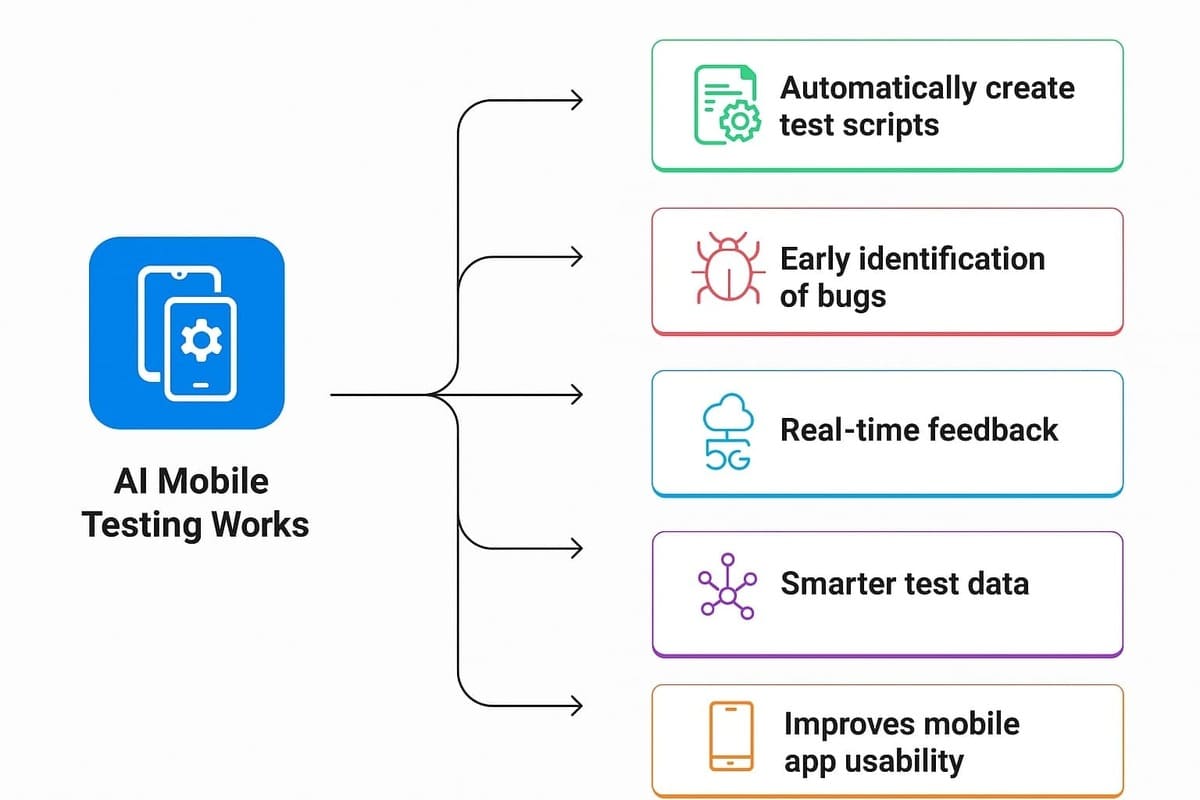
1. Automatically create test scripts
One of the most useful benefits of AI in mobile testing is that it can automatically write test scripts. These scripts are based on new features added to the mobile app, updates in functionality, or specific user requirements.
Here’s how the AI mobile app testing process usually works:
- First, you should explain what the mobile app should do. Like, “Add an item to the cart” or “Do a payment.”
- Then you can feed these requirements to the AI model.
- The AI reads and understands your needs and begins to generate test cases.
- Next, you can review these AI-generated test cases and give feedback.
The above process continues until the AI delivers test cases that fully match your needs. Through this testing process, you can save a lot of time and effort, especially when apps are updated frequently.
2. Early identification of bugs
AI can also predict where bugs might appear, even before they happen. By analyzing old testing data, AI spots patterns and finds risky portions of the app that need more attention. Here’s how it works:
- The AI reviews previous testing results and looks at what failed, where, and why.
- AI then uses that information to understand what issues to expect in future versions of the mobile app.
- After being trained properly, the AI can analyze new app versions and alert about potential bugs.
3. Real-time feedback
Instead of waiting until the end of testing, tools give you updates as tests run. It means you can fix issues before and prevent long delays. To use AI: Pick an AI tool that meets your needs. Add it to your testing system. Run your tests, and the tool will track results instantly. You’ll get detailed insights like which tests are flaky, how many failed, and where to focus next. AI helps your team to deploy faster and make better decisions.
4. Smarter test data
You do not need a large amount of real user data. AI can create smart, false data that behaves like real user data. It can also hide sensitive data to ensure privacy while testing. AI test data helps in:
- Producing both successful and failing test scenarios that resemble real-life situations.
- Creating new data on the fly rather than storing large datasets.
- Reducing the need to write or collect test data manually.
5. Improves mobile app usability
AI testing tools can look into how people use your app and find areas where users might struggle. These tools give feedback to your team to improve the design and user experience. Here’s what to do:
- Choose an AI testing tool that includes usability tracking.
- Add it to your mobile app testing process.
- Use the insights to examine and fix any issues that could affect the user journey.

How AI Addresses Traditional Mobile Testing Challenges
AI’s value appears across the testing lifecycle.
| Testing type | Traditional challenge | How AI helps |
|---|---|---|
| Functional | Creating and maintaining large numbers of test cases | Generates scenarios, drafts test steps, identifies elements, and self-heals when the UI changes |
| Regression | Re-running and maintaining large test suites | Prioritizes relevant tests, self-heals broken locators, and flags flaky or recurring failures |
| UI & Visual | UI changes and device-specific rendering | Recognizes elements visually and separates meaningful changes from rendering noise |
| Compatibility | Large device and OS matrix | Prioritizes important device combinations and analyzes device-specific failures |
| Performance | Generating realistic conditions and analyzing large datasets | Models realistic load patterns and detects anomalies and performance regressions |
| Accessibility | Repetitive checks across many screens and devices | Automates common checks at scale, freeing testers to focus on issues that need human judgment |
| Exploratory | Manual effort and difficulty turning discoveries into automation | Explores flows, suggests scenarios, and converts useful discoveries into reusable tests |
Modern Mobile Testing Challenges and What to Look for in an AI Testing Tool
Devices are changing, screens are becoming more adaptive, and users expect applications to maintain their state as they switch between different ways of using their phones.
These developments create new testing requirements. Instead of evaluating an AI testing tool solely on how quickly it generates scripts, teams should consider whether it can handle the following challenges.
1. Adaptive screens and foldable devices
Foldable phones introduce multiple screen sizes and postures within the same device. An app may need to move between a compact cover screen and a larger inner display, adjust to a hinge, or maintain its layout in split-screen mode. These transitions can expose clipped buttons, distorted layouts, and lost form or navigation state.
What to look for in an AI testing tool:
- Cross-device and cross-configuration test execution.
- UI element recognition that works when layouts, positions, and dimensions change.
- Test maintenance that handles UI changes without masking genuine failures.
- Support for testing application state and complete user journeys across configurations.
2. Dynamic interfaces and operating system changes
Modern interfaces must account for more than screen dimensions. Features such as the Dynamic Island, system overlays, permission dialogs, changing text sizes, dark mode, and different languages can affect how an app looks and behaves.
What to look for in an AI testing tool:
- Context-aware element identification rather than dependence on fixed coordinates or identifiers.
- Test creation from requirements, recorded flows, or application exploration.
- The ability to maintain tests as application interfaces evolve.
- Visual and functional validation across relevant device settings and OS versions.
3. Interruptions, app state, and real-world user journeys
Users switch between apps, respond to notifications, grant or deny permissions, change connectivity, and return to unfinished tasks. A successful test of an uninterrupted, ideal-case flow cannot establish that these scenarios work correctly.
What to look for in an AI testing tool:
- End-to-end testing across mobile UI, APIs, authentication, and backend operations.
- Support for testing different application states and interrupted flows.
- AI-assisted test discovery to identify scenarios beyond predefined, linear flows.
- Failure analysis that helps distinguish application defects from automation issues.
4. Growing device coverage without growing maintenance effort
Supporting more devices, OS versions, display configurations, and application states can expand the regression suite quickly. Maintaining separate scripts for every combination increases duplication and makes releases harder to manage.
What to look for in an AI testing tool:
- Reusable, modular test logic across supported devices and operating systems.
- Autonomous healing that adapts to appropriate UI changes.
- Risk-based test prioritization and regression execution.
- Parallel execution, CI/CD integration, and clear failure reports.
These capabilities also address the more familiar challenges of test creation, maintenance, debugging, and release speed without turning the section into another general checklist of AI features.
AI Tools for Modern Mobile Testing
Modern mobile apps must adapt to changing screen layouts, operating system updates, interruptions, and a growing number of device configurations. The right AI testing tool can help teams cover these scenarios while reducing test maintenance and debugging effort.
Here are four tools to consider based on their AI capabilities and mobile testing requirements.
1. ACCELQ Autopilot
ACCELQ Autopilot combines AI-driven test discovery, creation, and maintenance to help teams build reusable automation for complex application workflows.
Key AI features:
- Autonomous Discovery: Identifies end-to-end user flows and potential test scenarios within an application.
- QGPT Logic Builder: Converts plain-English instructions into automation logic spanning the UI, APIs, backend, and middleware.
- Autonomous Healing: Adapts tests to application changes using the semantic and functional attributes of elements rather than relying only on fragile locators.
- Design-First AI-Architect: Recommends modular test designs and parameterization to reduce duplication and simplify maintenance.
2. KaneAI by LambdaTest
KaneAI helps teams create, manage, and debug end-to-end tests using natural language, with support for web and mobile testing.
Key AI features:
- Natural-language test authoring: Creates automated tests from plain-English instructions without requiring manual scripting.
- Test scenario generation: Generates scenarios from text, Jira tickets, documents, and media files.
- Cross-platform authoring: Supports test creation across web and mobile applications.
- Multilingual code export: Exports generated tests into supported programming languages and frameworks.
3. Testsigma
Testsigma combines AI-powered test creation and maintenance with cross-device execution, helping teams expand mobile coverage without maintaining separate tests for every configuration.
Key AI features:
- AI test generation: Creates test cases from user stories, product requirements, Figma designs, and walkthrough videos.
- Cross-platform testing: Runs reusable mobile tests across supported native and hybrid iOS and Android applications.
- AI-powered self-healing: Adapts broken tests when application interfaces change.
- AI-driven failure analysis: Identifies recurring issues, flaky elements, redundant flows, and potential causes of failures.
4. Sauce Labs AURA
AURA (AI-Unified Release Assurance) connects AI-driven test authoring, execution, and analysis with human review throughout the release lifecycle.
Key AI features:
- Intent-driven test creation: Generates tests from plain-language business requirements.
- Real and virtual device execution: Supports parallel testing across real devices and virtual environments through Sauce Labs.
- AI-powered root-cause analysis: Provides contextual insights to help teams investigate test failures faster.
- Production error reporting: Uses crash and error data to help teams connect production issues with testing and improve subsequent releases.
How to Implement AI in Mobile Testing
You don’t need to replace your existing mobile testing process to start using AI. Start with one problem where AI can remove significant manual effort.
1. Identify the Bottleneck: Find where your team spends the most time. This could be test creation, test maintenance, regression testing, failure analysis, or device coverage.
2. Start With a High-Value Flow: Choose a frequently tested, business-critical flow such as login, checkout, or onboarding. Start small instead of applying AI to the entire application.
3. Give AI the Right Context: Provide requirements, existing test cases, application flows, and other relevant information. The more context AI has, the better it can understand what the test is meant to validate.
4. Let AI Handle Repetitive Work: Use AI for tasks such as generating test logic, identifying UI elements, maintaining tests, analyzing failures, and expanding coverage across devices. Keep decisions such as expected behavior, test priorities, and risk assessment with the testing team.
5. Integrate With Your Testing Workflow: Connect AI-powered tests to your CI/CD pipeline so they can run automatically with builds and regression cycles.
6. Measure and Expand: Compare results before and after implementation. Look at test creation time, maintenance effort, failure diagnosis, coverage, and regression time. If AI is reducing effort without reducing test quality, gradually expand it to more workflows and devices.
How AI Powers Mobile Testing With ACCELQ Autopilot
ACCELQ Autopilot applies AI across the full mobile testing lifecycle, from discovering what to test to creating, maintaining, and improving automation. It connects each stage in one workflow:
- Discover and create: Autonomous Discovery maps user flows, and QGPT Logic Builder turns plain-English scenarios into automation.
- Build and maintain: Design-First AI-Architect and Autonomous Healing keep tests modular and stable as the app changes.
- Expand and improve: AI Test Data Generation creates varied data combinations for broader coverage, while Logic Insights highlights reliability and maintainability gaps.
ACCELQ also brings mobile, web, API, and backend automation into a unified flow, with execution across mobile OS and devices.
This makes AI part of the complete mobile testing lifecycle. Want to see how AI can automate your mobile testing? Explore ACCELQ’s AI-powered mobile testing capabilities.
FAQs
Will AI replace mobile QA engineers?
No. AI takes over repetitive work such as writing boilerplate steps, locating elements, and triaging failures. It can't decide what "correct" means for your app, which risks matter most in a release, or whether a behavior is a bug or intended.
The role shifts from writing and repairing scripts to reviewing AI output, defining expected behavior, and owning risk. Testers who can judge test quality become more valuable, not less.
What are the challenges of implementing AI in mobile app testing?
Implementing AI in mobile app testing comes with a few challenges. Teams need AI skills and training to use these tools effectively, while implementation costs can be high for smaller organizations. Integrating AI with existing testing frameworks and DevOps pipelines may also cause compatibility issues. Additionally, AI can struggle to understand application context and human behavior, making human oversight essential. Since AI testing may process sensitive data, strong security measures and regulatory compliance are also necessary.
How is AI mobile testing different from traditional script-based automation?
Script-based frameworks follow exact instructions: tap the element with this ID, then assert this text. If the ID changes, the test fails. AI-driven testing works from intent (for example, "add an item to the cart") plus a model of the app, so it can re-identify elements from multiple signals and adjust steps when the UI changes. Scripts give you precise control, while AI reduces the upkeep. Many teams keep hand-written scripts for edge cases that need exact control and use AI for the bulk of their regression coverage.
How do I know AI-generated tests are testing the right thing?
A passing test doesn’t always mean it tests the right behavior. Review AI-generated assertions against the original requirements, verify that tests fail when defects are introduced, compare coverage with existing manual tests, and track defects that escape into production. Treat AI-generated tests as a first draft that requires tester review and approval.
Does AI mobile testing work with hybrid and cross-platform apps such as React Native or Flutter?
It depends on how the tool identifies elements. React Native renders native components that most tools can see, while Flutter draws its own interface, so detection relies on the accessibility labels developers add. Hybrid apps also require switching between native and web contexts. During evaluation, test your own app, focusing on web views and custom-drawn components.ACCELQ's unified platform works across native, hybrid, and cross-platform mobile apps, as well as web, API, and desktop, so one approach covers your entire application stack.



Nishan Joseph
VP Sales Engineering
Nishan is a tech strategist with expertise in Test Automation and roles at giants like TCS, Microfocus, and Parasoft. At ACCELQ, he champions Strategic Alliances, cultivating global tech partnerships. Educated at Leeds University and Symbiosis Pune, he also possesses an engineering background from Bangalore.


You Might Also Like:
 Mobile Testing: Risks, Strategies & Tools
Mobile Testing: Risks, Strategies & Tools
 Your Guide to 12 Types of Mobile Testing
Your Guide to 12 Types of Mobile Testing
 AI Mobile Testing: Tools, Benefits & Best Practices